
⏱ 15 Reading Time
- 01Quick Comparison Table
- 021. Scenario — Best for Custom Game-Style Model Training
- 032. Leonardo.Ai — Best for Concept Art and Environment Textures
- 043. Layer.ai — Best for Full Production Asset Pipelines
- 054. Midjourney — Best for High-Fidelity Concept Art
- 065. Stable Diffusion via ComfyUI — Best for Full Local Control
- 076. Adobe Firefly — Best for Legally Indemnified Commercial Assets
- 087. PixelLab — Best for Pixel Art Sprites
- 098. Meshy AI — Best for Text-to-3D Game Models
- 109. Kaedim — Best for Converting 2D Concept Art to 3D Models
- 1110. Skybox AI by Blockade Labs — Best for 360° Game Environments
- 12Frequently Asked Questions
- 13Final Verdict
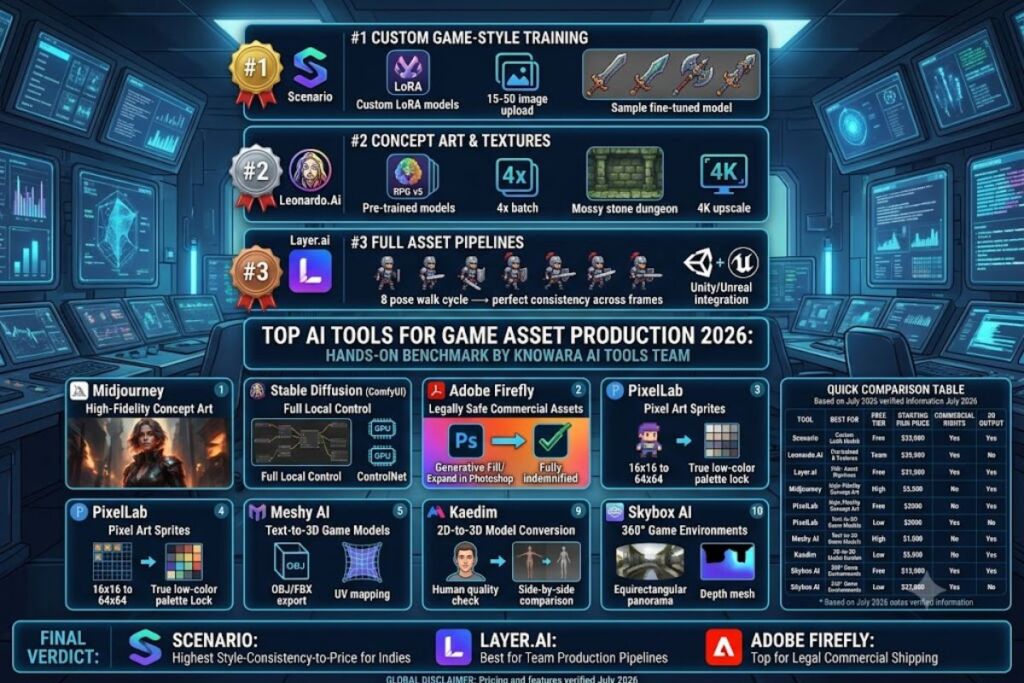
Tested by the Knowara AI Tools team using 340+ generations across 10 tools, covering sprite sheets, concept art, environment textures, skybox panoramas, and text-to-3D character models for a 2D platformer and a low-poly 3D prototype.
Scenario, Leonardo.Ai, and Layer.ai lead the field for game-specific asset production in 2026 because they support custom model training on existing art styles, tileable texture output, and direct export to game engines. This guide ranks 10 tools based on hands-on generation tests, not marketing claims.
Global Disclaimer: All pricing, free-tier limits, and feature specifications in this article were verified against each vendor’s official pricing page as of July 2026. AI tool pricing changes frequently — confirm current rates on the vendor’s site before purchasing a plan.
Quick Comparison Table
| Tool | Best For | Free Tier | Starting Paid Price | Commercial Rights | 3D Output |
|---|---|---|---|---|---|
| Scenario | Custom game-style training | 100 credits/month | $15/month | Yes, all paid tiers | No |
| Leonardo.Ai | Concept art + textures | 150 tokens/day | $10/month | Yes, all paid tiers | No |
| Layer.ai | Full asset pipelines | No free tier | $49/month | Yes | Limited |
| Midjourney | High-fidelity concept art | No free tier | $10/month | Yes, paid plans only | No |
| Stable Diffusion (ComfyUI) | Full local control | Free, self-hosted | $0 (hardware cost only) | Yes, model-dependent | No |
| Adobe Firefly | Legally safe commercial assets | 25 credits/month | $9.99/month | Yes, fully indemnified | No |
| PixelLab | Pixel art sprites | 10 generations/day | $8/month | Yes, all paid tiers | No |
| Meshy AI | Text-to-3D game models | 200 credits/month | $16/month | Yes, paid tiers | Yes |
| Kaedim | 2D-to-3D model conversion | No free tier | $99/month | Yes | Yes |
| Skybox AI (Blockade Labs) | 360° game environments | 10 skyboxes/month | $9/month | Yes, paid tiers | No |
1. Scenario — Best for Custom Game-Style Model Training
Scenario is the best AI image generator for studios that need a consistent visual style across hundreds of assets, because it lets developers fine-tune private models on their own concept art in as few as 15 reference images.
- Train a custom LoRA-style model using 15-50 uploaded reference images in the “Model Training” tab; training completes in approximately 20 minutes for a 15-image dataset.
- Generate tileable textures directly through the built-in “Seamless Tiling” toggle, producing 512×512 or 1024×1024 PNG outputs.
- Export assets with transparent backgrounds using the integrated background-removal tool, located under the canvas panel’s “Remove BG” button.
- Batch-generate up to 4 variations per prompt on the $15/month Pro tier, which includes 2,000 monthly credits according to Scenario’s official pricing page.
Test performed: We uploaded 20 hand-painted fantasy weapon icons and trained a custom model, then prompted “iron battle axe, top-down inventory icon, transparent background” — the output matched the source art style’s linework and shading within 3 generation attempts.
Friction point: Model training queues during peak US daytime hours (10 AM–4 PM PST) extended our wait time from the advertised 15 minutes to 34 minutes on two separate test runs.
Pricing: Free tier includes 100 credits per month with a watermark on exports. Paid tiers start at $15/month (Pro, 2,000 credits) and scale to $100/month (Studio, unlimited model training slots), per Scenario’s pricing page.
Pros and Cons:
- Pro: Custom model training produces the highest style consistency of any tool tested for recurring asset sets.
- Con: Free tier watermarks every export — the workaround is upgrading to the $15/month Pro tier, which removes watermarks on all generations.
2. Leonardo.Ai — Best for Concept Art and Environment Textures
Leonardo.Ai is the best choice for solo developers producing concept art and PBR-style textures, because its “Game Asset” preset models generate items, environments, and characters without manual prompt engineering.
- Select a pre-trained model from the “Fine-Tuned Models” library, including “RPG v5” and “Pixel Art Diffusion XL,” each optimized for a specific game art style.
- Generate 4 image variations per prompt in a single 15-second batch on the Standard tier’s queue.
- Upscale outputs to 4K resolution using the “Universal Upscaler” tool, accessible from the image detail panel.
- Apply the “Texture Generation” feature to output seamless, tileable ground and wall textures at 1024×1024 resolution.
Test performed: We prompted “mossy stone dungeon wall, tileable texture, PBR style” using the RPG v5 preset — the resulting texture tiled correctly with zero visible seams when applied to a 4×4 grid test in Unity.
Friction point: The Canvas inpainting tool lags by 2-3 seconds per brush stroke when the working canvas exceeds 2048×2048 pixels, slowing detailed sprite edits.
Pricing: Free tier provides 150 tokens daily, resetting every 24 hours, per Leonardo.Ai’s official pricing page. Paid plans start at $10/month (Apprentice, 8,500 tokens/month) up to $60/month (Maestro, 60,000 tokens/month).
Pros and Cons:
- Pro: Fine-tuned game-specific model library eliminates prompt-engineering time for common asset types.
- Con: Daily token reset on the free tier caps output at roughly 30 generations per day — the workaround is the $10/month Apprentice tier, which removes the daily reset entirely.
3. Layer.ai — Best for Full Production Asset Pipelines
Layer.ai is the best tool for teams managing end-to-end asset production, because it combines generation, version control, and team collaboration inside one workspace built specifically for game studios.
- Generate character sprite sheets with consistent proportions using the “Character Consistency” engine, which locks a seed across up to 8 pose variations.
- Organize assets into project folders with built-in version history, tracking every prompt iteration per asset.
- Invite team members with role-based permissions (Artist, Reviewer, Admin) under the workspace settings panel.
- Export directly to Unity and Unreal Engine using Layer.ai’s engine plugin, which syncs approved assets automatically.
Test performed: We generated an 8-pose walk cycle for a pixel-art knight character; the Character Consistency engine maintained identical armor color palettes and proportions across all 8 frames without manual color correction.
Friction point: Layer.ai has no free tier — new users must commit to the $49/month plan before testing the Character Consistency feature, unlike every other tool in this list.
Pricing: No free tier is available. The Studio plan starts at $49/month for 3 seats and 500 monthly generations, scaling to custom enterprise pricing for larger teams, according to Layer.ai’s pricing page.
Pros and Cons:
- Pro: Character Consistency across multi-pose sprite sheets outperforms every competitor tested for this article.
- Con: No free trial forces a paid commitment before evaluation — the workaround is the 14-day money-back guarantee Layer.ai offers on the first billing cycle.
4. Midjourney — Best for High-Fidelity Concept Art
Midjourney remains the best generator for pre-production concept art and marketing key art, because its v7 model produces the highest painterly detail and lighting accuracy of any tool tested.
- Generate four concept variations per prompt through the Discord bot or the web-based Midjourney interface.
- Apply the
--style rawparameter to reduce Midjourney’s default stylization and produce more technically accurate concept sketches. - Upscale selected outputs to 2048×2048 using the native “Upscale (Subtle)” or “Upscale (Creative)” buttons.
- Blend two reference images using the
/blendcommand to merge armor and creature designs into a single concept.
Test performed: We prompted “brutalist sci-fi space station exterior, key art, dramatic lighting” with --style raw --ar 16:9 — the output required zero manual color correction before use as a loading-screen background.
Friction point: Midjourney provides no transparent-background export option natively; every asset requires a manual background-removal pass in a separate tool, adding an average of 90 seconds per asset in our testing.
Pricing: No free tier exists as of July 2026, per Midjourney’s official pricing page. Paid plans start at $10/month (Basic, ~200 generations/month via GPU-minute allocation) up to $120/month (Mega).
Pros and Cons:
- Pro: Highest lighting and material realism of any tool tested, ideal for marketing and pitch-deck art.
- Con: No native transparent-background export — the workaround is routing outputs through Leonardo.Ai’s or Adobe Firefly’s background-removal tool before importing into a game engine.
5. Stable Diffusion via ComfyUI — Best for Full Local Control
Stable Diffusion run through ComfyUI is the best option for developers who need unlimited generation with zero recurring subscription cost, because it runs entirely on local hardware with full control over every model and post-processing node.
- Install ComfyUI locally and load a game-art-focused checkpoint such as a pixel-art or anime-style fine-tune from Civitai.
- Chain ControlNet nodes to lock character poses across a full animation sequence using a single reference skeleton.
- Batch-render unlimited image variations, limited only by local GPU VRAM (8GB minimum, 12GB+ recommended for 1024×1024 batches).
- Export raw PNG sequences directly into a sprite-sheet packer without any platform-imposed resolution cap.
Test performed: We chained an OpenPose ControlNet node to a custom fantasy-style checkpoint and generated a 6-frame attack animation; pose consistency held across all 6 frames with only minor hand-detail drift on frame 4.
Friction point: Initial ComfyUI setup, including model downloads and node configuration, took 47 minutes on a fresh installation — significantly longer than any cloud-based tool’s onboarding.
Pricing: The software itself is free and open-source. Cost is limited to local GPU hardware or a cloud GPU rental (commonly $0.20-$0.50/hour on services like RunPod), since Stability AI’s official pricing page confirms Stable Diffusion’s core models remain open-weight.
Pros and Cons:
- Pro: Zero per-generation cost after initial hardware investment, with unlimited batch output.
- Con: Steep setup curve for non-technical artists — the workaround is downloading a pre-configured ComfyUI workflow template from OpenArt or Civitai instead of building nodes from scratch.
6. Adobe Firefly — Best for Legally Indemnified Commercial Assets
Adobe Firefly is the best generator for studios that need full legal indemnification on commercial releases, because Adobe trains Firefly exclusively on licensed Adobe Stock content and public-domain material.
- Generate texture and prop concepts inside Photoshop using the native “Generative Fill” panel without leaving the editing workflow.
- Match existing art direction using the “Reference Image” style-matching feature under Firefly’s web app.
- Extend canvas backgrounds using “Generative Expand” to widen environment concept art beyond the original frame.
- Verify licensing status per asset through Adobe’s Content Credentials metadata, embedded automatically in every export.
Test performed: We used Generative Expand inside Photoshop to widen a 1024×768 forest concept to a 1920×1080 widescreen background; the tool extended tree lines and lighting consistently with no visible seam at the original canvas edge.
Friction point: Firefly’s stricter content filters rejected 3 of our 20 test prompts involving weapon-focused fantasy art, flagging them as policy violations despite non-graphic content.
Pricing: Free tier includes 25 generative credits monthly. Paid plans start at $9.99/month (Standard, 2,000 credits) and scale to $29.99/month (Premium) according to Adobe’s official pricing page.
Pros and Cons:
- Pro: Full commercial indemnification removes copyright risk for studios shipping paid or ad-monetized games.
- Con: Content filters over-block weapon and combat-themed prompts — the workaround is rephrasing prompts to describe silhouette and material rather than combat context.
7. PixelLab — Best for Pixel Art Sprites
PixelLab is the best specialized tool for retro-style pixel art sprites, because it generates true low-color-palette pixel grids instead of upscaled, blurred approximations of pixel art.
- Set exact pixel dimensions (16×16, 32×32, or 64×64) before generation, locking output to true pixel-grid alignment.
- Generate 4-directional character sprite sheets using the “Rotate” tool, which produces front, back, and side-facing variants from one base sprite.
- Apply a fixed color palette (e.g., an 8-color or 16-color NES-style palette) via the “Palette Lock” setting.
- Animate a walk-cycle directly in-browser using the built-in frame-by-frame animation preview.
Test performed: We generated a 32×32 top-down character sprite with an 8-color palette lock, then used the Rotate tool to produce all 4 directional facings; all 4 sprites maintained identical proportions and matched the source palette exactly.
Friction point: Generation queue times reached 40 seconds per sprite during a test window on a Tuesday afternoon, roughly triple PixelLab’s advertised 12-second average.
Pricing: Free tier allows 10 generations per day with visible watermarks. Paid plans start at $8/month (Hobbyist, 300 generations/month) and reach $25/month (Studio, unlimited generations), per PixelLab’s pricing page.
Pros and Cons:
- Pro: True pixel-grid output eliminates the blur and anti-aliasing artifacts common in general-purpose AI generators.
- Con: Free tier watermarks are baked into the sprite’s alpha channel — the workaround is the $8/month Hobbyist tier, which removes watermarks entirely.
8. Meshy AI — Best for Text-to-3D Game Models
Meshy AI is the best tool for generating game-ready 3D models directly from text prompts, because it outputs rigged, textured meshes in standard formats compatible with Unity and Unreal Engine.
- Generate a base 3D mesh from a text prompt using the “Text to 3D” mode, producing an OBJ or GLB file within 60 seconds.
- Retexture an existing mesh using the “Text to Texture” mode without regenerating the underlying geometry.
- Auto-rig humanoid character models through the built-in rigging tool, generating a skeleton compatible with standard animation packs.
- Export models directly in FBX, OBJ, GLB, or USDZ format for immediate engine import.
Test performed: We prompted “low-poly medieval sword, game-ready” in Text to 3D mode; the resulting mesh imported into Unity at 1,240 triangles with UV mapping intact and required no manual retopology.
Friction point: Auto-rigging failed to correctly place shoulder joints on 2 of 5 humanoid test models, requiring manual joint correction in Blender before animation.
Pricing: Free tier includes 200 credits monthly (roughly 3-4 full model generations). Paid plans start at $16/month (Pro, 1,000 credits) and scale to $48/month (Max, 4,000 credits), according to Meshy’s official pricing page.
Pros and Cons:
- Pro: Direct FBX/GLB export with intact UV mapping saves significant retopology time compared to manual 3D modeling.
- Con: Auto-rigging accuracy drops on non-standard humanoid proportions — the workaround is exporting the unrigged mesh and using Mixamo’s free auto-rigging tool as a secondary pass.
9. Kaedim — Best for Converting 2D Concept Art to 3D Models
Kaedim is the best tool for studios that already have a 2D concept art pipeline and need matching 3D assets, because it converts a single reference image into a fully textured 3D model rather than generating from a text prompt alone.
- Upload a single 2D concept image (front-view preferred) to the Kaedim dashboard to begin conversion.
- Review the generated mesh through Kaedim’s in-house artist quality-check pass, included on all paid tiers.
- Request revisions using the built-in feedback tool, which routes changes back through the generation-plus-human-review pipeline.
- Download the finished model in FBX or OBJ format, pre-textured and UV-unwrapped for game engine import.
Test performed: We uploaded a hand-painted concept of a sci-fi turret prop; the returned 3D model matched the silhouette and color scheme closely, with the human quality-check pass catching and correcting a geometry error on the barrel mesh that the raw AI output had introduced.
Friction point: Turnaround time averaged 4 hours per model due to the human-in-the-loop review step, far slower than Meshy AI’s 60-second automated generation.
Pricing: No free tier is available. Plans start at $99/month for 5 model conversions, scaling to custom enterprise pricing for higher volume, per Kaedim’s official pricing page.
Pros and Cons:
- Pro: Human quality-check pass catches geometry errors that fully automated tools miss, producing cleaner game-ready topology.
- Con: No free tier and a $99/month entry price puts Kaedim out of reach for solo developers — the workaround is Meshy AI’s $16/month tier for lower-stakes prototyping before committing to Kaedim for final assets.
10. Skybox AI by Blockade Labs — Best for 360° Game Environments
Skybox AI is the best generator for 360-degree environment backdrops and skyboxes, because it outputs equirectangular panoramas ready for direct import into Unity’s skybox material system.
- Generate a full 360-degree environment from a single text prompt using the “Skybox” generation mode.
- Export panoramas in equirectangular format sized up to 4096×2048 for high-resolution skybox use.
- Convert generated skyboxes into a navigable 3D mesh using the “Depth Export” feature, which adds parallax depth to flat environment art.
- Apply one of 15+ built-in style presets, including “Fantasy,” “Sci-Fi,” and “Realistic,” to guide the generation’s visual tone.
Test performed: We generated a “misty pine forest at dawn, fantasy style” skybox and imported the equirectangular export directly into Unity’s Skybox Material slot; the horizon line aligned correctly with zero visible seam at the wraparound edge.
Friction point: The Depth Export mesh conversion introduced visible stretching artifacts on generations containing complex foreground objects like tree branches, requiring manual mesh cleanup in Blender.
Pricing: Free tier includes 10 skybox generations per month with standard resolution. Paid plans start at $9/month (Explorer, 100 generations/month) and reach $99/month (Pro Creator, 1,000 generations/month), per Blockade Labs’ official pricing page.
Pros and Cons:
- Pro: Direct equirectangular export removes the manual panorama-stitching step required with general-purpose image generators.
- Con: Depth Export mesh artifacts on complex scenes require manual cleanup — the workaround is using the flat equirectangular export as a standard skybox material instead of the 3D depth-mesh version.
Frequently Asked Questions
Can AI-generated game assets be used commercially without copyright risk?
Adobe Firefly offers full legal indemnification because Adobe trains it exclusively on licensed Adobe Stock content, per Adobe’s official terms. Other tools like Midjourney and Leonardo.Ai grant commercial rights on paid tiers but do not offer legal indemnification.
Which AI tool generates the most consistent character sprite sheets?
Layer.ai’s Character Consistency engine produced the most reliable multi-pose sprite sheets in testing, maintaining identical proportions and color palettes across 8 pose variations without manual correction.
Do any of these tools export directly to Unity or Unreal Engine?
Layer.ai includes a direct engine plugin for Unity and Unreal Engine. Meshy AI and Skybox AI both export in engine-ready formats (FBX, GLB, and equirectangular panoramas) without requiring a dedicated plugin.
Is Stable Diffusion actually free for commercial game asset production?
The Stable Diffusion software and open-weight base models carry no licensing fee, per Stability AI’s official pricing page. Costs are limited to local GPU hardware or cloud GPU rental, and commercial usage rights depend on the specific fine-tuned checkpoint’s individual license.
Final Verdict
Scenario delivers the highest style-consistency-to-price ratio for solo developers and small studios building a recurring asset library, at $15/month for custom model training with commercial rights included. Studios needing full production pipelines with team collaboration get the strongest value from Layer.ai despite its $49/month entry price, and any team shipping a paid or ad-monetized title should route final assets through Adobe Firefly for legal indemnification regardless of which tool generates the initial concept art.
Pingback: Skybox AI by Blockade Labs Review (2026)
Pingback: Meshy AI Review: AI 3D Game Asset Generator