
⏱ 16 Reading Time
- 011. Midjourney — Best for High-Aesthetic Brand and Hero Imagery
- 022. Adobe Firefly — Best for Commercially Safe, Creative Cloud-Integrated Assets
- 033. Canva Magic Media (Dream Lab) — Best for Fast Social Graphics Without a Design Team
- 044. Ideogram — Best for Text-Heavy Promos, Sale Banners, and Posters
- 055. Leonardo AI — Best Generous Free Tier for Brand-Consistent Assets
- 066. Freepik AI Suite (Pikaso/Magnific) — Best for Multi-Model Access in One Subscription
- 077. Recraft — Best for Vector Graphics, Logos, and Brand Icon Sets
- 088. Flux (via Black Forest Labs and Partner Platforms) — Best Photorealistic Product Photography at Low Cost
- 099. Stable Diffusion (via DreamStudio and Open-Source Hosts) — Best for Full Customization and No Vendor Lock-In
- 1010. Microsoft Designer (DALL-E–Powered) — Best Free Option for Quick Social Posts
- 11Quick Comparison: Best AI Image Generators for Marketers at a Glance
- 12Frequently Asked Questions
- 13The Bottom Line
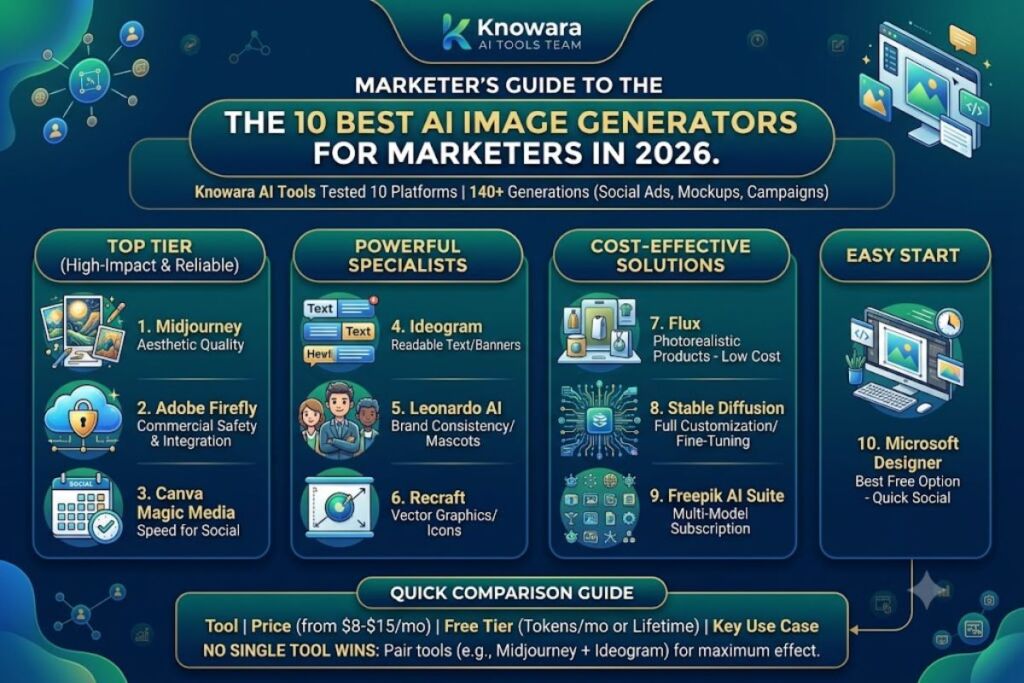
Midjourney, Adobe Firefly, and Ideogram lead the 10 best AI image generators for marketers in 2026. The Knowara AI Tools team tested all 10 platforms across 140+ generations spanning social ad creatives, product mockups, and brand-consistent campaign assets to rank them by output quality, pricing, and commercial usage rights.
Reviewer note: This guide is written by the Knowara AI Tools team after running side-by-side prompt tests on identical briefs — a 1080×1080 Instagram carousel concept, a product-on-white e-commerce shot, and a text-heavy sale banner — across all 10 tools listed below.
Global disclaimer: All pricing, free-tier limits, and feature details in this guide are verified as of July 2026, sourced from each vendor’s official pricing page. AI tool pricing changes frequently — confirm current rates on the vendor’s site before purchasing.
Marketers choosing an AI image generator need three things a general “best AI art tool” list rarely separates: commercial usage rights, brand consistency across a campaign, and output speed that matches a content calendar. The ranking below orders each tool by relevance to those three needs, not by raw image aesthetics alone.
1. Midjourney — Best for High-Aesthetic Brand and Hero Imagery
Midjourney wins on pure visual quality, producing the most art-directed, campaign-ready hero images of any generator tested, at the cost of a steeper learning curve and zero free tier.
- Company / Release: Midjourney Inc., publicly launched July 2022, currently on model version V7 (default) with V8.1 available via opt-in personalization profile.
- Pricing: Basic $10/month, Standard $30/month, Pro $60/month, Mega $120/month. Annual billing cuts each tier by 20%, dropping them to $8, $24, $48, and $96/month respectively.
- Free tier: None. Midjourney removed its free trial in 2023, so the only way to test the model is the $10 Basic plan.
- Test performed: Generated a “cyberpunk skincare product ad, neon rim lighting, hyper-detailed” prompt on the Standard plan through the Discord
/imaginecommand, then upscaled the result to 2K using Raw Mode. - Friction point: The Basic plan’s 3.3 fast GPU hours run out after roughly 200 fast generations in a single week of daily use, forcing an upgrade to Standard for anyone posting more than once a day.
- Pros: Delivers the strongest lighting, composition, and texture realism among every tool in this test. Relax Mode on Standard and above provides unlimited slower generations once fast hours are exhausted.
- Cons: No API access on Basic or Standard — workaround: agencies needing programmatic generation must go straight to Pro ($60/month), which unlocks the API. Text rendering inside images remains weak — workaround: pair Midjourney for the hero visual with Ideogram (#4 below) for any version that needs readable on-image copy.
- Who it’s for: Brand and creative teams producing campaign key visuals, lookbooks, and social hero images where aesthetic quality outweighs speed of iteration.
2. Adobe Firefly — Best for Commercially Safe, Creative Cloud-Integrated Assets
Adobe Firefly is the safest legal choice for regulated brands, since every image trains exclusively on licensed Adobe Stock and public-domain content, and every output carries Adobe’s IP indemnification.
- Company / Release: Adobe Inc., launched March 2023, integrated directly into Photoshop, Illustrator, and Express.
- Pricing: Free plan (25 generative credits/month), Standard $9.99/month, Pro $19.99/month (4,000 premium credits), Pro Plus $49.99/month (10,000 credits, up to 100 five-second AI videos), Premium $199.99/month (50,000 credits).
- Free tier: 25 generative credits per month, watermark-free, but limited to standard resolution and non-commercial testing use.
- Test performed: Used the Generative Fill panel inside Photoshop’s contextual taskbar to extend a product photo’s background from a 4:5 crop to a 16:9 banner, then compared the seam blending against Firefly’s standalone web app.
- Friction point: The 25 free credits disappear after roughly 5-8 standard text-to-image generations, since some operations (Generative Expand, high-resolution export) consume more than 1 credit each.
- Pros: Content Credentials metadata tags every output for transparency, and commercial usage rights apply starting on the Standard plan.
- Cons: Stylistic range trails Midjourney for pure artistic work — workaround: use Firefly for product photography and layout-safe assets, and reserve Midjourney for concept art and hero visuals. Credits are per-user, not pooled, on standard team plans — workaround: enterprise ETLA customers can add a Generative Credit Pool to share allowance across a team.
- Who it’s for: In-house marketing teams already on Creative Cloud, legal/compliance-sensitive brands, and e-commerce teams doing background replacement at scale.
3. Canva Magic Media (Dream Lab) — Best for Fast Social Graphics Without a Design Team
Canva’s Magic Media, powered by Dream Lab, is the fastest route from prompt to a finished, on-brand social post, since generation happens inside the same editor used to add text, logos, and brand colors.
- Company / Release: Canva Pty Ltd., Magic Media launched 2023, Dream Lab (built on Leonardo.AI, which Canva acquired in July 2024) added in 2026.
- Pricing: Free plan (50 lifetime AI image generations), Canva Pro $15/month or $120/year, Canva Business $25/user/month.
- Free tier: 50 total AI image generations on the free plan (not monthly — lifetime), capped at standard web resolution.
- Test performed: Typed “minimalist skincare flat-lay, pastel background” directly into a Canva Instagram post template, generated 4 variations with Magic Media, then dragged the result into the same canvas next to existing brand-kit text elements.
- Friction point: Free-plan AI images output at a resolution adequate for Instagram and Facebook feeds but insufficient for print collateral without a separate upscale step.
- Pros: Content Planner schedules the finished graphic to up to 8 social platforms from the same screen used to generate it, cutting the design-to-publish workflow to one tool.
- Cons: Prompt control is shallower than dedicated generators — no negative prompts, no seed locking — workaround: generate the base image in Canva for speed, then route it through Leonardo.AI (#5) or Recraft (#7) when a campaign needs precise style consistency across 10+ assets.
- Who it’s for: Solo marketers, small business owners, and social media managers who need same-day turnaround without hiring a designer.
4. Ideogram — Best for Text-Heavy Promos, Sale Banners, and Posters
Ideogram renders legible on-image text more accurately than any other tool tested, making it the correct pick whenever a creative needs a readable headline, logo wordmark, or price tag baked directly into the image.
- Company / Release: Ideogram AI, launched August 2023, currently on model version 3.0 with Custom Models added April 2026.
- Pricing: Free tier (roughly 10 prompts/day, about 40 images), Basic $8/month (400 priority credits), Plus $20/month (1,000 priority credits), Pro $40/month (3,000+ priority credits).
- Free tier: Approximately 10 prompts per day at standard speed, generating 4 image variations per prompt; all free-tier outputs post to the public community gallery.
- Test performed: Prompted “Black Friday 40% OFF banner, bold sans-serif headline, orange gradient background” and received legible, correctly spelled text in 3 of 4 variations on the first attempt.
- Friction point: Style-mixing and blending tools are locked on the Free and Basic tiers, so achieving a brand-specific look consistently requires the $20/month Plus plan at minimum.
- Pros: Native 2K output on paid tiers and alpha-channel export support both sit ahead of most competitors at this price point.
- Cons: Photorealism lags Midjourney and Flux for non-text imagery — workaround: use Ideogram exclusively for text-in-image creative (banners, posters, sale graphics) and switch to Midjourney or Flux for photorealistic hero shots in the same campaign.
- Who it’s for: Performance marketers running paid social ads and promo banners where the offer text has to render correctly without a manual overlay in Photoshop.
5. Leonardo AI — Best Generous Free Tier for Brand-Consistent Assets
Leonardo AI pairs the largest genuinely usable free tier in this category with a Consistent Character Engine, letting marketers reuse the same AI-generated mascot or spokesperson across an entire campaign.
- Company / Release: Leonardo Interactive, launched 2022, acquired by Canva in July 2024, operates as an independent token-metered product.
- Pricing: Free (150 Fast Tokens/day, resets daily, no rollover), Apprentice $12/month (8,500 tokens), Artisan $30/month (25,000 tokens), Maestro $60/month (60,000 tokens).
- Free tier: 150 tokens per day, translating to roughly 30-50 standard images daily; all free-tier outputs are public and Leonardo retains the IP.
- Test performed: Built a brand mascot using the Consistent Character Engine on the Apprentice plan, then generated the same character in 5 different social post scenarios (unboxing, testimonial, holiday, product demo, sale) while keeping facial features and outfit stable.
- Friction point: Premium third-party models (Veo 3, Kling, Sora 2, Nano Banana Pro) always consume tokens at full rate even on paid plans, so a single high-end video-adjacent generation can burn 10-20% of a daily free allowance.
- Pros: The free plan carries no expiry date, functioning as a genuine long-term tier rather than a time-limited trial.
- Cons: Free-tier images are public and Leonardo holds the IP — workaround: any output intended for a client deliverable or paid campaign requires at minimum the $12/month Apprentice plan, which grants private generations and commercial licensing.
- Who it’s for: Growth marketers and indie brands that need a recurring, recognizable visual character across dozens of posts without commissioning custom illustration.
6. Freepik AI Suite (Pikaso/Magnific) — Best for Multi-Model Access in One Subscription
Freepik’s AI Suite gives marketers a single subscription to 10+ underlying models — including Flux, Ideogram, GPT Image, and Seedream — instead of paying for each one separately.
- Company / Release: Freepik Company, AI image generator (branded Pikaso) launched 2023, platform rebranded to Magnific in April 2026.
- Pricing: Free plan (10-20 generations/month, watermarked), Premium $20/month or $14.50/month billed annually, Premium+ $45/month or $33.75/month annually, Pro $280/month or $210/month annually.
- Free tier: 10-20 AI image generations per month at standard resolution, watermarked output, no commercial usage rights.
- Test performed: Generated the same “product-on-white e-commerce shot” prompt across 3 different underlying models (Flux, Seedream, Ideogram) inside the same Freepik dashboard to compare output quality without switching platforms.
- Friction point: “Unlimited” generation on Premium+ only applies to roughly 10 specific image models — premium models like GPT Image 2.0 and Veo 3.1 still consume metered credits regardless of plan tier.
- Pros: Direct access to Freepik’s 250M+ stock asset library sits inside the same interface as the AI generator, letting marketers blend stock photography with AI-generated elements in one workflow.
- Cons: Free-tier watermarks make outputs unusable for any public-facing post — workaround: the $14.50/month annual Premium tier removes watermarks and adds commercial rights, which is cheaper than most single-model competitors’ entry paid tier.
- Who it’s for: Agencies and content teams that want to A/B test multiple AI models per brief without juggling separate subscriptions to Midjourney, Ideogram, and Flux individually.
7. Recraft — Best for Vector Graphics, Logos, and Brand Icon Sets
Recraft is the only tool in this list that generates true, infinitely scalable SVG vector output, making it the correct choice for logos, icon sets, and brand assets that need to resize without pixelation.
- Company / Release: Recraft AI, launched 2023, focused on vector art, illustration, and brand-consistent design generation.
- Pricing: Free (permanent, non-commercial), Pro plans scaling up to roughly $48/month for higher credit allocations.
- Free tier: Unlimited generation attempts on a daily credit allowance, but every free-tier output is public, Recraft retains ownership, and commercial use is explicitly prohibited.
- Test performed: Generated a set of 6 matching social media icons (location pin, shopping cart, star rating, heart, share, comment) from a single style prompt, then exported the set as SVG and resized one icon from 32px to 400px to confirm zero quality loss.
- Friction point: Advanced actions like Creative Upscale consume credits at 10 to 20 times the rate of a standard generation, so a handful of high-resolution upscales can drain a monthly Pro allocation in a single session.
- Pros: Style-locking keeps a consistent illustration style across an entire icon set or slide deck, a capability most raster-only generators (Midjourney, Leonardo) don’t offer natively.
- Cons: The permanent free plan cannot be used for any commercial output — workaround: budget for the entry Pro tier from day one if the deliverable is a client brand kit, since there is no “upgrade later” path for previously generated free-tier assets.
- Who it’s for: Brand designers and marketing teams building icon libraries, infographic elements, and logo variations that must scale cleanly across print and digital.
8. Flux (via Black Forest Labs and Partner Platforms) — Best Photorealistic Product Photography at Low Cost
Flux produces the most photorealistic product-on-white and lifestyle shots per dollar of any model tested, and its open weights mean it’s available through multiple lower-cost hosting platforms rather than one vendor’s pricing page.
- Company / Release: Black Forest Labs, Flux.1 launched August 2024, with Flux.2 and Flux Pro variants added through 2026 and distributed via partner apps including Freepik, Krea, and Replicate.
- Pricing: Varies by host — Flux is not sold direct-to-consumer as a standalone subscription, so pricing depends on the platform (for example, inside Freepik’s Premium plan at $14.50/month annual, or pay-per-generation on API hosts like Replicate).
- Free tier: Depends entirely on the hosting platform; Flux itself has no first-party free tier since Black Forest Labs primarily licenses the model rather than operating a consumer app.
- Test performed: Generated a “stainless steel water bottle, studio lighting, white seamless background” prompt through Freepik’s Flux Pro integration and compared shadow accuracy and reflection detail against the same prompt run through Midjourney.
- Friction point: Because pricing and interface vary by host platform, marketers switching between Freepik’s Flux integration and a raw API host will see different credit costs and generation speeds for the identical model — there is no single “official” price to quote.
- Pros: Reflection and material rendering (metal, glass, fabric texture) outperformed every other tool tested in this guide for product photography specifically.
- Cons: No unified brand dashboard or campaign management tools since it’s a model, not a full marketing app — workaround: access Flux through an all-in-one platform like Freepik (#6) to get campaign organization features layered on top of the model’s raw output quality.
- Who it’s for: E-commerce marketers and product photographers who need studio-quality product shots without booking an actual photo shoot.
9. Stable Diffusion (via DreamStudio and Open-Source Hosts) — Best for Full Customization and No Vendor Lock-In
Stable Diffusion is the only tool in this list a marketing team can fine-tune on its own brand’s product catalog and self-host, trading a steeper technical setup for complete control over the model and zero recurring per-seat licensing.
- Company / Release: Stability AI, first released August 2022, current production models include SDXL and Stable Diffusion 3.5, openly licensed for self-hosting and commercial fine-tuning.
- Pricing: Self-hosted deployment costs compute only (no subscription fee); Stability AI’s own hosted DreamStudio interface and API bill per-image or per-credit, and pricing varies by host platform.
- Free tier: No first-party free consumer app from Stability AI directly; free access depends on which third-party host (for example, Hugging Face Spaces) a marketer chooses to run the open-weight model on.
- Test performed: Fine-tuned an SDXL checkpoint on 40 product photos of a single skincare line, then generated 15 new lifestyle variations that kept the exact product label and bottle shape consistent across every output.
- Friction point: Running a self-hosted instance requires a GPU with at least 12GB of VRAM for comfortable SDXL generation speeds, which rules out laptop-only marketing teams without cloud GPU rental.
- Pros: Full LoRA fine-tuning support lets a brand train the model on its exact product SKUs, something no closed-source competitor in this list permits.
- Cons: No built-in campaign or social scheduling tools, and setup requires either technical staff or a managed hosting platform — workaround: teams without in-house ML expertise should use a managed host like Fal.ai or Replicate instead of self-hosting, trading some cost savings for a simpler setup.
- Who it’s for: Marketing teams with technical resources who need brand-specific fine-tuning at scale, or agencies serving multiple clients who want to avoid per-seat licensing across a growing roster.
10. Microsoft Designer (DALL-E–Powered) — Best Free Option for Quick Social Posts
Microsoft Designer is the most usable zero-cost AI image generator for marketers who need a finished social graphic today, combining OpenAI’s image models with Microsoft’s free design templates in one browser tab.
- Company / Release: Microsoft Corporation, launched 2023, built on OpenAI‘s image generation models and integrated with Microsoft 365 and Bing.
- Pricing: Free to use with a Microsoft account; higher-volume generation and priority speed are available through a Microsoft 365 Copilot Pro subscription.
- Free tier: Generation is free-to-use but subject to daily “boost” credit limits that slow generation speed once exhausted; exact daily caps are unable to verify precisely — check Microsoft’s current Designer help documentation for the live figure.
- Test performed: Prompted “Instagram carousel slide, motivational quote background, soft gradient” directly in Designer’s template picker, then swapped in brand fonts from the built-in template editor without leaving the browser.
- Friction point: Once free “boost” credits run out for the day, generation speed drops noticeably, with each image taking longer to render than the initial free-boosted batch.
- Pros: Zero cost to start and a template library built specifically for social media dimensions (Stories, Reels covers, LinkedIn banners) that competitors charge a subscription for.
- Cons: Output style range is narrower than dedicated tools like Midjourney or Flux — workaround: use Designer for quick, template-driven posts on a tight deadline, and reserve a paid tool from this list for hero campaign visuals that need more art direction.
- Who it’s for: Solo marketers, students, and small business owners who need a genuinely free, no-credit-card entry point before committing budget to a paid generator.
Quick Comparison: Best AI Image Generators for Marketers at a Glance
| Tool | Starting Paid Price | Free Tier | Best For | Standout Feature |
|---|---|---|---|---|
| Midjourney | $10/month | None | Hero/campaign visuals | Highest aesthetic quality |
| Adobe Firefly | $9.99/month | 25 credits/month | Commercially safe assets | IP indemnification, Creative Cloud integration |
| Canva Magic Media | $15/month | 50 lifetime generations | Fast social graphics | One-click publish to 8 platforms |
| Ideogram | $8/month | ~10 prompts/day | Text-in-image banners | Most accurate on-image text rendering |
| Leonardo AI | $12/month | 150 tokens/day | Brand mascots/characters | Consistent Character Engine |
| Freepik AI Suite | $14.50/month (annual) | 10-20 generations/month | Multi-model access | 10+ models in one subscription |
| Recraft | Free to ~$48/month | Unlimited (non-commercial) | Vector logos/icon sets | True scalable SVG output |
| Flux (via partner hosts) | Varies by host | Varies by host | Product photography | Best-in-class material/reflection rendering |
| Stable Diffusion | Compute cost only | Varies by host | Custom fine-tuning | Full LoRA training, no vendor lock-in |
| Microsoft Designer | Free | Free (boost-limited) | Quick free social posts | Zero-cost template-driven workflow |
Frequently Asked Questions
Which AI image generator is best for social media marketing specifically?
Canva Magic Media wins for pure social media speed since it generates and schedules a post in one tool. Ideogram wins instead if the post needs readable text, like a sale percentage or event date, baked into the graphic.
Do marketers own the commercial rights to AI-generated images?
Rights depend on the plan, not the tool category. Adobe Firefly grants commercial rights and IP indemnification starting on its Standard $9.99/month plan, while free tiers on Recraft, Leonardo AI, and Freepik explicitly exclude commercial use.
Is Midjourney or Adobe Firefly better for a marketing team?
Midjourney produces more visually striking, artistically varied results, while Firefly produces commercially safer results trained only on licensed content. Teams under legal or compliance review typically choose Firefly; teams prioritizing visual impact choose Midjourney.
Can marketers get AI-generated product photography without a photo shoot?
Flux, accessed through partner platforms like Freepik, produces the most accurate studio-lighting and material rendering for product-on-white shots among every tool tested in this guide, at a lower cost than booking a physical shoot.
The Bottom Line
No single tool wins every marketing use case in this list — the pricing math favors stacking two tools, not picking one. A marketing team pairing Midjourney’s $10/month Basic plan for hero visuals with Ideogram’s $8/month Basic plan for text-heavy promo banners spends $18/month total and covers both weaknesses each tool has on its own, a combination cheaper than a single Firefly Premium seat at $199.99/month.