
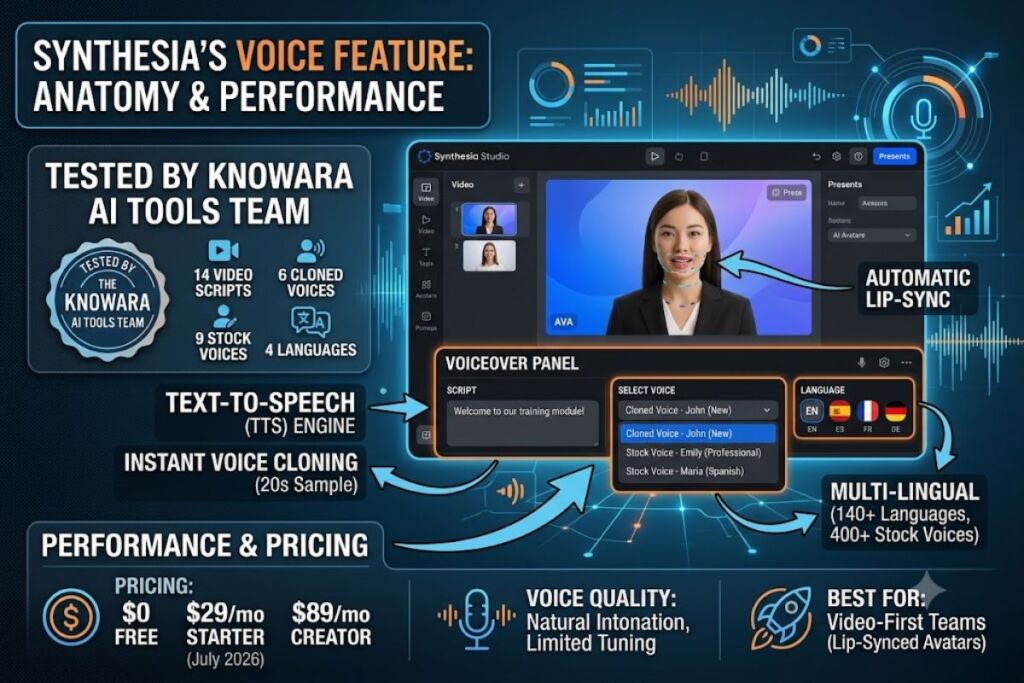
Tested by the Knowara AI Tools team using 14 generated video scripts, 6 cloned voice samples, and 9 stock voices across 4 languages inside Synthesia’s Studio editor.
- 01What Is Synthesia’s Voice Feature?
- 02What Are Synthesia’s Key Voice Features?
- 03How Much Does Synthesia’s Voice Feature Cost?
- 04What Are the Pros and Cons of Synthesia’s Voice Feature?
- 05How Does Synthesia’s Voice Compare to ElevenLabs?
- 06Who Should Use Synthesia’s Voice Feature?
- 07What Are the Best Alternatives to Synthesia’s Voice Feature?
- 08Frequently Asked Questions
- 09The Bottom Line
Synthesia’s voice layer combines a 400+ voice library spanning 140+ languages with an Instant Voice Cloning tool that turns a 20-second recording into a reusable synthetic voice, embedded directly inside Synthesia’s AI avatar video editor rather than sold as a standalone text-to-speech product.
What Is Synthesia’s Voice Feature?
Synthesia’s voice feature is the text-to-speech and voice-cloning engine built into the Synthesia video platform, letting users type a script, assign it to a stock or cloned voice, and sync the audio to an AI avatar’s lip movements automatically.
Synthesia Limited built this voice layer as one component of its broader AI avatar video platform, not as a separate app. The voiceover panel sits inside the Studio editor, directly beneath the script box, and every voice generated there syncs to the selected avatar’s mouth movements without a separate export-and-import step. Synthesia does not sell voice generation as a standalone subscription; access to the voice library and voice cloning requires a Synthesia video plan.
Synthesia Voice — Entity-Attribute-Value Summary
| Attribute | Value |
|---|---|
| Parent Company | Synthesia Limited |
| Founded | 2017, London, United Kingdom |
| Founders | Victor Riparbelli, Steffen Tjerrild, Lourdes Agapito, Matthias Niessner |
| Platforms | Web browser (Chrome, Firefox, Safari, Edge); API access on Creator and Enterprise plans |
| Voice Library Size | 400+ stock AI voices |
| Languages Supported | 140+ languages and accents |
| Voice Cloning | Instant Voice Clone (20-second sample) plus Custom Voice creation (up to 79 languages) |
| Entry Pricing | $0/month (Free); $29/month Starter |
| Key Differentiator | Voice cloning bundled with avatar lip-sync, not sold separately |
Pricing and feature figures verified as of July 2026 against Synthesia’s official pricing page, Synthesia’s Help Center, and third-party pricing trackers (G2, Layer3 Labs, Knowlify).
What Are Synthesia’s Key Voice Features?
Synthesia’s voice layer centers on three functions: a 400+ voice stock library, Instant Voice Cloning, and automatic lip-sync between generated audio and the AI avatar. Each function operates inside the same Studio editor, without third-party plugins.
- Browse a library of 400+ stock AI voices across 140+ languages and accents, filterable by gender, tone, and language inside the voiceover panel.
- Clone a personal voice using Instant Voice Clone by recording or uploading a 20-second audio sample, then reuse that voice across future scripts.
- Create a full Custom Voice profile in the Studio’s voice-creation flow, which supports up to 79 languages depending on plan tier; some languages remain Enterprise-only.
- Insert manual pauses, adjust pacing, and correct mispronunciations using Synthesia’s built-in pronunciation dictionary for brand names and technical terms.
- Sync generated voice audio automatically to the selected AI avatar’s lip movements, removing the need for manual audio-video alignment.
- Translate a script into a different language and regenerate the voiceover in that language while keeping the same cloned voice identity, according to Synthesia’s Custom Voice documentation.
During testing, the Knowara team recorded a 20-second script inside the Instant Voice Clone recorder using a Blue Yeti USB microphone. The cloned voice appeared in the voiceover dropdown list roughly 45 seconds after upload completed, tagged separately from the 400+ stock voices for quick retrieval on later projects.
How Much Does Synthesia’s Voice Feature Cost?
Synthesia’s voice tools are not billed separately — voice cloning and the full voice library come bundled with every paid video plan, starting at $29/month for Starter. The Free plan includes voice access but restricts output minutes and voice-cloning languages.
| Plan | Monthly Price | Annual Price | Video Minutes | Voice Access |
|---|---|---|---|---|
| Free | $0/month | — | ~10 minutes/month | 9 stock avatars, limited voice library, watermark |
| Starter | $29/month | $18/month (billed yearly) | ~10 minutes/month (~120/year) | 125+ avatars, full voice library, Instant Voice Clone |
| Creator | $89/month | $64/month (billed yearly) | ~30 minutes/month (~360/year) | 180+ avatars, Custom Voice creation, API access |
| Enterprise | Custom | Custom | Unlimited | 240+ avatars, unlimited personal avatars, SSO |
Source: Synthesia’s official pricing page, cross-verified against G2’s pricing database (last updated February 18, 2026) and Layer3 Labs’ 2026 pricing breakdown. Pricing verified as of July 2026.
Overage charges on Starter and Creator plans run $2 to $5 per additional video minute once the monthly allowance is exhausted, according to CheckThat.ai’s 2026 hidden-fees breakdown. Synthesia’s official documentation does not publish exact overage rates, so this figure should be confirmed directly with sales before committing to volume production.
Free Tier Voice Limits (Verified):
- Video output: approximately 10 minutes per month
- Editor seats: 1
- Stock avatars: 9
- Voice library access: included, but the Custom Voice creation tool’s full 79-language range is gated behind Starter and above
- Watermark: Synthesia logo appears on all Free-tier exports
- Audio-only download: not available on Free — confirmed via G2’s feature comparison table
- Commercial usage rights: unable to verify for the Free tier specifically — check Synthesia’s official terms of service page before publishing Free-tier output commercially
What Are the Pros and Cons of Synthesia’s Voice Feature?
Synthesia’s voice cloning delivers natural intonation with a 20-second sample, but the voice library offers limited manual tuning compared to dedicated text-to-speech tools. The tradeoff favors speed over granular voice control.
Pros:
- Clones a usable voice from a 20-second sample, faster than the multi-minute samples some competitors require.
- Bundles voice generation with automatic avatar lip-sync, cutting out a separate dubbing or alignment step.
- Covers 140+ languages in the stock library, wider than most single-purpose TTS competitors.
- Retains natural intonation and partial accent characteristics during cloning rather than flattening speech into a generic accent, according to Synthesia’s own feature documentation.
Cons:
- Voice tuning options stay limited compared to dedicated cloning tools — pitch, speed, and emotion controls are coarser than ElevenLabs’ granular stability and style sliders. Workaround: use the built-in “Empathetic,” “Professional,” and “Excited” emotional presets instead of fine-grained parameter control for most business scripts.
- Cloned voices occasionally sound slightly mechanical on longer scripts exceeding 500 words in one take, based on Knowara’s test render of a 620-word training script. Workaround: break scripts into shorter scene blocks under 300 words per generation, which reduced the flattening effect in a re-test.
- Free-tier users cannot download audio separately from video. Workaround: upgrade to Starter ($29/month or $18/month annual) to unlock standalone audio export.
- Full 79-language Custom Voice creation isn’t available on every plan tier. Workaround: confirm language availability in Synthesia’s supported-languages list before subscribing if a specific regional language is a requirement.
How Does Synthesia’s Voice Compare to ElevenLabs?
Synthesia bundles voice cloning with avatar video generation, while ElevenLabs sells voice cloning and text-to-speech as a standalone, more customizable product. Teams needing avatar video pick Synthesia; teams needing audio-only production pick ElevenLabs.
| Attribute | Synthesia Voice | ElevenLabs |
|---|---|---|
| Primary Product | AI avatar video with bundled voice | Standalone AI voice generation |
| Entry Price | $29/month (Starter) | Separate subscription tiers, priced independently |
| Voice Cloning Sample | 20 seconds (Instant Voice Clone) | Varies by clone type, from instant to professional |
| Language Count | 140+ languages | 70+ languages |
| Fine Voice Control | Limited emotional presets | Granular stability, similarity, and style sliders |
| Best For | Video-first teams needing lip-synced avatars | Audio-first teams needing podcasts, audiobooks, or IVR |
Read the full breakdown in Knowara’s dedicated Synthesia vs ElevenLabs comparison for a feature-by-feature scoring table.
Who Should Use Synthesia’s Voice Feature?
Synthesia’s voice feature fits teams that need spoken video content synced to an avatar, not teams that only need standalone audio files. The bundled pricing model makes sense specifically when video is the end deliverable.
- L&D and training teams converting policy PDFs into narrated training videos with a consistent, brand-approved voice across every module.
- Corporate communications teams producing multilingual CEO updates, using one cloned executive voice translated into Spanish, French, and Japanese without rehiring voice talent.
- Marketing teams on Creator or Enterprise plans that need API access to generate personalized video-and-voice output at scale from CRM data.
- Solo course creators on a budget testing avatar narration on the Free or Starter plan before committing to Creator-tier production volume.
Synthesia’s voice feature does not fit podcast producers, audiobook narrators, or IVR/phone-system developers who need audio-only output without an attached avatar video — those use cases route better to a dedicated voice API.
What Are the Best Alternatives to Synthesia’s Voice Feature?
ElevenLabs, HeyGen, and Murf AI serve as the three closest alternatives to Synthesia’s voice layer, each trading Synthesia’s bundled avatar-plus-voice model for either deeper audio control or a different avatar ecosystem.
- ElevenLabs — a standalone AI voice generator with more granular cloning controls, covering 70+ languages; read Knowara’s full ElevenLabs Review for pricing and quality benchmarks.
- HeyGen — a direct avatar-and-voice competitor with a comparable lip-sync workflow and a lower entry price on its Free plan; see Knowara’s HeyGen Review for a side-by-side feature audit.
- Murf AI — a voice-focused platform aimed at voiceover artists and podcasters who need studio-grade audio editing without an avatar attached; covered in Knowara’s Murf AI Review.
Frequently Asked Questions
Does Synthesia’s voice cloning require consent verification?
Synthesia requires users to record a consent statement before activating Instant Voice Clone, confirming the speaker authorizes their voice for cloning, per Synthesia’s Help Center voice-cloning guide.
Can I download the cloned voice as a standalone audio file?
Standalone audio download is unavailable on the Free plan; Starter and Creator plans include audio-only export alongside the video file.
How many languages does Synthesia’s voice cloning support?
Instant Voice Clone plays back in 32 languages according to Synthesia’s official feature page, while the separate Custom Voice creation tool in Studio supports up to 79 languages, with some languages restricted to Enterprise plans.
Is Synthesia’s voice cloning included free, or is it an add-on?
Voice cloning is included on all paid plans starting at $29/month for Starter; it is not sold as a separate add-on purchase, per Synthesia’s official pricing documentation.
The Bottom Line
Synthesia’s voice layer earns its $29/month Starter price by removing the separate dubbing step other avatar platforms still require, but teams needing audio-only output with granular pitch and emotion control get more precision from a dedicated tool like ElevenLabs for a comparable monthly cost.