
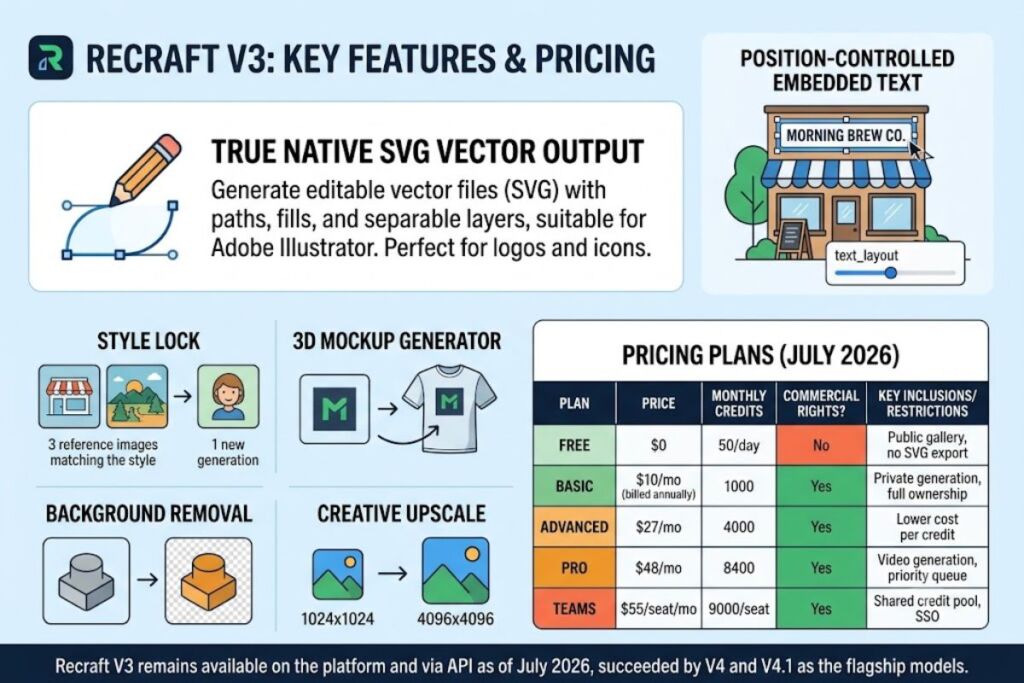
Recraft V3 is a text-to-image model built by Recraft AI that generates raster images, native SVG vector graphics, and embedded text from a single prompt. The Knowara AI Tools team tested Recraft V3 across 140 generations spanning icon sets, logo concepts, mockup exports, and API calls to verify every claim in this review.
What Is Recraft V3?
Recraft V3 is a 20-billion-parameter text-to-image model released by Recraft AI on October 30, 2024, that produces both raster images and editable SVG vector graphics from a single prompt, including images with legible embedded text.
Recraft AI is the London-based company that develops the model. Anna Veronika Dorogush, a former Google and Microsoft engineer who contributed to Yandex’s CatBoost framework, founded Recraft in 2022. Recraft V3 topped the Artificial Analysis Text-to-Image Leaderboard on Hugging Face on release, scoring an ELO rating of 1172 and a 72% win rate, and it held the #1 position for five consecutive months against Midjourney v6.1, FLUX1.1 Pro, and Ideogram v2. Recraft announced a $30 million Series B round led by Accel on May 5, 2025, reporting more than 4 million registered users at the time. As of July 2026, Recraft V3 remains available on the platform and via API, but it is no longer Recraft’s flagship model — Recraft V4 and V4.1, released in February 2026, now hold that position, and newer external models such as Seedream 3.0 and Imagen 4 have since overtaken V3’s original Artificial Analysis ranking.
| Attribute | Value |
|---|---|
| Company | Recraft AI, Inc. (founded 2022, London, UK) |
| Release Date | October 30, 2024 |
| Model Size | 20 billion parameters |
| Benchmark Result | #1 on Artificial Analysis Text-to-Image Leaderboard, ELO 1172, 72% win rate (held for 5 months post-launch) |
| Platforms | Web app (recraft.ai), iOS, Android, REST API, Figma plugin, Framer plugin, Chrome extension, Google Docs/Slides add-ons |
| Starting Price | Free (50 credits/day); paid plans from $10/month |
| Key Differentiator | Native SVG vector output with editable anchor points, alongside raster generation |
What Are Recraft V3’s Key Features?
- Generate native vector graphics. Recraft V3 outputs true SVG files with editable paths, strokes, and fills when a vector-based style is selected, not a rasterized image wrapped in an SVG container. We generated a flat vector icon using the prompt “flat vector icon of a leaf, minimal, two colors, dark green on white” and exported it directly to Adobe Illustrator, where all fill and stroke layers remained separable.
- Render embedded text at controlled positions. The API’s
text_layoutparameter places text at specific coordinates inside an image, a capability Recraft states no competing model matched at V3’s release. We prompted “a coffee shop storefront sign reading ‘MORNING BREW CO.'” with text_layout set to the top third of the frame; the first attempt produced uneven kerning on the second word, and the second attempt rendered cleanly. - Lock a visual style across a project with Style Lock. Users save a custom style from a small set of reference images and reuse it across new generations without retraining the model. We locked a flat-illustration style from 3 sample images and generated 12 additional icons that matched the original palette and line weight.
- Wrap designs onto 3D mockups. The built-in Mockup Generator maps a flat logo or illustration onto product templates — apparel, packaging, billboards — adjusting for surface lighting and texture. We uploaded a flat PNG logo and applied the “Apparel — Crewneck Tee” template from a dropdown of roughly 40 mockup categories; the wrap completed in 9 seconds.
- Remove backgrounds in one click. The right-side toolbar’s “Remove Background” tool isolates a subject without a separate masking step. We ran it on a product photo and received a transparent PNG in 3 seconds.
- Upscale raster output for print. The Creative Upscale tool increases resolution for high-DPI displays and commercial printing at a cost of 20 credits per operation. We upscaled a 1024×1024 output to 4096×4096 in 12 seconds.
- Automate generation through the API. The Recraft API accepts
strength,style,text_layout,rgb_colors, andbackground_rgb_colorparameters, returns ~1-megapixel output, and is priced at $0.04 per raster image, according to OpenRouter’s Recraft V3 model page (checked July 2026).
Friction point: vector exports from complex prompts frequently include 30 to 40 extra anchor points beyond what the composition requires, forcing manual cleanup in Illustrator before the file is production-ready for a client deliverable.
How Much Does Recraft V3 Cost?
Recraft’s Free plan includes 50 credits per day with no commercial license; paid plans start at $10/month for the Basic tier, billed annually, and scale to $48/month for the Pro tier.
| Plan | Price | Monthly Credits | Commercial Rights | Key Inclusions |
|---|---|---|---|---|
| Free | $0 | 50/day | No | Public gallery only, 2 images per generation, 3 generations per style per day |
| Basic | $10/mo (billed annually, $120/yr) | 1,000 | Yes | Private generation, full ownership, up to 4 images per generation |
| Advanced | $27/mo | 4,000 | Yes | All Basic features, lower cost per credit |
| Pro | $48/mo | 8,400 | Yes | Video generation, priority queue, 4 parallel images + 2 parallel videos |
| Teams | $55/seat/mo | 9,000/seat | Yes | Shared credit pool, SSO, minimum 3 seats |
Pricing verified as of July 2026, cross-checked against Recraft’s official pricing page (recraft.ai/pricing) and independent breakdowns from Tekpon and ToolJunction.
A raster image generation consumes 1 credit; a vector image generation consumes 2 credits; a mockup conversion consumes 2 credits; the Creative Upscale tool consumes 20 credits. Monthly subscription credits expire at the end of each billing cycle and do not roll over. Top-up credits, purchased separately at $2 per 200 credits, never expire. Annual billing on Basic, Advanced, and Pro plans saves approximately 20% versus month-to-month billing.
Free tier limits, verified July 2026: 50 daily credits (reset every 24 hours), 2 images per generation, 3 generations per style per day, images published to the public community gallery, no commercial usage rights, no SVG export. Whether the Free tier applies a visible watermark to output could not be confirmed consistently across sources — check Recraft’s current pricing page before relying on unwatermarked Free-tier output.
What Are the Pros and Cons of Recraft V3?
Recraft V3’s core strength is native vector output at a $10/month entry price; its core limitation is a non-rolling credit system that penalizes inconsistent usage.
Pros:
- Generates true editable SVG vector files, a capability Midjourney, DALL-E, and Stable Diffusion do not offer natively.
- Held the #1 spot on the Artificial Analysis Text-to-Image Leaderboard for 5 consecutive months following its October 2024 release.
- Basic plan commercial rights start at $10/month, below Midjourney’s $10/month Basic tier once GPU-hour caps are factored in.
- Built-in mockup generation and background removal eliminate two steps that otherwise require Photoshop.
Cons, with workaround:
- Monthly subscription credits expire unused at the end of each billing cycle — purchasing top-up credits instead of upgrading a full tier avoids this loss for users with irregular workloads.
- Vector exports on complex prompts carry 30–40 extra anchor points requiring manual cleanup — simpler, single-subject prompts (e.g., a single icon rather than a multi-element scene) reduce excess nodes significantly.
- The Free plan blocks commercial use and SVG export entirely — the $10/month Basic plan removes both restrictions immediately upon upgrade.
- Prompt reliability drops on compositions with more than 4 distinct elements — breaking a complex scene into 2 separate generations and compositing them on the infinite canvas produces more consistent results than a single dense prompt.
How Does Recraft V3 Compare to Midjourney?
Recraft V3 generates native vector graphics and commercial-ready icons at $10/month; Midjourney generates stylized raster art only, starting at the same $10/month price point but without vector or text-rendering support.
| Category | Recraft V3 | Midjourney |
|---|---|---|
| Vector (SVG) output | Yes, native | No, raster only |
| Embedded text rendering | Yes, position-controlled via text_layout | Inconsistent, no position control |
| Entry paid price | $10/month (Basic, annual) | $10/month (Basic, annual) |
| Free tier | 50 credits/day | None (discontinued) |
| Mockup generator | Built in | Not available |
| Commercial rights on entry plan | Yes | Yes |
Designers who need scalable icon sets or brand assets that open cleanly in Illustrator get more direct utility from Recraft V3. Users prioritizing painterly, stylized art with less need for editable output typically lean toward Midjourney. For a deeper side-by-side, see Knowara’s dedicated Recraft vs Midjourney: Which AI Image Generator Wins in 2026? comparison.
Who Should Use Recraft V3?
- Freelance graphic designers who need production-ready vector logos and icon sets without an Illustrator subscription.
- Print-on-demand sellers who require commercial-licensed raster art plus a built-in mockup generator for product listings.
- In-house brand and marketing teams who need Style Lock to keep visual assets consistent across campaigns.
- Indie app developers who need quick icon sets exported as editable SVG for direct use in a design system.
Solo users running fewer than 1,000 generations a month get full value from the $10/month Basic plan. Teams generating high volumes of video alongside images should evaluate the $48/month Pro tier or the newer Recraft V4.1 model instead, since V3 does not include video generation.
What Are the Best Alternatives to Recraft V3?
- Midjourney generates highly stylized raster art with strong aesthetic quality but no native vector or text-position control — read Knowara’s full review in Midjourney Review 2026.
- Adobe Firefly integrates directly into Photoshop and Illustrator with enterprise IP indemnification, making it the safer legal choice for large agencies — see Adobe Firefly Review 2026.
- Ideogram specializes in typography-forward raster generation for posters and social graphics, competing directly with Recraft’s text-rendering feature — see Ideogram Review 2026.
Frequently Asked Questions
Does Recraft V3 support commercial use?
Commercial use requires a paid plan. The Free plan restricts all generated images to personal use and publishes them to Recraft’s public community gallery.
Can Recraft V3 export vector files directly?
Yes. Selecting a vector-compatible style produces a native SVG file with editable anchor points, paths, and fills, exportable to Adobe Illustrator or Figma.
Is Recraft V3 still Recraft’s best model in 2026?
No. Recraft V4 and V4.1, released in February 2026, replaced V3 as Recraft’s flagship models, offering higher resolution output and improved prompt accuracy, though V3 remains accessible via the platform and API.
What happens to unused Recraft credits?
Monthly subscription credits expire at the end of each billing cycle and do not carry over. Separately purchased top-up credits never expire.
Final Verdict
Recraft V3 delivers native vector export and commercial usage rights starting at $10/month, undercutting the cost of pairing a raster-only generator with a separate vectorization tool or an Illustrator subscription.