
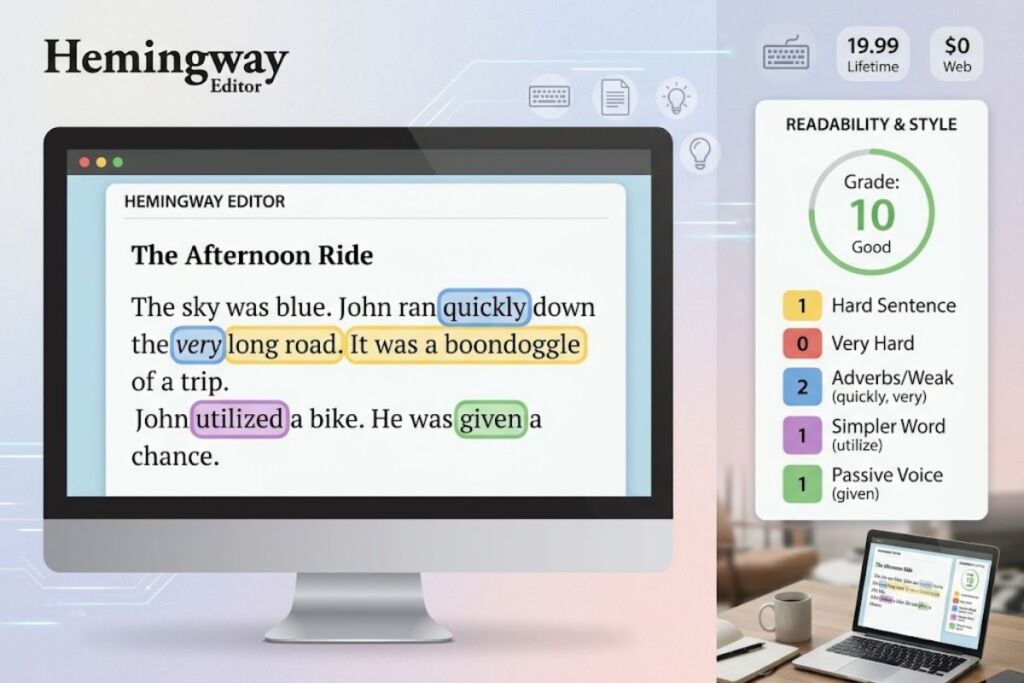
Hemingway Editor is a readability and style-editing tool that highlights long sentences, passive voice, adverbs, and complex words in color-coded text. Boondoggle Studio, LLC built it in 2013, and it runs as a free web app plus a paid desktop app and AI subscription tier.
- 01What Is Hemingway Editor?
- 02What Are Hemingway Editor’s Key Features?
- 03How Much Does Hemingway Editor Cost?
- 04What Are the Pros and Cons of Hemingway Editor?
- 05How Does Hemingway Editor Compare to Grammarly?
- 06Who Should Use Hemingway Editor?
- 07What Are the Best Alternatives to Hemingway Editor?
- 08Frequently Asked Questions
- 09Related Reading
What Is Hemingway Editor?
Hemingway Editor is a writing-clarity tool that scores text on an Automated Readability Index (ARI) and flags sentence-level problems in five colors. Writers paste or type text into the editor, and the tool returns a grade-level score along with specific edits.
The tool takes its name from Ernest Hemingway, whose prose Hemingway’s creators grade at a 5th-grade reading level. According to the app’s own benchmark data, the average American reads at a 10th-grade level, and Hemingway Editor pushes writers toward that lower, more accessible range rather than away from it. Adam Long and Ben Long, two developer brothers, built the original desktop app first and launched the free browser version afterward, under the company Boondoggle Studio, LLC.
Hemingway Editor does not correct spelling or basic grammar in its free tier. It focuses on style: sentence length, sentence structure, passive voice, adverb density, and word complexity. The paid Hemingway Editor Plus tier adds an AI grammar checker and AI-generated sentence rewrites, built on OpenAI’s models.
| Attribute | Value |
|---|---|
| Company | Boondoggle Studio, LLC |
| Release Year | 2013 |
| Pricing | Free (web) / $19.99 one-time (desktop) / $10 per month or $100 per year (Editor Plus) |
| Platforms | Web browser, Windows desktop app, Mac desktop app |
| Key Feature | Color-coded readability highlighting with ARI grade scoring |
What Are Hemingway Editor’s Key Features?
Hemingway Editor’s core feature set centers on five color-coded highlight categories, a live readability grade, and one-click formatting for publishing. Each highlight targets one specific writing problem, and the sidebar tracks counts in real time.
- Flag long, hard-to-read sentences in yellow when they exceed roughly 20-25 words or stack three or more clauses.
- Flag very hard-to-read sentences in red when sentence complexity exceeds the yellow threshold significantly.
- Highlight words with simpler alternatives in purple (for example, “utilize” gets flagged in favor of “use”).
- Highlight adverbs and weak qualifiers in blue and recommend removing them (for example, “ran quickly” becomes “sprinted”).
- Highlight passive-voice sentences in green and suggest converting them to active voice.
- Score every draft against Automated Readability Index grade levels, updated live as the writer types.
- Export finished text to Medium, WordPress, HTML, Markdown, or Word .docx files from the paid desktop app.
- Generate AI sentence rewrites through Hemingway Editor Plus, which spends one AI sentence credit per rewrite.
- Fix grammar errors automatically in Hemingway Editor Plus, with unlimited grammar fixes included in every paid plan.
How Much Does Hemingway Editor Cost?
Hemingway Editor costs $0 for the web app, $19.99 one-time for the desktop app, and $10 per month (or $100 per year) for the AI-powered Hemingway Editor Plus subscription. Pricing comes directly from Hemingway’s official billing documentation.
The free web app, available at hemingwayapp.com, includes unlimited readability scoring and all five color-coded highlights, with no account or payment required. The one-time $19.99 desktop app, sold for both Windows and Mac, adds offline access, Word document import, and direct publishing to Medium and WordPress. Hemingway Editor Plus, the AI subscription layer, costs $10 per month billed monthly or $100 per year billed annually, which works out to $8.33 per month and cuts the effective monthly cost by 17%. Editor Plus includes unlimited automated grammar fixes and a monthly allotment of AI sentence credits for rewriting flagged sentences. Teams pay per seat on a Team plan, and Hemingway’s help documentation confirms each team member receives 10,000 AI sentence credits per month under a single consolidated bill.
What Are the Pros and Cons of Hemingway Editor?
Hemingway Editor’s biggest strength is its $19.99 lifetime price for the desktop app; its biggest limitation is a rigid style model that flags stylistic passive voice and complex sentences without regard for genre or authorial voice.
Pros:
- Free web version includes full readability analysis with zero paywalled highlights.
- Desktop app costs $19.99 one time, with no recurring subscription required for core features.
- Color-coded feedback identifies specific sentence-level problems instead of generic “improve this” notes.
- Grade-level scoring gives writers a concrete, numeric readability target instead of subjective feedback.
- Direct publishing to Medium and WordPress removes a manual copy-paste export step.
Cons:
- Free and desktop tiers skip spelling and grammar correction entirely; grammar checking requires the $10/month Plus subscription.
- The rigid sentence-length model penalizes long sentences even in genres (literary fiction, academic writing) where complexity serves the content.
- Hemingway Editor Plus AI rewrites run on general-purpose OpenAI models rather than a writing-specific engine, and reviewers report the rewrites smooth out distinctive authorial voice into generic prose.
- No real-time collaboration or commenting features exist in either the free or paid tiers.
- The free web version has no autosave; closing the browser tab without copying text out loses the draft.
How Does Hemingway Editor Compare to Grammarly?
Hemingway Editor focuses on readability and style; Grammarly focuses on grammar, spelling, and tone correction — the two tools solve different problems and frequently get used together. Grammarly costs $12 per month on its Premium plan, higher than Hemingway Editor Plus’s $10 per month tier.
| Attribute | Hemingway Editor | Grammarly |
|---|---|---|
| Core focus | Sentence readability and style | Grammar, spelling, tone |
| Free tier | Full readability highlights, unlimited use | Basic grammar and spelling checks |
| Grammar correction | Plus tier only ($10/mo) | Included in free tier |
| Desktop app cost | $19.99 one-time | Not sold as a one-time purchase |
| Browser extension | Not available | Available for Chrome, Edge, Safari |
Writers who need grammar correction as the primary function get more value from Grammarly’s free tier. Writers who already use a grammar checker and need a dedicated style and readability layer get more targeted feedback from Hemingway Editor. For a full feature-by-feature breakdown, see Hemingway Editor vs Grammarly: Which One Should You Use?
Who Should Use Hemingway Editor?
Hemingway Editor fits bloggers, journalists, and content marketers who publish short-form web content and need a fast readability check before hitting publish. It fits less well for fiction writers and academics who require sentence complexity.
- Bloggers and content marketers who write for search-driven audiences benefit most, since Hemingway’s grade-level target aligns with the readability levels search engines and general web audiences respond to.
- Freelance journalists on tight deadlines use the free web version as a final style pass before submitting copy, without paying for a subscription.
- Non-native English speakers drafting business communication use the blue adverb highlights and purple word-complexity flags to simplify vocabulary quickly.
- Fiction writers and academics get less value, since Hemingway’s rigid sentence-length rules flag stylistically intentional long sentences and passive constructions common in literary and scholarly writing.
What Are the Best Alternatives to Hemingway Editor?
Grammarly, ProWritingAid, and QuillBot are the three closest alternatives to Hemingway Editor, each trading Hemingway’s narrow style focus for broader grammar, structural, or paraphrasing capability.
- Grammarly corrects grammar, spelling, and tone in real time across a browser extension, desktop app, and Word add-in; read the full Grammarly Review: Grammar and Style, Tested.
- ProWritingAid adds in-depth style reports covering pacing, dialogue tags, and repeated words, aimed at long-form authors; read the full ProWritingAid Review: Deep Editing, Tested.
- QuillBot centers on AI paraphrasing and sentence restructuring rather than readability scoring, useful for rewriting dense academic text into simpler phrasing.
Frequently Asked Questions
Is Hemingway Editor free?
The web version at hemingwayapp.com is completely free with no account required. The desktop app costs $19.99 one time, and the AI-powered Hemingway Editor Plus tier costs $10 per month or $100 per year.
Does Hemingway Editor check grammar?
The free web app and $19.99 desktop app do not check grammar or spelling. Grammar correction requires a Hemingway Editor Plus subscription, which includes unlimited automated grammar fixes.
What does the green highlight mean in Hemingway Editor?
Green highlights mark passive-voice sentences. Hemingway Editor Plus subscribers can click a green highlight and use an AI credit to generate an active-voice rewrite.
Is Hemingway Editor good for fiction writing?
Hemingway Editor’s rigid sentence-length and passive-voice rules flag stylistic choices common in fiction, including long descriptive sentences and intentional passive construction. Fiction writers get more targeted feedback from ProWritingAid’s genre-specific style reports.
Related Reading
Hemingway Editor sits in Knowara’s broader AI tools coverage alongside grammar checkers, paraphrasing tools, and coding assistants. For a wider view of the AI tools landscape, see the Best AI Coding Tools in 2026 hub, or compare Hemingway directly against a grammar-first competitor in Hemingway Editor vs Grammarly: Which One Should You Use? and Best AI Writing Tools in 2026.
Hemingway Editor’s $19.99 desktop app remains the single cheapest one-time-purchase writing tool in this category — every competitor listed above runs on a recurring subscription