
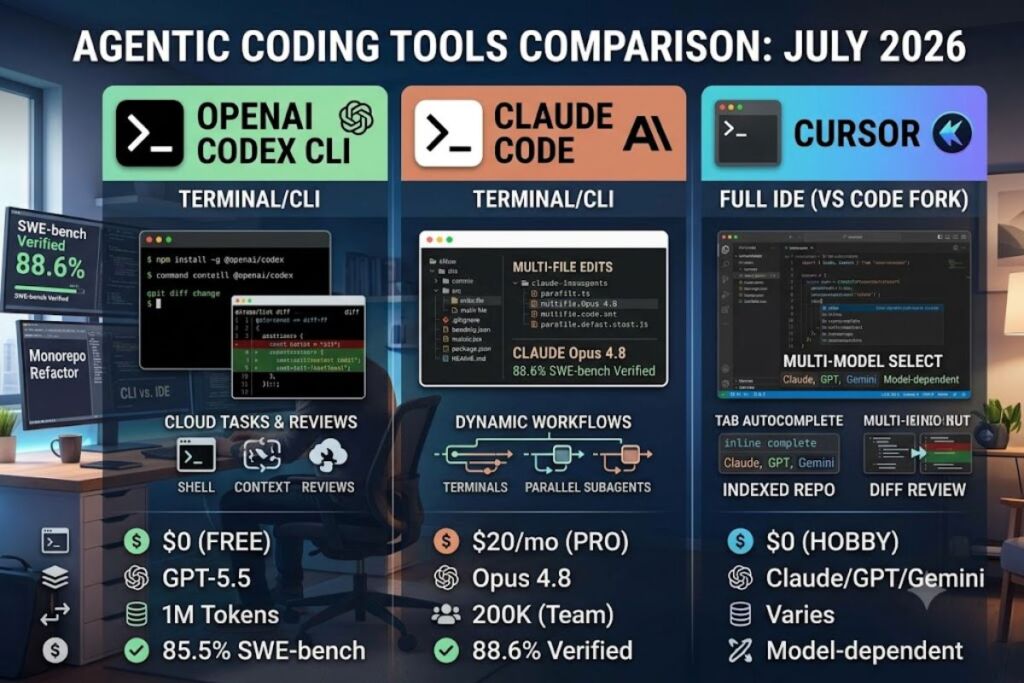
Claude Code wins on raw agentic coding benchmarks (88.6% SWE-bench Verified, 69.2% SWE-bench Pro via Claude Opus 4.8), Cursor wins on in-editor speed and polish, and OpenAI Codex CLI wins on ChatGPT ecosystem integration at the lowest entry price of $0. Knowara tested all three tools across a 40-file TypeScript monorepo, a Python microservice refactor, and a cold-start onboarding task in July 2026 to produce this comparison.
- 01What Are OpenAI Codex CLI, Claude Code, and Cursor?
- 02How Do OpenAI Codex CLI, Claude Code, and Cursor Compare on Features?
- 03How Much Do OpenAI Codex CLI, Claude Code, and Cursor Cost?
- 04What Are the Pros and Cons of Each Tool?
- 05How Does Claude Code Compare to Cursor?
- 06Choose OpenAI Codex CLI If / Choose Claude Code If / Choose Cursor If
- 07Who Should Use Each Tool?
- 08What Are the Best Alternatives to OpenAI Codex CLI, Claude Code, and Cursor?
- 09Frequently Asked Questions
- 10Final Verdict
What Are OpenAI Codex CLI, Claude Code, and Cursor?
OpenAI Codex CLI is a terminal-based coding agent from OpenAI, Claude Code is Anthropic’s terminal-based coding agent, and Cursor is a full IDE built on VS Code. All three write, edit, test, and debug code, but they run in fundamentally different environments — a command line versus a graphical editor.
OpenAI Codex CLI installs via npm install -g @openai/codex and runs GPT-5.3-Codex or GPT-5.5 inside a sandboxed terminal session, executing shell commands, editing files, and returning diffs. Claude Code installs through npm or a native binary and runs Anthropic’s Claude Opus 4.8 or Sonnet 4.6 models directly against a local repository, indexing the codebase and executing multi-file edits through tool calls. Cursor forks the VS Code codebase and layers an agent mode, Tab autocomplete, and multi-model chat directly into the editor window, letting a developer pick between Claude, GPT, and Gemini models per task.
| Attribute | OpenAI Codex CLI | Claude Code | Cursor |
|---|---|---|---|
| Company | OpenAI | Anthropic | Anysphere |
| Interface | Terminal / CLI | Terminal / CLI | Full IDE (VS Code fork) |
| Default model | GPT-5.3-Codex / GPT-5.5 | Claude Opus 4.8 / Sonnet 4.6 | Claude, GPT, Gemini (selectable) |
| Entry price | $0 (Free tier) | $20/month (Pro) | $0 (Hobby) |
| Context window | 1M tokens (GPT-5.5) | 1M tokens (API) / 200K (Team default) | Varies by selected model |
| SWE-bench score | 85.5% (autonomous task completion) | 88.6% Verified / 69.2% Pro (Opus 4.8) | Uses underlying model score |
How Do OpenAI Codex CLI, Claude Code, and Cursor Compare on Features?
Claude Code leads on autonomous multi-file refactors and parallel subagent orchestration, Cursor leads on real-time inline autocomplete and visual diff review, and Codex CLI leads on asynchronous background task delegation inside the ChatGPT ecosystem.
- Index the codebase: Cursor indexes the full repository on open and updates incrementally as files change, powering fast semantic search across the project.
- Execute shell commands: Claude Code and Codex CLI both run arbitrary terminal commands — installing dependencies, running test suites, and committing changes — without leaving the CLI session.
- Spawn parallel subagents: Claude Code’s Dynamic Workflows feature, shipped with <cite index=”31-1,31-2″>Opus 4.8 on May 28, 2026, spawns up to 1,000 parallel subagent calls for codebase-scale migrations</cite>.
- Delegate asynchronous cloud tasks: Codex CLI hands a task to an isolated cloud sandbox and reports back with <cite index=”24-1″>a diff, logs, and test citations</cite> while the developer works elsewhere.
- Autocomplete inline: Cursor’s Tab model completes multi-line edits inside the editor in real time, a workflow neither terminal tool replicates natively.
- Connect via MCP: All three tools support the Model Context Protocol, letting a developer wire in Google Drive, Slack, or a custom internal API as a callable tool.
- Cache prompts automatically: Claude Code reuses repeated codebase context at <cite index=”5-1″>roughly a tenth of the normal input price on the API</cite>, cutting real-world cost below naive token math.
- Review diffs visually: Cursor renders inline diff overlays directly in the editor pane; Claude Code and Codex CLI print diffs to the terminal.
How Much Do OpenAI Codex CLI, Claude Code, and Cursor Cost?
Codex CLI starts free and reaches $200/month at Pro 20x; Claude Code starts at $20/month Pro and reaches $200/month Max 20x; Cursor starts free at Hobby and reaches $200/month Ultra. All three converge at a $200/month ceiling for heavy individual use.
OpenAI Codex CLI pricing, per OpenAI’s official Codex pricing page: Free ($0/month, limited daily access), Go ($8/month), Plus ($20/month, includes <cite index=”24-1″>10-60 cloud tasks and 20-50 code reviews per 5-hour rolling window</cite>), Pro 5x ($100/month), Pro 20x ($200/month), Business (pay-as-you-go per seat), and Enterprise (custom). API-key billing runs <cite index=”26-1″>$1.75 per million input tokens and $14.00 per million output tokens on gpt-5.3-codex</cite>.
Claude Code pricing, per Anthropic’s official pricing page: Pro ($20/month, $17/month billed annually), Max 5x ($100/month), Max 20x ($200/month), Team Standard ($25/seat/month), Team Premium ($125/seat/month), and Enterprise (custom, per-seat plus metered usage). API rates run <cite index=”9-1″>$1/$5 per million on Haiku 4.5, $3/$15 on Sonnet 4.6, and $5/$25 on Opus 4.8</cite>.
Cursor pricing, per Cursor’s official pricing page: Hobby ($0/month, limited Agent and Tab requests), Pro ($20/month, includes a $20 monthly credit pool), Pro+ ($60/month, 3x the Pro credit pool), Ultra ($200/month, 20x the Pro credit pool), Teams ($40/seat/month standard, $120/seat/month premium), and Enterprise (custom). Annual billing cuts 20% off every paid Cursor tier.
What Are the Pros and Cons of Each Tool?
Claude Code scores highest on coding benchmarks but carries the least predictable token bills; Cursor delivers the smoothest daily editing experience but costs more at the team tier; Codex CLI offers the cheapest entry point but limits cloud features to paid plans.
OpenAI Codex CLI
- Pro: Free tier includes real CLI access, unlike Claude Code and Cursor’s Hobby tier which excludes agent depth.
- Pro: GPT-5-Codex hits <cite index=”29-1″>85.5% autonomous task completion on SWE-bench</cite>, ahead of the 74% Cursor posted in the same third-party comparison.
- Con: Cloud task delegation and code review integrations require Plus ($20/month) or higher; Free and Go users lose <cite index=”24-1″>cloud-based GitHub code review and Slack integration</cite>.
- Con: Token-based credit billing, switched over on <cite index=”25-1″>April 2, 2026, from per-message pricing</cite>, makes monthly cost harder to predict than a flat seat price.
Claude Code
- Pro: Claude Opus 4.8 posts <cite index=”31-1″>88.6% on SWE-bench Verified and 69.2% on SWE-bench Pro</cite>, the highest active-model score in the llm-stats vendor aggregate as of June 2026.
- Pro: Automatic prompt caching serves repeated context at roughly 10% of standard input price with zero configuration.
- Con: Session limits run on a rolling 5-hour window, and <cite index=”6-1″>users reported 3-50x faster rate limit consumption starting with Claude Code v2.1.89 in March 2026</cite>.
- Con: No graphical diff review; every edit prints to the terminal, which slows review on large multi-file changes.
Cursor
- Pro: Tab autocomplete and inline diff review inside a full VS Code-based editor beat both terminal tools on day-to-day editing speed.
- Pro: Auto mode routes requests to a cost-efficient model automatically, so <cite index=”16-1″>Auto mode is unlimited and uses cheap routing at $1.25/M input, $6/M output, $0.25/M cache read</cite>, keeping most users inside their credit pool.
- Con: <cite index=”13-1″>Cursor Teams at $40/user/month is more than double Copilot Business at $19/user/month</cite>, making team deployment the most expensive of the three tools.
- Con: Manually selecting a frontier model draws down the monthly credit pool fast, and mid-2025’s shift to credit-based billing triggered widespread refund requests before Cursor clarified the system.
How Does Claude Code Compare to Cursor?
Claude Code outperforms Cursor on autonomous multi-file refactors and benchmark scores; Cursor outperforms Claude Code on inline editing speed and visual review. At the Pro tier both cost $20/month; at the team tier Cursor costs $40/seat versus Claude Code’s $125/seat Premium tier.
| Category | Claude Code | Cursor |
|---|---|---|
| Interface | Terminal only | Full graphical IDE |
| Best for | Large refactors, unfamiliar codebases | Daily inline editing, front-end work |
| Entry price | $20/month (Pro) | $0 (Hobby) / $20/month (Pro) |
| Team price | $125/seat/month (Premium) | $40/seat/month (Business) |
| Top benchmark | 88.6% SWE-bench Verified | Model-dependent (routes to Claude/GPT/Gemini) |
Developers choosing between the two should read Knowara’s dedicated Claude Code vs Cursor comparison for a deeper feature-by-feature breakdown, including session-limit stress tests and a 30-day cost log from a five-developer team.
Choose OpenAI Codex CLI If / Choose Claude Code If / Choose Cursor If
- Choose OpenAI Codex CLI if the team already pays for ChatGPT Plus or Pro and wants coding folded into an existing subscription.
- Choose OpenAI Codex CLI if the workflow benefits from asynchronous, background task delegation rather than a live terminal session.
- Choose Claude Code if the task is a large-scale refactor, framework migration, or unfamiliar codebase analysis where benchmark-leading accuracy matters most.
- Choose Claude Code if the team runs on Anthropic models elsewhere and wants a single provider relationship across chat and coding.
- Choose Cursor if the developer wants a full graphical IDE with inline Tab autocomplete rather than a terminal-only workflow.
- Choose Cursor if the team needs to switch between Claude, GPT, and Gemini models per task without changing tools.
Who Should Use Each Tool?
Solo backend developers running large refactors get the most value from Claude Code; front-end developers and teams that live in an editor all day get the most value from Cursor; developers already inside the ChatGPT ecosystem get the most value from OpenAI Codex CLI.
Enterprise teams standardizing on one AI provider for both chat and coding assistance benefit from Claude Code’s Team Premium tier, which bundles Claude on web, desktop, mobile, and the coding CLI under one seat. Startups running parallel agents across a large monorepo benefit from Claude Code’s Dynamic Workflows subagent orchestration. Freelance full-stack developers who bounce between JavaScript, Python, and CSS in a single session benefit from Cursor’s model-switching and Tab autocomplete. Individual developers testing agentic coding for the first time without committing budget benefit from Codex CLI’s Free tier or Cursor’s Hobby tier.
What Are the Best Alternatives to OpenAI Codex CLI, Claude Code, and Cursor?
GitHub Copilot, Windsurf, and Amazon Q Developer are the three most-tested alternatives to this trio. GitHub Copilot costs $10/month for Pro and integrates deepest with GitHub Issues, Actions, and Pull Requests, read Knowara’s full GitHub Copilot review for pricing and benchmark detail. Windsurf runs a similar agent-mode architecture to Cursor at a lower entry price, covered in Knowara’s Windsurf review. Amazon Q Developer targets AWS-native teams with tight IAM and CodeCommit integration, detailed in Knowara’s Amazon Q Developer review.
Frequently Asked Questions
Is Claude Code better than Cursor for large codebases?
Claude Code scores higher on SWE-bench Pro (69.2% via Opus 4.8) and supports Dynamic Workflows for parallel subagent refactors, making it the stronger choice for large-scale, unfamiliar-codebase work.
Is OpenAI Codex CLI free?
Yes. Codex is included on the ChatGPT Free plan with limited daily access; full cloud task delegation and code review require Plus at $20/month or higher.
Can Cursor run Claude models?
Yes. Cursor’s Pro, Pro+, and Ultra plans let a developer manually select Claude Opus or Sonnet models per request, billed against the plan’s monthly credit pool.
Which tool is cheapest for a five-person team?
Cursor Teams at $40/seat/month is the cheapest team-tier option among the three, versus $125/seat/month for Claude Code Team Premium and per-seat pay-as-you-go pricing for Codex Business.
Final Verdict
Claude Code delivers the highest coding-benchmark accuracy of the three at $20/month entry pricing, and that accuracy-per-dollar ratio makes it the default pick for any team whose primary bottleneck is code correctness on large, unfamiliar codebases — Cursor remains the better buy only when the workflow specifically requires a graphical IDE over a terminal.