
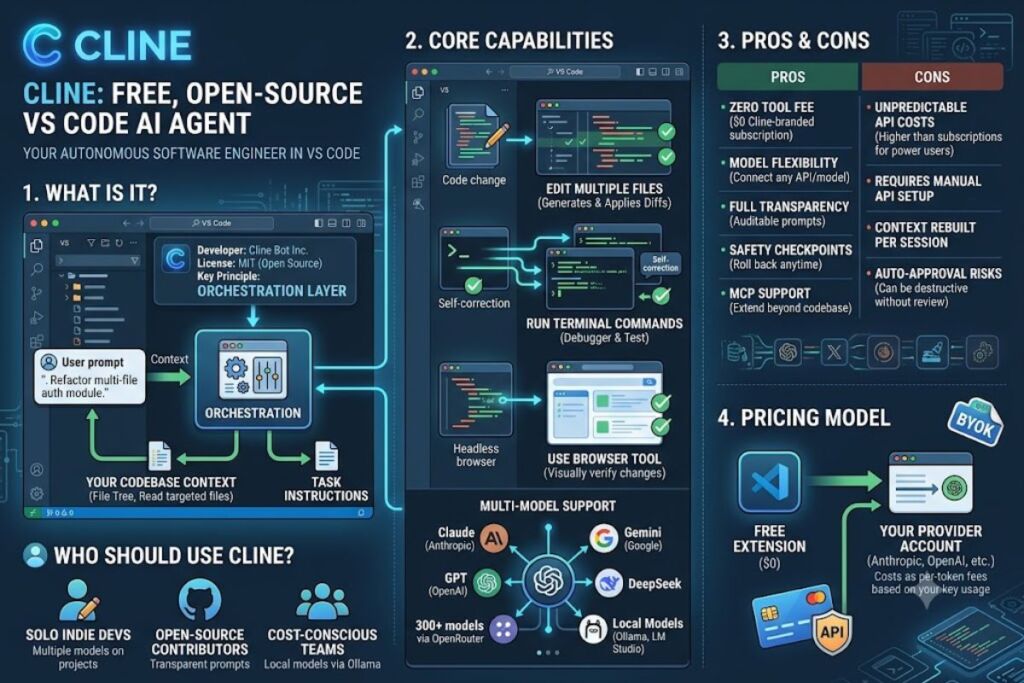
Cline is a free, open-source VS Code extension that operates as an autonomous coding agent inside the editor. It reads the codebase, edits multiple files, executes terminal commands, and uses a browser tool to test its own output, connecting to Claude, GPT, and 300+ other models through a bring-your-own-API-key setup.
What Is Cline?
Cline is an open-source, MIT-licensed VS Code extension that turns a large language model into an autonomous software engineer capable of reading a repository, editing multiple files, running terminal commands, and verifying its own changes. Developer Saoud Rizwan released the extension in 2024 under the name “Claude Dev” before renaming it Cline to reflect support for multiple model providers.
Cline does not ship its own model. It acts as an orchestration layer: the extension sends the codebase context and task instructions to a model API, then executes the returned plan step by step inside VS Code, requesting approval before file edits and terminal commands unless the user enables auto-approval.
| Attribute | Value |
|---|---|
| Developer | Cline Bot Inc. (originally Saoud Rizwan) |
| Release Year | 2024 (as “Claude Dev”), renamed Cline in 2024 |
| License | Open source, MIT |
| Pricing | Free extension; pay only for API usage (BYOK) |
| Platforms | VS Code, Cursor, VS Code-based forks (via Open VSX and VS Code Marketplace) |
| Key Feature | Plan/Act mode with autonomous multi-file editing and terminal/browser tool use |
| Model Support | Anthropic Claude, OpenAI GPT models, Google Gemini, DeepSeek, local models via Ollama and LM Studio, 300+ models via OpenRouter |
Source: Cline’s official GitHub repository and VS Code Marketplace listing.
What Are Cline’s Key Features?
Cline combines codebase awareness with tool execution rights, distinguishing it from autocomplete-only extensions.
- Index the active workspace using a file-tree analysis and targeted file reads instead of a full vector-embedding index, reducing token consumption on large repositories.
- Edit multiple files in a single task by generating diffs and applying them directly, with a visual diff view before each write.
- Execute terminal commands inside VS Code’s integrated terminal, capturing stdout and stderr to self-correct failed builds or test runs.
- Control a headless browser to launch a local dev server, click through a UI, and read console logs, closing the loop between writing code and verifying it visually.
- Switch between Plan and Act modes, separating discussion and strategy (Plan) from execution (Act) so the model doesn’t edit files during a planning conversation.
- Create automatic checkpoints after each task step, letting the user roll back the workspace to any prior state with one click.
- Connect to Model Context Protocol (MCP) servers, extending the agent with external tools such as database queries, web search, or ticketing-system access.
- Track token and dollar cost per task in real time, displaying the exact API spend before and after each request.
How Much Does Cline Cost?
Cline itself costs $0 because it is a free, open-source VS Code extension; the only recurring cost is the API usage fee charged by whichever model provider the user connects. According to Cline’s official pricing documentation, there is no Cline-branded subscription tier.
Cost varies entirely by model choice:
- Anthropic Claude Sonnet 4.6 via direct API: billed at Anthropic’s standard per-token rate through the user’s own Anthropic Console account.
- OpenRouter models: billed per-token at OpenRouter’s published rates, with a small routing markup on top of the base model price.
- Local models via Ollama or LM Studio: $0 in API fees, limited by the user’s own GPU/CPU hardware.
- Cline Accounts (optional): Cline offers an account layer that provides usage tracking and credits purchased in bulk, billed separately from any third-party API key.
There is no free token allowance bundled with the extension; every autonomous task consumes real API credits from the connected provider.
What Are the Pros and Cons of Cline?
Cline’s largest advantage is model flexibility combined with real tool execution rights, while its largest drawback is unpredictable API cost on large, multi-step tasks.
Pros:
- Connects to any model with an OpenAI-compatible or Anthropic-compatible API, avoiding vendor lock-in.
- Executes terminal commands and reads the results, enabling autonomous debugging loops that autocomplete-only tools cannot perform.
- Open-source codebase allows full inspection of every prompt sent to the model.
- Checkpoint system reverts unwanted changes without relying on Git commits.
- MCP support extends the agent beyond the codebase into external systems.
Cons:
- No bundled model means costs scale directly with task complexity; a large multi-file refactor can consume several dollars in tokens in a single session on premium models.
- Requires manual API key setup and provider account creation before first use, adding friction compared to tools with built-in subscriptions.
- Full autonomous mode (auto-approval enabled) can execute destructive terminal commands if the user does not review each step.
- Codebase context is rebuilt per session rather than maintained in a persistent vector index, which increases latency on very large monorepos.
How Does Cline Compare to Cursor?
Cline and Cursor both integrate AI agents into a code editor, but they differ in architecture: Cursor is a standalone forked editor with a built-in subscription model, while Cline is an extension installed into an existing VS Code setup with a pay-per-token model.
| Attribute | Cline | Cursor |
|---|---|---|
| Distribution | VS Code extension | Standalone editor (VS Code fork) |
| Pricing model | Free extension, pay-per-token API usage | $20/month Pro tier (per Cursor’s official pricing page) |
| Model choice | Any API-compatible model, 300+ via OpenRouter | Cursor-curated model list |
| Terminal execution | Yes, with output capture | Yes, via Cursor Agent |
| License | Open source (MIT) | Closed source |
Read the full breakdown in Cline vs Cursor: Which AI Coding Tool Wins in 2026.
Who Should Use Cline?
Cline fits developers who want full control over which model they use and are comfortable managing their own API billing. Three user profiles get the most value from Cline:
- Solo indie developers running side projects who want to test multiple models (Claude, GPT, DeepSeek) on the same codebase without switching editors.
- Open-source contributors who require full transparency into every prompt and API call the agent makes, since Cline’s source code is fully auditable.
- Cost-conscious teams running local models through Ollama who need zero-dollar inference for internal tooling and are willing to accept lower output quality than frontier hosted models.
Enterprise teams standardized on a single vendor-managed subscription, such as GitHub Copilot Business, get less benefit from Cline’s multi-provider flexibility since procurement already fixes the model choice.
What Are the Best Alternatives to Cline?
- Cursor: a standalone AI-first code editor with a built-in subscription and tighter first-party model integration. Read the full Cursor AI Review.
- GitHub Copilot: Microsoft’s subscription-based coding assistant with native GitHub and Codespaces integration. Read the full GitHub Copilot Review.
- Windsurf: an agentic IDE from Codeium with a built-in “Cascade” agent and bundled model credits. Read the full Windsurf AI Review.
Frequently Asked Questions
Does Cline require a paid subscription?
No. Cline is a free, open-source VS Code extension. Costs come only from the API provider connected to it, billed per token by that provider directly.
Can Cline run without an internet connection?
Yes, when connected to a local model server such as Ollama or LM Studio running on the same machine. Cloud-hosted models (Claude, GPT, Gemini) require an internet connection.
Is Cline safe to run in auto-approval mode?
Auto-approval lets Cline execute file edits and terminal commands without manual review. Cline’s official documentation recommends reviewing each action manually in production or shared codebases to prevent unintended destructive commands.
Which models work best with Cline?
Cline’s own benchmarking and community usage data point to Anthropic’s Claude Sonnet models as the most reliable for multi-step autonomous tasks, based on their tool-calling accuracy in agentic workflows, per Cline’s official documentation.
The Bottom Line
Cline delivers the most model-agnostic autonomous coding agent available as a VS Code extension, priced at $0 for the tool itself with cost scaling directly to whichever model API the user connects, making it the highest-value option for developers who prioritize model choice and prompt transparency over a bundled, flat-rate subscription.