
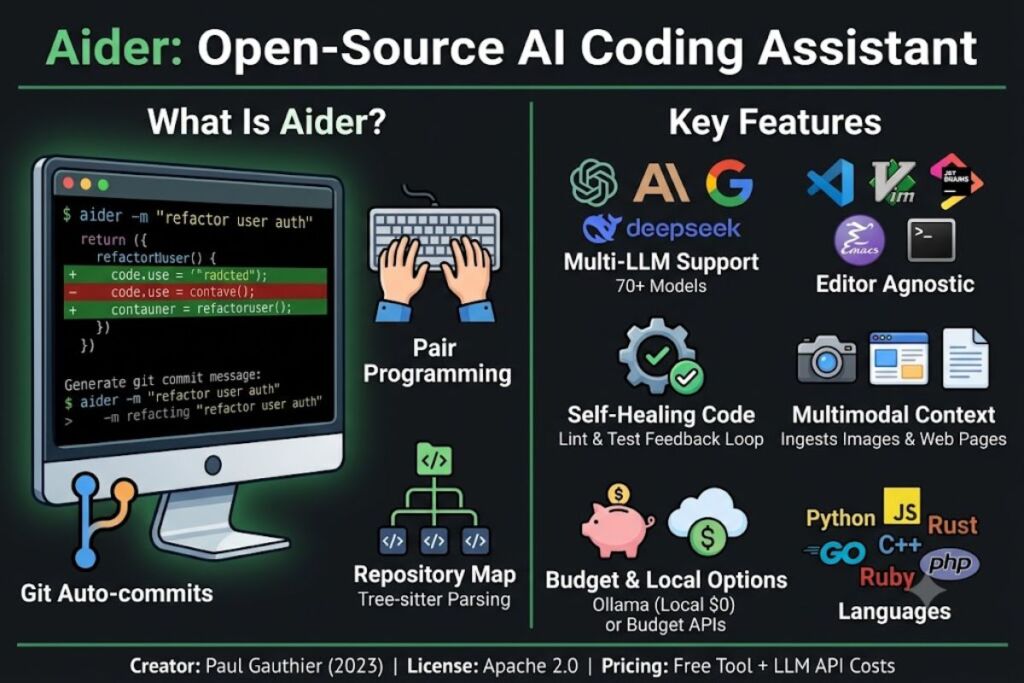
Aider is an open-source, terminal-based AI coding assistant that edits files directly in a local Git repository and auto-commits every change. Developer Paul Gauthier released it in 2023 under the Apache 2.0 license, and it now runs on 70+ LLMs from OpenAI, Anthropic, Google, and DeepSeek.
What Is Aider?
Aider is a command-line AI pair programmer that reads, edits, and writes code files in a developer’s existing Git repository, then commits each change automatically. It does not run as an IDE plugin or a hosted app. It runs as a Python process inside a terminal, working against whatever editor the developer already uses.
Aider connects to a large-language-model API, builds a map of the local repository using tree-sitter syntax parsing, and sends relevant code context to that model. The model returns edits in a structured diff format, and Aider writes those edits to disk before creating a Git commit with a generated message. This workflow lets a developer undo any AI change with a standard git revert command.
| Attribute | Value |
|---|---|
| Company/Creator | Paul Gauthier (independent open-source project) |
| Release Year | 2023 |
| License | Apache 2.0 |
| Pricing | Free (tool); pay only for LLM API tokens |
| Platforms | macOS, Linux, Windows; editor-agnostic (VS Code, JetBrains, Vim, Emacs, terminal) |
| Key Feature | Repository mapping + automatic atomic Git commits |
| GitHub Stars | 44,000+ stars Codegen |
| PyPI Installs | 6.8 million+ installs Codegen |
Aider differs from editor-native tools like Cursor and Windsurf. Cursor is a fork of Visual Studio Code, embedding AI directly into a proprietary editor shell. Aider instead attaches to any editor a developer already runs, including a bare terminal over SSH, because it operates only on the filesystem and Git — never on a proprietary editor layer.
What Are Aider’s Key Features?
Aider ships 7 core capabilities that define its position among AI coding tools:
- Index the full repository using tree-sitter parsing, generating a compact map of function signatures and class definitions without loading every file into the model’s context window.
- Commit every AI-generated change automatically to Git, attaching a descriptive commit message and creating a reviewable, revertible history.
- Pair a high-reasoning “architect” model with a cheaper “editor” model in
--architectmode — the architect plans the change, and the editor model emits the actual file diffs, reducing token cost on hard refactors. - Watch source files continuously in
--watchmode, executing changes whenever a developer writes an inlineAI?comment, with no plugin required. - Lint and test code automatically after every edit; Aider feeds test-suite or linter failures back to the model for a second correction pass.
- Ingest images, screenshots, and web pages into the chat session using the
/webcommand, giving the model visual or documentation context beyond raw source code. - Support over 100 programming languages, including Python, JavaScript, Rust, Go, C++, Ruby, and PHP, through its tree-sitter-language-pack integration.
On Aider’s own polyglot benchmark — 225 of Exercism’s hardest coding exercises across C++, Go, Java, JavaScript, Python, and Rust — GPT-5 ranks first with a score of 88.0 as of July 2026, while DeepSeek-V3.2-Exp leads open-source models with a score of 0.745. MetatextLLM Leaderboard
How Much Does Aider Cost?
Aider itself costs $0 — it is free, open-source software with no subscription tier. The only recurring expense is API usage billed directly by the LLM provider a developer connects, typically $5 to $20 per month for regular use.
Three cost paths exist, based on which model a developer configures:
- Cloud frontier models (GPT-5, Claude Opus, Gemini 2.5 Pro) bill per-token at the provider’s published API rate, with heavy daily use typically running $5 to $20 per month. Codegen
- Budget cloud models (DeepSeek V3.2, DeepSeek R1) cut that cost sharply — DeepSeek’s polyglot benchmark run costs as little as $1.30 per full 225-task suite, versus GPT-5’s substantially higher run cost.
- Local models via Ollama run entirely on a developer’s own hardware, bringing ongoing API cost to $0 and keeping all code on-device for air-gapped or compliance-sensitive environments.
Aider carries no seat licenses, no team tiers, and no enterprise SKU listed on its official documentation. That absence of a paid tier is also a limitation — see the Cons section below.
What Are the Pros and Cons of Aider?
Aider’s core advantage is vendor-agnostic flexibility with zero licensing cost; its core limitation is the absence of a visual diff-review step before changes hit disk.
Pros:
- Free to install and run, with no Aider-side markup on top of LLM API pricing.
- Switches models mid-session with a single
/modelcommand, letting a developer pair GPT-5 for planning with DeepSeek for cheap edits. - Commits every change atomically to Git, producing a reviewable audit trail that squash-merge-averse teams can inspect line by line.
- Runs identically across VS Code, JetBrains, Vim, Emacs, and plain terminals, since it never depends on a specific editor’s plugin API.
- Processes 15 billion tokens per week across its active user base as of mid-2026, evidence of sustained real-world usage at scale.
Cons:
- Lacks inline tab-completion and an editor-native diff-approval screen — Aider writes changes to disk before a developer visually approves them, unlike Cursor’s inline diff view.
- Remains in 0.x versioning as of mid-2026, with breaking changes to CLI flags and the
.aider.conf.ymlconfig format occurring across minor releases. - Carries no SOC 2 certification or audited compliance documentation, which blocks approval at organizations with formal security-review processes.
- Generates a dense Git commit history from auto-commits, which teams using squash-merge workflows must actively manage.
How Does Aider Compare to Cursor?
Aider is a free, terminal-only CLI with no editor lock-in; Cursor is a paid, VS Code-based editor with a built-in interface and a $20-per-month Pro tier. The two solve the same problem — AI-assisted code editing — through opposite architectures.
| Attribute | Aider | Cursor |
|---|---|---|
| Interface | Terminal/CLI | Standalone editor (VS Code fork) |
| Cost | Free (API tokens only) | Free tier + $20/month Pro |
| Model choice | 70+ models, swap anytime | Primarily OpenAI/Anthropic via Cursor’s backend |
| Diff review | No pre-write approval screen | Inline diff, accept/reject per change |
| Git integration | Auto-commit every change | Manual commit via standard Git panel |
| Editor lock-in | None | Requires Cursor’s editor |
A developer who wants inline diff approval and a polished GUI gains that experience from a dedicated Aider vs. Cursor comparison, which breaks down pricing tiers and benchmark differences in full.
Who Should Use Aider?
Aider fits developers who already work in the terminal, prioritize Git-based review, and want provider flexibility over a locked-in editor. Three specific profiles get the most value from it:
- Solo indie developers running side projects who want zero licensing cost and full control over which LLM handles each task.
- DevOps and backend engineers working over SSH on remote servers without a graphical environment, where GUI-based tools like Cursor cannot run.
- Teams standardizing on local models through Ollama for regulated industries — healthcare, finance, government contracting — where sending code to a third-party cloud API violates data-handling policy.
Enterprise teams that require SOC 2-audited vendors or a formal support SLA find Aider’s open-source, community-support model insufficient, since no compliance documentation exists for it as of mid-2026.
What Are the Best Alternatives to Aider?
Three tools address the same AI pair-programming need through different architectures:
- Cursor replaces the terminal workflow with a full VS Code-based editor, adding inline diff approval and a built-in chat panel for developers who prefer a GUI over a CLI.
- Cline runs as a VS Code extension rather than a standalone CLI, giving developers Aider-style multi-file autonomous editing without leaving their existing editor.
- Claude Code ships as Anthropic’s own terminal-based agentic coding tool, competing directly with Aider on the command line but tying model choice to Anthropic’s API exclusively.
Each of these tools has a dedicated review on Knowara covering pricing, benchmark scores, and setup steps in full.
Frequently Asked Questions
Is Aider completely free?
Aider the software costs $0 under its Apache 2.0 license. A developer still pays their chosen LLM provider directly for API tokens, since Aider has no proprietary backend or markup.
Does Aider send code to Aider’s servers?
No. Aider has no servers of its own — it sends code directly from a developer’s machine to whichever LLM API they configure, whether that’s OpenAI, Anthropic, or a local Ollama instance.
Which model works best with Aider?
GPT-5 leads Aider’s own polyglot leaderboard at an 88.0% score as of July 2026, with Claude Opus and DeepSeek V3.2 close behind at a fraction of the per-run cost.
Can Aider work without an internet connection?
Yes, when configured with a local model through Ollama. All processing then runs on-device, and no code leaves the machine.
Aider delivers zero licensing cost and full model choice in exchange for skipping a visual diff-approval step — the trade-off that defines every terminal-first AI coding tool against its GUI-based competitors in 2026.