
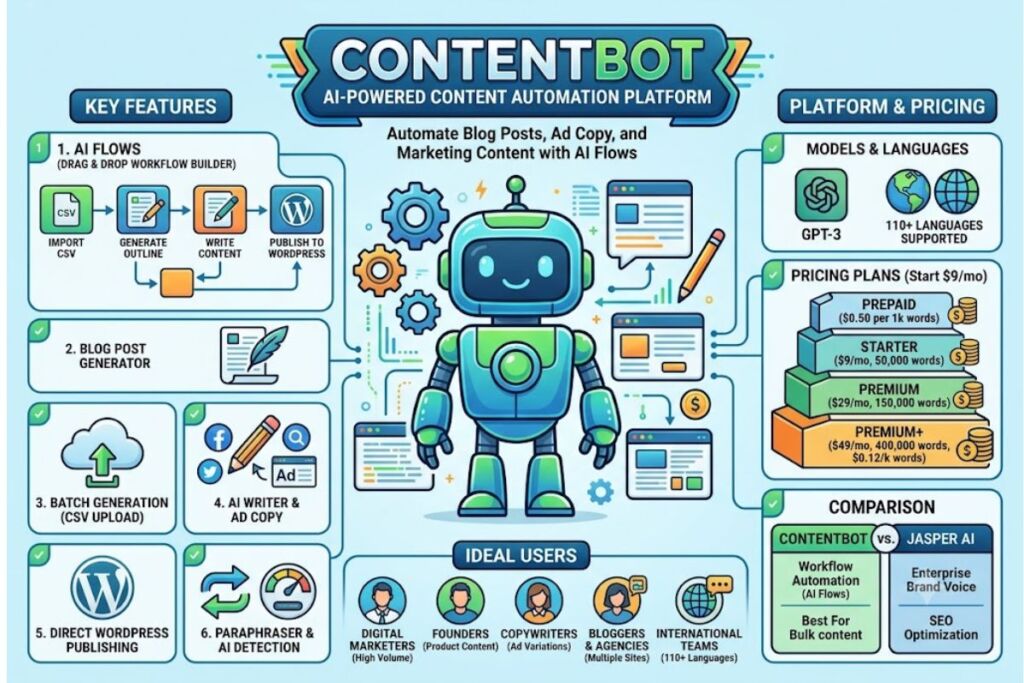
ContentBot is an AI-powered content automation platform that generates blog posts, ad copy, and marketing content through a drag-and-drop workflow builder called AI Flows. ContentBot combines an AI Writer, a Blog Post Generator, and an automation engine to produce content in 110+ languages, starting at $9/month for 50,000 words.
What Is ContentBot?
ContentBot is a cloud-based AI writing and content-automation platform built by Code Cabin, Inc., founded by Nick Duncan in 2021, that runs on OpenAI’s GPT-3 language model to generate blog posts, ad copy, and marketing content through customizable workflows called AI Flows. The platform launched in January 2021 as an AI content plugin for WordPress before expanding into a full web application with a Chrome extension and API access.
ContentBot operates from Miami, Florida, and Boksburg, South Africa, and reports more than 77,000 registered user accounts as of its most recent milestone announcement. The company took on outside capital when cross-border payments provider LianLian Global acquired a minority stake in ContentBot.ai on October 19, 2022, according to Tracxn’s funding records.
| Attribute | Value |
|---|---|
| Company | Code Cabin, Inc. (ContentBot.ai) |
| Founder | Nick Duncan |
| Release Year | 2021 |
| Headquarters | Miami, Florida, US |
| Underlying AI Model | GPT-3 (OpenAI) |
| Starting Price | $9/month (Starter, 50,000 words) |
| Platforms | Web app, WordPress plugin, Chrome extension, API |
| Languages Supported | 110+ |
| Key Feature | AI Flows (drag-and-drop content workflow builder) |
| Free Trial | Not offered on the public pricing page |
What Are ContentBot’s Key Features?
ContentBot bundles four core tools into a single dashboard, each targeting a different stage of the content-production pipeline.
- Build custom AI Flows using a drag-and-drop workflow editor that chains prompts, imports, and output steps into a repeatable automation sequence.
- Generate full-length blog posts through the Blog Writer, which accepts a main topic, breaks it into subheadings, and produces multiple content variations per section.
- Import existing topic lists or CSV files to batch-generate content at scale instead of prompting one piece at a time.
- Publish finished drafts directly to WordPress through the native integration, removing the manual copy-paste step.
- Paraphrase existing text with the built-in rewriting tool to reduce duplicate-content risk across large content batches.
- Detect AI-generated text with the platform’s AI Detection feature, which flags content likely to be machine-written before publication.
- Score drafts for readability and uniqueness using the built-in readability index and plagiarism checker inside the AI Writer interface.
- Translate content into more than 110 languages, including Spanish, German, French, Chinese, Russian, and Swahili, without a separate translation tool.
- Manage teams through role-based access control, user permission settings, and activity tracking on higher-tier plans.
- Integrate with Zapier to connect ContentBot’s output to external apps such as CMS platforms and social schedulers.
How Much Does ContentBot Cost?
ContentBot runs on a word-metered subscription model with four pricing options, starting at $0.50 per 1,000 words on the pay-as-you-go plan and $9/month for the entry-level subscription.
| Plan | Price | Word Allowance | Cost per 1,000 Words |
|---|---|---|---|
| Prepaid (Pay-as-you-go) | $0.50 per 1,000 words | No monthly cap | $0.50 |
| Starter | $9/month | 50,000 words | $0.18 |
| Premium | $29/month | 150,000 words | $0.19 |
| Premium+ | $49/month | 400,000 words | $0.12 |
These figures come from ContentBot’s public pricing page as compiled by Techjockey, ColdIQ, and DigitalProductsDP in their 2026 pricing summaries. ContentBot does not list a permanent free tier, and the platform requires either a prepaid balance or an active subscription to generate content. Third-party pricing trackers such as xpay.sh confirm the entry-level Standard plan starts at $29/month for full business feature access, a figure that reflects a bundled tier above the $9 Starter plan rather than a conflicting price point.
What Are the Pros and Cons of ContentBot?
ContentBot’s biggest strength is workflow automation at scale; its biggest weakness is output quality that still requires manual editing before publication.
Pros:
- Automates repetitive content tasks through AI Flows, cutting manual drafting time for teams publishing on a recurring schedule.
- Publishes directly to WordPress without exporting or reformatting content first.
- Supports 110+ languages in a single platform, removing the need for a separate translation tool.
- Prices the Premium+ tier at $0.12 per 1,000 words, undercutting many word-count-based competitors at high volume.
- Includes a pay-as-you-go option at $0.50 per 1,000 words for one-off projects that don’t justify a subscription.
Cons:
- Omits a free trial, unlike most direct competitors such as Jasper AI and Writesonic, which offer trial credits before purchase.
- Requires manual editing on long-form output, according to Originality.AI’s hands-on testing, which found the drag-and-drop interface takes time to learn despite giving more structural control.
- Lacks a mobile app; ContentBot runs as a web-based platform only, with no native Android or iOS client.
- Trails newer AI writers on raw output polish, since ContentBot still runs on GPT-3 rather than a newer-generation model, based on the platform’s own company profile data.
How Does ContentBot Compare to Jasper AI?
ContentBot competes with Jasper AI, an AI writing platform built for enterprise marketing teams that combines brand-voice controls with SEO-focused content generation.
| Factor | ContentBot | Jasper AI |
|---|---|---|
| Starting Price | $9/month | Higher entry tier, billed per seat |
| Free Trial | No | Yes |
| Core Strength | Workflow automation (AI Flows) | Brand-voice consistency and SEO optimization |
| Language Support | 110+ | Multiple, fewer than ContentBot |
| Best For | Bulk automated content pipelines | Enterprise marketing teams needing brand control |
ContentBot leans toward flexibility and task automation, while Jasper AI and Writesonic focus more heavily on ranking-oriented content generation, according to AitroTools’ 2026 platform comparison. Teams choosing between the two should weigh automation depth against SEO-specific tooling. For a full feature-by-feature breakdown, see our dedicated Jasper AI vs ContentBot comparison.
Who Should Use ContentBot?
ContentBot fits teams that need to automate recurring content production rather than polish a single flagship piece of writing.
- Digital marketers producing high-volume copy on a recurring schedule who need a workflow, not a single-document editor.
- Founders managing content creation alongside product and operations work, using AI Flows to generate product descriptions and website copy without a dedicated writer.
- Copywriters who need faster first-draft generation for ad variations before manual refinement.
- Bloggers and agencies running multiple WordPress sites that benefit from direct publishing integration.
- International content teams that need output in more than one of the platform’s 110+ supported languages without a separate translation subscription.
ContentBot suits teams less well when the priority is a single, highly polished piece of long-form writing with minimal editing, since Originality.AI’s testing found that output still requires manual refinement before publication.
What Are the Best Alternatives to ContentBot?
Three platforms compete directly with ContentBot on price, automation depth, or output quality.
- Jasper AI targets enterprise marketing teams with stronger brand-voice controls and a free trial that ContentBot does not offer. Read our full Jasper AI Review.
- Writesonic focuses on SEO-optimized long-form content generation with tighter search-ranking features than ContentBot’s automation-first design.
- Word AI specializes in paraphrasing and content spinning rather than full workflow automation, making it a narrower but cheaper option for rewriting tasks.
Frequently Asked Questions
Does ContentBot offer a free trial?
ContentBot does not offer a permanent free trial on its public pricing page, according to Originality.AI and DigitalProductsDP reviews. The platform requires a prepaid balance or an active subscription starting at $9/month.
What AI model powers ContentBot?
ContentBot runs on GPT-3, developed by OpenAI, according to PitchBook’s company profile of ContentBot.ai.
Can ContentBot publish directly to WordPress?
Yes. ContentBot includes a native WordPress integration that publishes generated content directly to a connected site without manual export.
How many languages does ContentBot support?
ContentBot generates and paraphrases content in more than 110 languages, including Spanish, German, French, Chinese, and Swahili.
Final Verdict
ContentBot’s Premium+ plan delivers content at $0.12 per 1,000 words, the lowest per-word cost among its four pricing tiers, making it a workflow-automation tool built for volume rather than a single-document polish tool — teams that batch-produce content on a recurring schedule get more value from ContentBot than teams writing one flagship article at a time.