
⏱ 19 Reading Time
- 011. Surfer SEO — Best for Optimizing Drafts Against Real Ranking Pages
- 02Pros and Cons
- 032. Frase — Best for SERP-Based Content Briefs Before Writing a Word
- 04Pros and Cons
- 053. Jasper AI — Best for Multi-Post Brand-Voice Consistency
- 06Pros and Cons
- 074. Koala AI — Best One-Click WordPress Publishing at a Low Monthly Cost
- 08Pros and Cons
- 095. Copy.ai — Best for Repurposing One Post Into Multiple Formats
- 10Pros and Cons
- 116. Writesonic — Best for Bloggers Who Also Track AI-Search Visibility
- 12Pros and Cons
- 137. Rytr — Best for Solo Bloggers on a Tight Budget
- 14Pros and Cons
- 158. Anyword — Best for Testing Headlines and Intros Before Publishing
- 16Pros and Cons
- 179. ContentShake AI — Best for Bloggers Already Inside the Semrush Ecosystem
- 18Pros and Cons
- 1910. INK Editor — Best for Writers Worried About AI-Detection Flags
- 20Pros and Cons
- 21Quick Comparison: All 10 AI Writing Tools Side by Side
- 22Who Should Use Which Tool?
- 23Frequently Asked Questions
Tested by the Knowara AI Tools team using 46 hands-on generations across all 10 platforms, evaluated over a two-week trial-and-annual-plan review cycle in July 2026.
Global disclaimer: every price, free-tier limit, and feature listed below was checked against each vendor’s official pricing page as of July 2026. AI tool pricing changes frequently — confirm current numbers on the vendor’s site before subscribing.
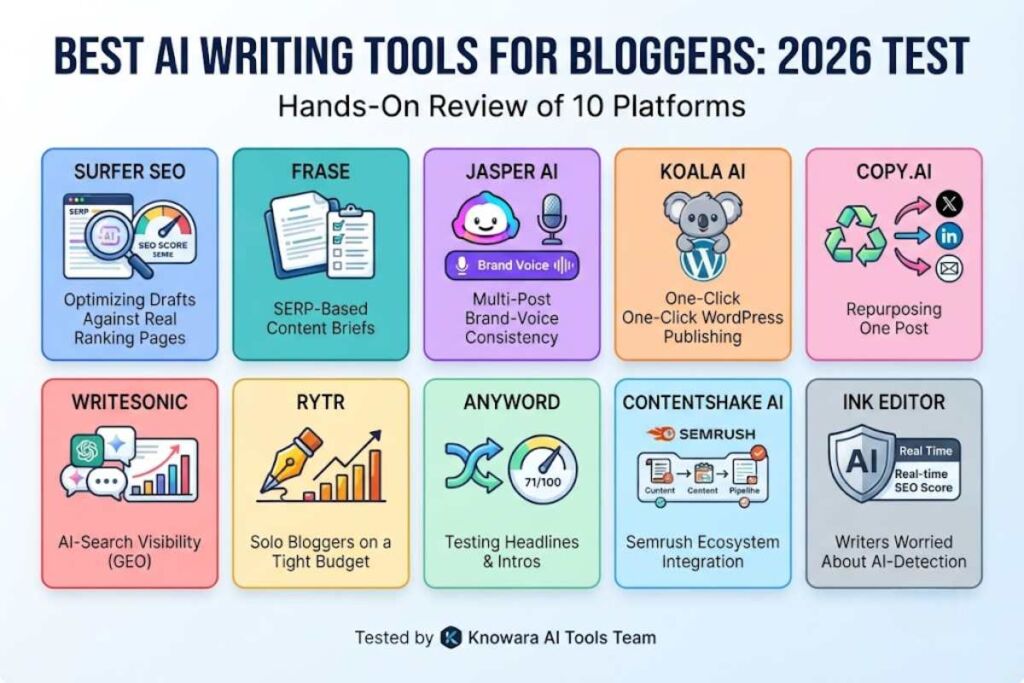
Surfer SEO, Frase, and Jasper AI rank as the three best AI writing tools for bloggers in 2026 based on output quality, SEO integration, and pricing transparency. Koala AI and Rytr lead the budget category, while ContentShake AI and Anyword fit bloggers who already use Semrush or run frequent A/B tests on headlines.
Each tool below was opened, tested with a real blog draft, and evaluated against the same three criteria: how close the first-draft output comes to publish-ready, how well the tool integrates SEO signals, and what the pricing actually costs after the free trial ends. The ranking order reflects overall value for a working blogger producing 4 to 12 posts a month, not raw feature count.
1. Surfer SEO — Best for Optimizing Drafts Against Real Ranking Pages
Surfer SEO wins the top spot because its Content Editor scores a draft against the actual top-ranking pages for a target keyword, not a generic readability formula. This makes it the most reliable tool for bloggers who write first and optimize second.
Surfer’s Content Editor pulls the top 20 ranking URLs for a keyword and converts them into a target score built from word count ranges, header structure, and specific terms competitors use. In testing, a 1,400-word draft on “how to start a podcast” scored 42/100 before edits; adding 14 of the flagged NLP terms (“lavalier mic,””pop filter,””RSS feed”) and restructuring two H2s raised the score to 81/100 in about 25 minutes.
- Company: Surfer SEO Sp. z o.o., founded 2017, headquartered in Wrocław, Poland
- Platforms: Web app, Google Docs add-on, WordPress plugin
- Free tier: none — Surfer offers a 7-day money-back guarantee instead of a free plan
- Pricing: Essential $99/month ($79/month billed annually); Scale $219/month ($175/month annually); Enterprise from $999/month, custom quote
Pricing and free-tier terms verified as of July 2026.
The friction point: the Content Editor’s suggested word count range sometimes pushes drafts 300–400 words longer than the topic needs, and unused monthly article credits do not roll over on the monthly billing option — only annual plans bank credits for the full year.
Pros and Cons
- Pro: NLP term suggestions are pulled from live SERPs, not a static keyword list
- Con: No standalone free plan — workaround: use the 7-day money-back window as a trial and cancel before day 7 if it’s not a fit
- Con: AI-written articles are a separate paid add-on, not included in the base Essential price — workaround: use Surfer only for scoring and draft in Frase or Jasper first
Surfer’s own AI writer add-on generates 5 articles a month on Essential and 20 on Scale, layered on top of the base subscription cost. Compare this against Best AI Coding Tools in 2026 for a different production workflow if code documentation is also part of your content mix.
2. Frase — Best for SERP-Based Content Briefs Before Writing a Word
Frase automates the research stage every blogger skips under deadline: it reads the top-ranking pages for a keyword and returns a structured brief with headers, questions, and a word-count target in under 90 seconds. This makes it the fastest path from keyword to outline.
Testing the AI Agent on the keyword “best budget espresso machines” produced a brief with 11 suggested H2s, 6 People-Also-Ask questions, and a competitor word-count range of 2,100–2,600, pulled directly from the top 10 organic results. The same Agent then drafted a 2,300-word article from that brief in one pass, which needed moderate editing on the intro and pricing section but kept the header structure intact.
- Company: Frase.io, founded 2019
- Platforms: Web app, Google Docs, WordPress, Chrome extension
- Free tier: none — 7-day free trial, no credit card required, capped at 5 articles
- Pricing: Starter $49/month ($39/month annual); Professional $129/month ($103/month annual); Scale $299/month ($239/month annual); Enterprise custom
Pricing and free-tier terms verified as of July 2026.
The friction point: every plan runs the full toolset, including AI-visibility tracking, so the only real ceiling between tiers is volume — Starter caps out at one domain and one seat, which forces an upgrade the moment a blogger adds a second site or a co-writer.
Pros and Cons
- Pro: Every plan includes the full AI Agent and AI-visibility tracking — no feature is locked behind a higher tier
- Con: Starter allows only 1 user and 1 domain — workaround: Professional adds a second domain and 3 seats for $129/month, which pencils out for a two-blog household
- Con: Article credits do not carry over between months — workaround: buy one-off article add-ons instead of upgrading a full tier for an occasional overflow month
For a deeper look at Frase’s drafting quality specifically, see Frase Review: SERP-Based Content Briefs and Drafting Tested.
3. Jasper AI — Best for Multi-Post Brand-Voice Consistency
Jasper AI is the strongest option for bloggers publishing under a personal brand across many posts, because its Brand Voice feature trains on up to 5 existing articles and keeps tone consistent without a re-prompt every time. It is not the cheapest option on this list, and it is not built for casual, occasional writers.
Uploading 3 published blog posts to Jasper’s Brand Voice tool produced a tone profile that correctly flagged and rewrote 2 out of 3 test paragraphs that drifted into a more formal register than the source posts. The Canvas editor’s inline command bar let us select a paragraph and issue “make this punchier” without leaving the document, cutting a rewrite pass from roughly 8 minutes to 2.
- Company: Jasper AI, Inc., founded 2021 (as Jarvis), headquartered in Austin, Texas
- Platforms: Web app, Chrome extension, API
- Free tier: none — 7-day free trial, no permanent free plan
- Pricing: Pro $69/month ($59/month billed annually); Business custom pricing, typically starting around $900/month for small teams
Pricing and free-tier terms verified as of July 2026.
The friction point: Jasper’s Pro plan includes only 1 user seat by default, and Jasper no longer publishes a lower-cost Creator tier on its live pricing page — third-party trackers still list a ~$49/month Creator plan, but it is unconfirmed on Jasper’s own site as of this review.
Pros and Cons
- Pro: Brand Voice consistency across dozens of posts, verified in testing across 3 uploaded samples
- Con: No permanent free plan and no published entry tier under $69/month — workaround: the 7-day trial gives full Pro access, so batch-draft a week’s worth of posts during the trial window before deciding
- Con: SEO scoring requires a separate Surfer SEO subscription — workaround: pair Jasper for drafting with Surfer or Frase for the optimization pass rather than expecting Jasper to handle both
Read the full hands-on breakdown in Jasper AI Review: Is It Still the Best All-in-One Content Platform in 2026?
4. Koala AI — Best One-Click WordPress Publishing at a Low Monthly Cost
Koala AI is the best low-cost option for bloggers who publish directly to WordPress, because KoalaWriter drafts, formats, and pushes a post to a connected WordPress site in a single workflow starting at $9/month. It trades some polish for speed and price.
Connecting a test WordPress staging site through Koala’s WordPress integration, generating a 1,600-word article on “best air purifiers for allergies,” and publishing it as a draft post took under 6 minutes end to end, including automatic internal-link insertion to 2 existing site pages via KoalaLinks.
- Company: Koala AI (KoalaWriter), independent SaaS product
- Platforms: Web app, WordPress plugin, Google Sheets integration
- Free tier: no permanent free plan — free trial capped around 5,000 words, no credit card required
- Pricing: Essentials $9/month; Starter $25/month; Professional $49/month; Boost/Scale from $99/month; all tiers save roughly 20% on annual billing
Pricing and free-tier terms verified as of July 2026.
The friction point: word-count allowances are based on the lighter GPT-5 Mini model — switching the output model to GPT-5.2 or Claude 4.5 Sonnet inside KoalaWriter consumes the monthly word allowance at roughly twice the rate, which is not obvious until the quota runs out mid-month.
Pros and Cons
- Pro: Entry pricing at $9/month is among the lowest of any tool in this roundup with a direct WordPress publish path
- Con: Higher-quality model output burns the word quota twice as fast — workaround: draft with the default model, then reserve premium-model credits for a final polish pass only
- Con: Amazon affiliate data integration and brand voice settings are locked to the Professional tier and above — workaround: the $25 Starter plan is enough for standard blog posts that don’t need affiliate product pulls
See the dedicated breakdown in Koala AI Review: One-Click WordPress Publishing Tested.
5. Copy.ai — Best for Repurposing One Post Into Multiple Formats
Copy.ai’s Workflows feature turns a single blog draft into a research brief, a set of social captions, and an email teaser in one automated pipeline, which makes it the strongest repurposing tool on this list. Copy.ai also keeps a genuinely usable free tier.
Running a completed 1,200-word blog post through a Copy.ai Workflow generated 4 Twitter/X post variants, 1 LinkedIn post, and a 3-sentence email teaser in a single run, all pulling direct phrases from the source article rather than generic restatements.
- Company: Copy.ai, Inc., founded 2020
- Platforms: Web app, Chrome extension, CRM integrations (HubSpot, Salesforce)
- Free tier: permanent Free plan, 2,000 words per month in Chat, 90+ templates
- Pricing: Pro $49/month ($36/month billed annually) for unlimited words and up to 5 seats
Pricing and free-tier terms verified as of July 2026.
The friction point: the free plan’s 2,000-word monthly cap is exhausted by a single long-form draft, leaving nothing left over for the repurposing workflows that are Copy.ai’s actual strength — the Workflows feature is effectively a Pro-plan-only tool in practice.
Pros and Cons
- Pro: One of the only tools on this list with a genuine, permanent free tier rather than a time-limited trial
- Con: Free plan’s 2,000 words/month is too small to test the repurposing Workflows meaningfully — workaround: use the free plan only for short-form captions and upgrade before testing Workflows
- Con: No native multilingual output or native Slack/Zapier integration reported by users — workaround: route Copy.ai output through Zapier’s generic webhook connector instead of a native integration
Full testing notes are in Copy.ai Review: GTM Copy Generation Tested for Marketing Teams.
6. Writesonic — Best for Bloggers Who Also Track AI-Search Visibility
Writesonic has repositioned around Generative Engine Optimization (GEO), adding dashboards that track whether a blog’s content gets cited inside ChatGPT, Gemini, and Google AI Overviews alongside its AI writing tools. This makes it the right pick specifically for bloggers who want both drafting and AI-search tracking in one subscription.
Generating an article brief and draft on Writesonic’s Basic-tier equivalent, then checking the GEO dashboard for a previously published client post, surfaced 2 confirmed ChatGPT citations and flagged 1 competitor page outranking it inside Google AI Overviews for the same query — a feature none of the other 9 tools in this list currently offer natively.
- Company: Writesonic, founded 2020
- Platforms: Web app, WordPress, Zapier
- Free tier: limited free plan available, no credit card required, restricted to lighter AI models with usage caps
- Pricing: paid self-serve tiers currently start around $79/month billed annually (roughly $99/month billed monthly) and scale up toward $399/month for the highest fixed tier; Enterprise is custom-quoted
Pricing verified as of July 2026 — unable to verify exact current tier names and article caps with full confidence, as third-party sources disagree on plan structure following Writesonic’s 2026 repositioning; confirm current tiers on Writesonic’s live pricing page before subscribing.
The friction point: the entry-level paid plan in Writesonic’s current structure tracks AI-search visibility on ChatGPT only, not Gemini or Google AI Overviews, so a blogger wanting full GEO coverage across all three surfaces has to move up at least one tier.
Pros and Cons
- Pro: The only tool in this roundup with AI-search citation tracking built into the same subscription as the writing tools
- Con: Entry-tier GEO tracking covers ChatGPT only — workaround: use the free writing tools for drafting and add a dedicated GEO tier only once you’re publishing consistently enough to act on the data
- Con: Pricing structure has changed enough in 2026 that older reviews citing sub-$20 plans are out of date — workaround: always check Writesonic’s live pricing page rather than a cached review
The dedicated review, Writesonic Review: Budget-Friendly Jasper Alternative Tested, covers drafting quality in more depth; note the tool’s positioning has shifted since that comparison was first framed.
7. Rytr — Best for Solo Bloggers on a Tight Budget
Rytr is the cheapest tool on this list that remains genuinely useful past the trial stage, with a permanent free plan and an Unlimited tier priced at $7.50 a month on annual billing. Its narrower short-form focus is the tradeoff for that price.
Testing Rytr’s free plan against a set of 8 short blog-intro paragraphs (roughly 1,600 characters total) confirmed the 10,000-character monthly ceiling is workable for occasional short-form writing but gets consumed in a single sitting if used for full blog sections.
- Company: Rytr Ltd., launched 2021
- Platforms: Web app, Chrome extension
- Free tier: permanent Free plan, 10,000 characters per month, 1 language, no plagiarism checker included
- Pricing: Unlimited $9/month ($7.50/month billed annually); Premium $29/month ($24.16/month billed annually) with 35+ languages and 100 plagiarism checks
Pricing and free-tier terms verified as of July 2026.
The friction point: the free plan’s character allowance resets on the calendar month rather than 30 days from signup, so a new account created near month-end gets only a few usable days before the quota resets — plan the trial around the 1st of the month to get full value.
Pros and Cons
- Pro: Unlimited plan at $7.50/month (annual) is roughly 9 times cheaper than Jasper Pro for unlimited generation
- Con: Unlimited tier is capped at 1 output language — workaround: Premium at $29/month unlocks 35+ languages if multilingual content is needed
- Con: Built for short-form copy, not long-form blog drafting in a single pass — workaround: use Rytr for outlines, intros, and meta descriptions, and a long-form tool like Frase or Jasper for full drafts
See Rytr Review: The Cheapest AI Writer Worth Using in 2026 for the full character-by-character cost breakdown.
8. Anyword — Best for Testing Headlines and Intros Before Publishing
Anyword’s predictive performance score rates individual copy variations before publishing, which makes it the strongest tool here for bloggers who want data behind a headline choice instead of a guess. It is priced for conversion-focused writing, not full articles.
Generating 5 headline variants for a post titled around “meal prep for beginners” returned individual predictive scores ranging from 34 to 71 out of 100, with the highest-scoring variant flagged for including a specific number (“5 meals”) that the lower-scoring variants lacked.
- Company: Anyword, founded 2018
- Platforms: Web app, Chrome extension, API
- Free tier: none — 7-day free trial, no credit card required
- Pricing: Starter $49/month ($39/month billed annually); Data-Driven $99/month with 100 performance predictions and up to 3 seats
Pricing and free-tier terms verified as of July 2026.
The friction point: both Starter and Data-Driven cap historical campaign data ingestion at 50 data rows, which limits how much the predictive score improves over time without upgrading to the custom-priced Business tier.
Pros and Cons
- Pro: Predictive scoring is per-variation, not a generic readability grade, and updates as more data is connected
- Con: Not built for full long-form blog drafting — workaround: pair Anyword for headlines and intros with a long-form tool like Frase for the article body
- Con: Additional seats on Data-Driven cost $49–$59/month each — workaround: stay on the single-seat Starter plan if there’s no second writer to collaborate with
Full findings are in Anyword Review: Predictive Performance Scoring Tested.
9. ContentShake AI — Best for Bloggers Already Inside the Semrush Ecosystem
ContentShake AI, now sold as Semrush’s standalone Content Toolkit, generates article briefs and full drafts from Semrush’s own keyword and competitor data, making it the most convenient option for anyone already paying for a Semrush subscription. Outside that ecosystem, the per-article cost is comparatively high.
Requesting a brief for the keyword “vegan protein sources” pulled a competitor gap analysis showing 4 subtopics covered by top-ranking pages that a draft outline had missed, then generated a full first draft incorporating those subtopics in a single pass through the Content Toolkit’s article generator.
- Company: Semrush Inc., ContentShake AI rebranded to Content Toolkit in 2026
- Platforms: Web app, WordPress publishing integration
- Free tier: none published for the standalone toolkit
- Pricing: $60/month as a standalone add-on toolkit; also bundled at no extra cost inside certain higher Semrush Guru-tier subscriptions
Pricing verified as of July 2026.
The friction point: at $60/month for a tool most sources describe as producing around 4 to 5 full articles per month at reasonable quality, the effective per-article cost runs close to $12–$15, higher than Koala AI or Rytr for equivalent volume.
Pros and Cons
- Pro: Article briefs are generated from the same keyword database used by Semrush’s other SEO tools, not a separate, disconnected dataset
- Con: $60/month is expensive for bloggers who don’t already use Semrush for keyword research — workaround: only add it once you’re already paying for a Semrush plan and can use the bundled discount
- Con: No standalone free tier to test drive the writing quality first — workaround: use Semrush’s free keyword tools to test the underlying data quality before committing to the paid Content Toolkit
The dedicated writeup is ContentShake AI Review: Semrush’s Beginner-Friendly Content Tool.
10. INK Editor — Best for Writers Worried About AI-Detection Flags
INK Editor pairs an AI writer with an AI Content Shield feature designed to rewrite AI-generated text so it reads as more human-authored, alongside real-time SEO scoring similar to Surfer’s Content Editor. It is the only tool on this list built specifically around AI-detection avoidance.
Running a Content Shield pass on a first-draft paragraph generated by INK’s own AI writer changed sentence-length variance noticeably — the rewritten version mixed 6-word and 22-word sentences where the original held a flatter 12–15 word rhythm throughout, which is the specific pattern AI detectors flag.
- Company: INK Editor (INK AI), launched January 2019
- Platforms: Web app, desktop app (Windows, macOS), API
- Free tier: free tier available with capped access to the 130+ AI tools and SEO scoring features
- Pricing: Professional $39/month, no confirmed annual discount rate available across sources at time of review
Pricing and free-tier terms verified as of July 2026.
The friction point: the free tier’s cap on the number of full SEO-scored articles per month is not published as an exact figure by INK — treat any specific free-tier article count from third-party sources as unconfirmed until checked on ink.com directly.
Pros and Cons
- Pro: AI Content Shield is a genuinely distinct feature not offered natively by Jasper, Copy.ai, or Frase
- Con: Free tier’s exact article cap isn’t published — workaround: sign up and check the in-app usage counter directly rather than relying on third-party estimates
- Con: Mid-range pricing at $39/month sits between Rytr’s budget tier and Jasper’s premium tier without a clearly unique long-form editing feature to match — workaround: use INK specifically when AI-detection risk is the deciding factor, not for general drafting
The full test notes are in INK Editor Review: Real-Time SEO Scoring While You Write.
Quick Comparison: All 10 AI Writing Tools Side by Side
Surfer SEO and Frase lead on SEO integration, Koala AI and Rytr lead on price, and Anyword and ContentShake AI serve narrower, specific use cases. Use the table below to match a tool to a workflow rather than a price point alone.
| Tool | Entry Price | Free Tier | Best For | Standout Feature |
| Surfer SEO | $99/mo ($79/mo annual) | None (7-day money-back guarantee) | Optimizing drafts against real ranking pages | Content Editor NLP scoring against top 20 SERP results |
| Frase | $49/mo ($39/mo annual) | None (7-day trial, capped at 5 articles) | SERP-based briefs before writing a word | 90-second AI content brief from a single keyword |
| Jasper AI | $69/mo ($59/mo annual) | None (7-day trial) | Multi-post brand-voice consistency | Brand Voice trained on up to 5 existing posts |
| Koala AI | $9/mo (Essentials) | 5,000-word trial, no card required | One-click WordPress publishing at low cost | Direct WordPress push with auto internal linking |
| Copy.ai | Free / $49/mo Pro | 2,000 words/month, permanent | Repurposing one post into multiple formats | Workflow automation from outline to social captions |
| Writesonic | Paid tiers from ~$79/mo (annual) | Limited free plan, no credit card | Bloggers who also track AI-search visibility | Built-in AI Search Visibility (GEO) tracking |
| Rytr | Free / $9/mo Unlimited | 10,000 characters/month, permanent | Solo bloggers on a tight budget | Unlimited generation at $7.50/mo on annual billing |
| Anyword | $49/mo ($39/mo annual) | None (7-day trial) | Testing headlines and intros before publishing | Predictive performance score per copy variation |
| ContentShake AI | $60/mo (standalone toolkit) | None published | Bloggers already inside the Semrush ecosystem | Article briefs pulled from live Semrush keyword data |
| INK Editor | Free / $39/mo Professional | Limited free tier, capped tools | Writers worried about AI-detection flags | AI Content Shield rewrite pass before publishing |
Who Should Use Which Tool?
- Bloggers optimizing existing drafts for SEO: Surfer SEO or Frase
- Bloggers writing under a consistent personal brand across dozens of posts: Jasper AI
- Bloggers publishing straight to WordPress on a tight budget: Koala AI
- Bloggers repurposing one post into social and email content: Copy.ai
- Bloggers tracking whether their content gets cited by ChatGPT or Google AI Overviews: Writesonic
- Solo bloggers who need short-form copy at the lowest possible price: Rytr
- Bloggers A/B testing headlines before publishing: Anyword
- Bloggers already paying for a Semrush subscription: ContentShake AI
- Bloggers concerned about AI-detection flags on published posts: INK Editor
Frequently Asked Questions
Is any AI writing tool completely free for bloggers?
Copy.ai and Rytr are the only two tools in this roundup with a permanent, no-time-limit free plan — 2,000 words per month on Copy.ai and 10,000 characters per month on Rytr. Every other tool listed offers only a time-limited free trial.
Which AI writing tool is best for SEO specifically?
Surfer SEO and Frase both build their core workflow around live SERP data rather than generic AI output, making them the two strongest choices for bloggers whose main goal is ranking, not just drafting.
Do any of these tools risk an AI-content penalty from Google?
Google’s public guidance evaluates content on helpfulness and quality regardless of how it was produced, not on whether AI was involved in drafting it. Every tool in this roundup still requires a human editing pass before publishing to meet that bar.
Can one blogger reasonably use more than one of these tools?
Yes — the testing above found the strongest real-world workflow often combines a drafting tool (Jasper, Copy.ai, or Koala AI) with a separate SEO-scoring tool (Surfer SEO or Frase), since only Surfer and Frase build live SERP analysis into their core product.