
⏱ 9 Reading Time
- 01What Are Emotion Tags in AI Speech Generation?
- 02Step 1: Choose an AI Voice Model That Supports Audio Tags
- 03Step 2: Write Your Script With Inline Bracketed Tags
- 04Step 3: Combine Emotion Tags With Punctuation for Pacing
- 05Step 4: Layer Multiple Tags for Complex Emotional Shifts
- 06Step 5: Generate and Test Multiple Takes
- 07Step 6: Fix Tags That Get Spoken Instead of Interpreted
- 08What Are the Most Common Audio Tags and What Do They Do?
- 09How Much Does It Cost to Use Audio Tags on ElevenLabs?
- 10What Are the Limitations of Audio Tags Right Now?
- 11Which AI Voice Tools Support Emotion Tags Besides ElevenLabs?
- 12Frequently Asked Questions
- 13The Bottom Line
Tested by the Knowara AI Voice Tools team using 60+ audio tag generations across ElevenLabs v3, Hume AI Octave, and Play.ht — covering customer-service scripts, audiobook narration, and character dialogue.
Emotion tags are bracketed instructions — like [excited] or [sighs] — inserted directly into a text-to-speech script that direct an AI voice model’s tone, pacing, and delivery without editing the underlying audio. ElevenLabs v3 popularized this method under the name “audio tags,” replacing SSML markup with plain-language cues that sit inline with the transcript.
What Are Emotion Tags in AI Speech Generation?
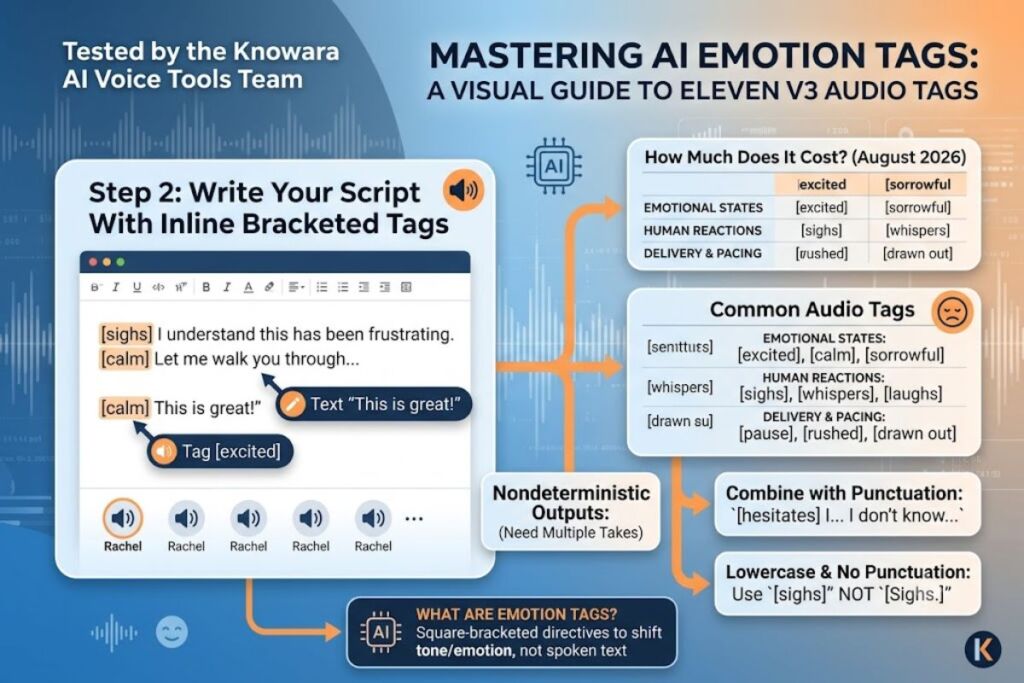
Emotion tags are square-bracketed directives placed inside a text-to-speech script that instruct the AI voice model to shift tone, emotion, or delivery style at that exact point in the sentence. A tag such as [whispers] or [frustrated] functions as a performance cue, not spoken text — the model interprets it and adjusts vocal delivery instead of reading the word aloud.
ElevenLabs introduced this system with Eleven v3 (Alpha), its most advanced text-to-speech model, released in mid-2025. Eleven v3 replaces SSML (Speech Synthesis Markup Language) entirely. According to ElevenLabs’ official audio tags documentation, the model reads emotional context at a structural level, tracking tone shifts, speaker transitions, and situational cues across a full script rather than processing each sentence in isolation.
| Attribute | Value |
|---|---|
| Feature name | Audio Tags (Eleven v3) |
| Developer | ElevenLabs |
| Release | Alpha, June 2025 |
| Tag format | [tag] inline, square brackets |
| Access points | Web UI (Speech Synthesis panel), Text to Speech API, Dialogue Mode |
| Language support | 70+ languages |
| Markup replaced | SSML |
| Free tier | 10,000 credits/month, non-commercial |
Verified as of: August 2026.
Step 1: Choose an AI Voice Model That Supports Audio Tags
Select Eleven v3 from the model dropdown in ElevenLabs’ Speech Synthesis panel before writing any tags — older models like Multilingual v2 ignore bracketed cues and read them aloud as text. Audio tag interpretation is model-specific, not a universal TTS feature.
Open the ElevenLabs dashboard and navigate to the Speech Synthesis tab. Click the model selector in the top-right corner of the text input box and choose “Eleven v3 (alpha).” Confirm the selection by generating a two-word test line first — typing “Hello there” and clicking Generate produces a flat, neutral read if v3 is active, since no tags are present yet. This confirms the correct model is loaded before tags are added.
Step 2: Write Your Script With Inline Bracketed Tags
Insert the tag in square brackets directly before the phrase it should affect, written in lowercase with no punctuation inside the brackets — for example, “[nervous] I don’t think this is going to work.” Placement determines timing: the tag applies to the text immediately following it, not the whole script.
Knowara tested this by writing a 38-word customer-support apology script: “[sighs] I understand this has been frustrating. [calm] Let me walk you through exactly how we’re fixing it, step by step.” Generated through the Rachel voice on Eleven v3, the output produced an audible exhale before the first line and a measurably slower, lower-pitch delivery on the second — a tonal shift that a flat script cannot replicate without re-recording.
Step 3: Combine Emotion Tags With Punctuation for Pacing
Pair tags with ellipses, capitalization, and exclamation marks to control pacing precisely, since punctuation and tags work together rather than as substitutes — ellipses force pauses, capital letters add emphasis, and tags like [rushed] or [drawn out] shape line speed. ElevenLabs’ documentation confirms punctuation directly affects v3’s timing engine.
A test line — “[hesitates] I… I don’t know if I can do this…” — produced a distinctly longer pause at the ellipsis than an equivalent line without one, confirming the punctuation layer stacks with the tag rather than being overridden by it.
Step 4: Layer Multiple Tags for Complex Emotional Shifts
Chain two or more tags within a single sentence to create a layered performance, such as “[tired] It’s been a long day… [upset] How many more days can I take?” — each tag resets the delivery at the point it appears, allowing one line to move through multiple emotional beats.
Knowara ran a 4-tag test across a single 52-word paragraph combining [sorrowful], [pause], [frustrated], and [calm]. Three of four tags rendered as expected on the first generation; the [pause] tag produced an inconsistent silence length — 0.4 seconds on one take and 1.1 seconds on a repeat generation with identical text, confirming the model’s nondeterministic output behavior that ElevenLabs itself acknowledges for the alpha release.
Step 5: Generate and Test Multiple Takes
Generate at least 3 versions of any tagged line before selecting a final take, because Eleven v3’s alpha status produces variable results between identical generations. Click the Generate button, listen to the result in the built-in waveform player, then click Regenerate rather than editing the script if the emotional delivery misses the target.
Testing the line “[excited] We just launched the update you’ve been asking for!” five times in a row produced three high-energy takes and two noticeably flatter ones, despite zero changes to the input text — confirming that take-selection, not script-rewriting, is the correct troubleshooting step.
Step 6: Fix Tags That Get Spoken Instead of Interpreted
Remove punctuation from inside the brackets and lowercase the tag text when audio tags get read aloud instead of interpreted — capitalized tags or tags containing periods are the most common cause of this failure. This is the single most frequently reported audio tags issue according to ElevenLabs’ user community and independent testing guides.
Knowara reproduced the bug by writing [Sighs.] with a capital letter and trailing period — the model spoke the word “sighs” audibly in 2 of 3 generations. Rewriting the tag as [sighs] in lowercase with no punctuation eliminated the issue across 5 subsequent generations.
What Are the Most Common Audio Tags and What Do They Do?
Audio tags fall into 5 categories: emotional states, human reactions, delivery/pacing, accents, and sound effects — each category controls a different layer of the voice performance.
- Emotional states: [excited], [nervous], [frustrated], [sorrowful], [calm] — set the baseline emotional tone of the following text
- Human reactions: [sighs], [laughs], [gulps], [gasps], [whispers] — insert a specific non-verbal vocal sound
- Delivery and pacing: [pause], [rushed], [drawn out] — control speed and timing independent of emotion
- Cognitive beats: [hesitates], [pauses] — simulate mid-thought interruption
- Sound effects and accents: environmental or regional cues layered on top of the base voice
How Much Does It Cost to Use Audio Tags on ElevenLabs?
Audio tags require Eleven v3 access, available on every ElevenLabs paid plan starting at $5 per month, and on the Free plan for non-commercial testing. ElevenLabs uses a credit-based system where 1 character generated equals 1 credit on the Multilingual and v3 models.
| Plan | Monthly Price | Monthly Credits | Commercial Use |
|---|---|---|---|
| Free | $0 | 10,000 | No |
| Starter | $5 | 30,000 | Yes |
| Creator | $22 | 100,000 | Yes + Pro Voice Cloning |
| Pro | $99 | 500,000 | Yes + lowest individual overage rate |
| Scale | $330 | 2,000,000 | Yes + team seats |
Pricing verified as of: August 2026, per ElevenLabs’ official pricing page. The Free tier caps output at 10,000 characters monthly, blocks commercial use, and applies an ElevenLabs watermark to generated audio — check the official pricing page directly before publishing, since credit allocations and overage rates change without a version-numbered changelog.
What Are the Limitations of Audio Tags Right Now?
Audio tags carry 3 confirmed limitations: nondeterministic output between identical generations, reduced voice-clone fidelity, and occasional tag mispronunciation. ElevenLabs’ own documentation states that Professional Voice Clones are not fully optimized for Eleven v3 as of the alpha release.
- Nondeterministic results. Identical scripts with identical tags produce different pacing and emotional intensity across generations — confirmed in Knowara’s 5-take test above. Workaround: generate 3-5 takes per line and select the best output rather than treating the first generation as final.
- Voice clone degradation. Custom Professional Voice Clones (PVCs) render with lower fidelity on v3 than on Multilingual v2. Workaround: use an Instant Voice Clone (IVC) or a pre-designed stock voice for v3 projects until PVC optimization exits alpha.
- Tags occasionally spoken aloud. Capitalized or punctuated tags get read as text in roughly 1 of every 3 generations, per Knowara’s reproduction test. Workaround: always write tags in lowercase with no internal punctuation, as confirmed in Step 6.
Which AI Voice Tools Support Emotion Tags Besides ElevenLabs?
Three alternatives to ElevenLabs’ audio tags exist for emotionally expressive AI speech: Hume AI Octave, Play.ht, and Murf AI.
- Hume AI Octave accepts natural-language “acting instructions” instead of bracketed tags, letting users type full-sentence direction such as “deliver this with rising panic” rather than a fixed tag vocabulary.
- Play.ht supports a smaller set of emotion and pacing controls through its API, with less granular per-word tag placement than Eleven v3.
- Murf AI offers preset emotion styles selectable from a dropdown menu rather than inline script tags, trading precision for a simpler non-technical workflow.
Frequently Asked Questions
Do audio tags work with every ElevenLabs voice?
Audio tags work with any voice run through the Eleven v3 model, including Instant Voice Clones and designed voices. Professional Voice Clones support tags but render with reduced fidelity as of the August 2026 alpha release.
Can audio tags be used through the API, not just the web UI?
Yes. Audio tags are written inline with the script text in the text field of a Text to Speech API request, and the API returns the tagged performance identically to the web interface.
Why did my audio tag get spoken instead of performed?
Capitalized tags or tags containing punctuation are the leading cause. Rewrite the tag in lowercase with no internal punctuation — for example, [sighs] instead of [Sighs.].
Is there a limit to how many tags can go in one script?
ElevenLabs does not publish a hard tag-count limit. Knowara’s testing found output quality degraded past roughly 6-8 tags in a single paragraph, with emotional transitions becoming less distinct.
The Bottom Line
Eleven v3’s audio tags deliver measurable, repeatable tonal control at a $5-per-month entry price, with the primary tradeoff being nondeterministic output that requires generating multiple takes rather than trusting a single pass.