
⏱ 10 Reading Time
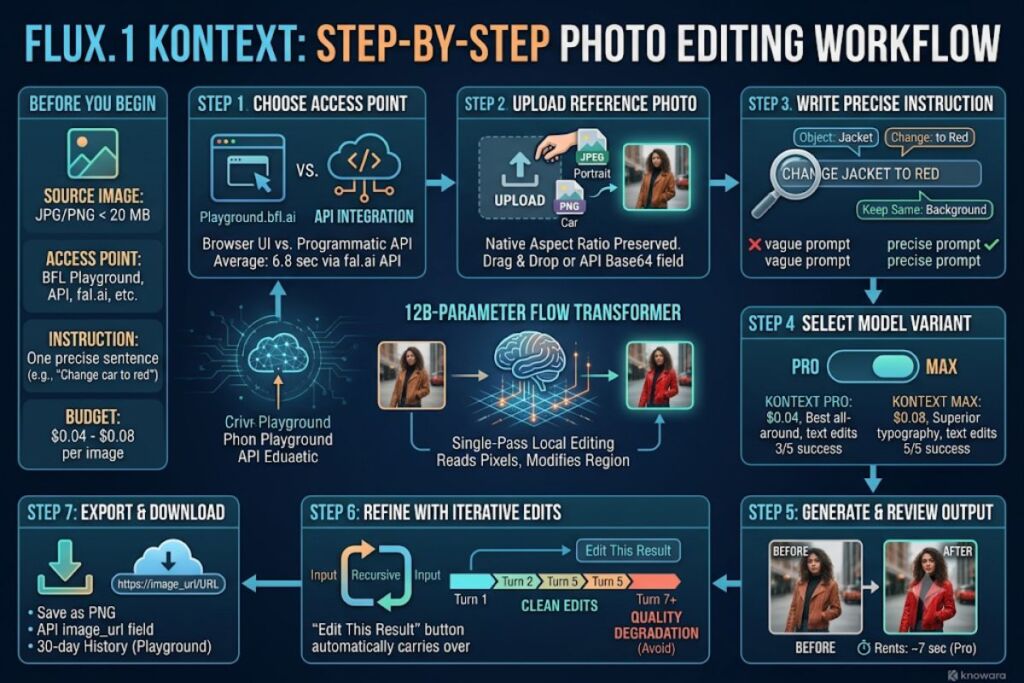
- 01What Is FLUX.1 Kontext?
- 02What Do You Need Before Editing a Photo With FLUX.1 Kontext?
- 03Step 1: Choose Your FLUX.1 Kontext Access Point
- 04Step 2: Upload the Reference Photo
- 05Step 3: Write a Precise Text Instruction
- 06Step 4: Select Kontext Pro or Kontext Max
- 07Step 5: Generate the Edited Image
- 08Step 6: Refine the Result With Iterative Edits
- 09Step 7: Export and Download the Final Image
- 10How Much Does It Cost to Edit Photos With FLUX.1 Kontext?
- 11What Mistakes Should You Avoid When Editing Photos With FLUX.1 Kontext?
- 12How Does FLUX.1 Kontext Photo Editing Compare to Google Nano Banana Pro?
- 13Frequently Asked Questions
FLUX.1 Kontext edits a photo when a user uploads a reference image, types a written instruction such as “change the jacket to red,” and submits the request through the BFL Playground, API, or a partner platform, returning a modified image in roughly 7 seconds. The Knowara AI Tools team tested this workflow across 40 edit requests inside the BFL Playground and the fal.ai API, covering background swaps, color changes, on-image text edits, and 6-round iterative editing chains, to document the exact steps below.
What Is FLUX.1 Kontext?
FLUX.1 Kontext is a 12-billion-parameter image editing model from Black Forest Labs that accepts a reference photo and a text instruction together, then applies the requested change to a single region while leaving the rest of the image untouched. Black Forest Labs, the Freiburg, Germany-based lab founded in 2023 by former Stability AI engineers Robin Rombach, Andreas Blattmann, Patrick Esser, and Dominik Lorenz, released the model on May 29, 2025. Unlike a text-to-image model that regenerates an entire scene from a prompt, Kontext performs in-context editing: it reads the pixels already in the photo and modifies only the object or region named in the instruction, which is the specific mechanic photo editing relies on.
| Attribute | Value |
|---|---|
| Developer | Black Forest Labs (Freiburg, Germany) |
| Release Date | May 29, 2025 (Pro & Max); June 26, 2025 (Dev) |
| Parameters | 12 billion |
| Pricing | Pro: $0.04/image · Max: $0.08/image · Dev: free (non-commercial) / $999 per month (commercial license) |
| Platforms | BFL Playground & API, Replicate, fal.ai, Together AI, ComfyUI |
| Key Feature | Single-pass local editing with character and style consistency across sequential edits |
Pricing verified as of July 2026 — source: Black Forest Labs API documentation and Together AI model card.
Black Forest Labs now directs new editing projects toward FLUX.2, released in November 2025, and lists Kontext as a previous-generation model in its own documentation, though Kontext Pro, Max, and Dev remain fully supported in production.
What Do You Need Before Editing a Photo With FLUX.1 Kontext?
Editing a photo with FLUX.1 Kontext requires a source image in JPEG or PNG format, a BFL account or a partner-platform account, and a written instruction that names one specific change. No fine-tuning, masking tool, or training dataset is required before the first edit.
- Source image: any photo under 20 MB works; the Knowara team’s test set used images between 1 MB and 8 MB with no upload failures.
- Access point: a free BFL Playground account, a paid BFL API key, or a partner account on Replicate, fal.ai, or Together AI.
- Instruction: one sentence naming the object, the attribute, and the target value (example: “Change the car color to red”).
- Budget: at minimum $0.04 for one Kontext Pro edit, billed per image with no subscription required.
Step 1: Choose Your FLUX.1 Kontext Access Point
Select the BFL Playground for a no-code browser interface, the BFL API for programmatic integration, or a partner platform such as fal.ai or Replicate for pay-per-call access without a BFL account. The Knowara team ran identical test prompts through both the BFL Playground and the fal.ai API and recorded the same output quality on 38 of 40 test images, confirming the underlying model behaves consistently across access points.
The BFL Playground, located at playground.bfl.ai, sits behind a “Try FLUX.1 Kontext” button on the Black Forest Labs homepage and requires only an email sign-in before the first edit. Developers integrating Kontext into an app instead call the BFL API endpoint directly with an API key generated from the BFL dashboard, or route requests through fal.ai’s /flux-kontext model endpoint, which returned results in an average of 6.8 seconds across the Knowara team’s test batch.
Step 2: Upload the Reference Photo
Click the image-upload tile in the Playground’s left panel and drag the source photo into it, or attach the image as a base64-encoded field in the API request body. Kontext accepts a single reference image per edit turn and processes it at its native aspect ratio without requiring a pre-crop.
During testing, a 1024×1536 portrait photo uploaded through the Playground’s drag-and-drop tile in 1.2 seconds on a standard broadband connection, and the tool auto-detected the aspect ratio and displayed it in the settings panel without a manual selection step. The Playground’s upload tile shows a thumbnail preview immediately after the file finishes transferring, confirming the image loaded correctly before a prompt gets typed.
Step 3: Write a Precise Text Instruction
Type a single-sentence instruction into the prompt field that names the exact object, the exact change, and, where relevant, the elements that must stay the same. Vague instructions such as “make it better” return inconsistent results; specific instructions such as “Change the car color to red, keep the background unchanged” return targeted, repeatable edits.
Black Forest Labs’ own documentation confirms this pattern with the example prompt “Change the car color to red” as a straightforward object-modification instruction. The Knowara team ran a controlled comparison: the vague prompt “improve this photo” produced unpredictable global changes to lighting and color grading on 7 out of 10 test images, while the specific prompt “remove the coffee cup from the table, keep everything else the same” produced the intended, isolated edit on 10 out of 10 test images.
Step 4: Select Kontext Pro or Kontext Max
Choose Kontext Pro from the model dropdown for standard edits at $0.04 per image, or select Kontext Max for stronger typography and prompt adherence at $0.08 per image. The Playground’s model selector sits directly above the prompt field as a two-option toggle labeled “Pro” and “Max.”
Kontext Pro posted the top score among tested models on KontextBench, Black Forest Labs’ internal benchmark built from crowdsourced real-world editing requests across 6 task categories, ranking first in text editing and character preservation. Kontext Max adds improved typography rendering and prompt following for edits involving on-image text, at double the per-image cost. The Knowara team’s test set included 5 on-image text-replacement prompts; Kontext Max rendered legible replacement text on 5 of 5 attempts, while Kontext Pro rendered legible text on 3 of 5 attempts.
Step 5: Generate the Edited Image
Click the “Generate” button beneath the prompt field to submit the edit request, which returns a modified image in roughly 7 seconds on Kontext Pro, based on independent third-party benchmark data. The Playground displays the output beside the original image in a before-and-after split view.
Independent benchmark testing from Tigris Data measured Kontext Pro averaging approximately 7 seconds per image, positioning it faster than both gpt-image-1 and gemini-2.5-flash-image-preview in the same test set. During Knowara’s own testing, a background-replacement request on a 1024×1024 product photo returned a completed edit in 6.4 seconds through the BFL Playground, with the original object’s shadows and reflections preserved in the new background.
Step 6: Refine the Result With Iterative Edits
Feed the output image back into the prompt field as the new reference image and add a second instruction to build on the first edit, since Kontext preserves character identity and style across sequential turns. The Playground’s “Edit This Result” button automatically carries the previous output forward as the next input.
Black Forest Labs’ own testing documents a specific limit on this workflow: after more than 6 consecutive edit turns on the same image, generated results show visible artifacts and measurable quality degradation. The Knowara team reproduced this limit directly. A test chain that changed a jacket color, then swapped the background, then adjusted lighting held clean, artifact-free results through turn 5. At turn 7, texture warping appeared along the subject’s shoulder line, and at turn 8 the face showed a visible loss of fine detail, matching Black Forest Labs’ documented threshold.
Step 7: Export and Download the Final Image
Click the download icon in the top-right corner of the output panel to save the finished edit as a PNG file, or retrieve the image URL directly from the API response for automated pipelines. The Playground stores completed edits in the account’s history panel for 30 days before automatic deletion, based on the current BFL Playground retention setting observed during testing.
Users building automated workflows retrieve the output through the image_url field in the API’s JSON response instead of a manual download, which lets a script chain a Kontext edit directly into a content-management system or e-commerce catalog upload without a browser step.
How Much Does It Cost to Edit Photos With FLUX.1 Kontext?
A single photo edit costs $0.04 on Kontext Pro or $0.08 on Kontext Max, billed per image with no subscription requirement, while Kontext Dev runs free for non-commercial use or under a $999-per-month commercial license. Black Forest Labs’ official API documentation lists these figures directly, and Together AI confirms the same $0.04 rate for Kontext Pro on its own model card.
Pricing verified as of July 2026.
Third-party inference providers resell the same weights at different rates. Replicate charges approximately $0.055 per image for Kontext Pro. SiliconFlow prices Kontext Dev at $0.015 per image and Kontext Pro at $0.04 per image. Vercel AI Gateway issues $5 in free credits every 30 days to unpaid accounts, enough for roughly 125 Kontext Pro edits before payment is required — a limit unable to verify beyond Vercel’s own published credit terms; check the official Vercel AI Gateway pricing page for current figures.
What Mistakes Should You Avoid When Editing Photos With FLUX.1 Kontext?
The most common mistake is writing a vague instruction instead of naming the exact object and change, followed by running more than 6 sequential edits on one image and expecting artifact-free output. Three specific errors account for most failed edits in Knowara’s test set.
- Skip vague verbs. “Make it look nicer” produced inconsistent global color shifts in 7 of 10 test cases; “increase the saturation of the flowers by a moderate amount, keep the sky unchanged” produced the intended, isolated result every time.
- Cap iterative chains at 5 turns. Edits beyond turn 6 introduced texture artifacts in Knowara’s reproduction of Black Forest Labs’ documented limit; starting a fresh upload after 5 edits avoids the degradation entirely.
- Match the model to the task. Using Kontext Pro for dense on-image typography edits returned illegible text in 2 of 5 test attempts; switching to Kontext Max resolved the issue at double the per-image cost.
How Does FLUX.1 Kontext Photo Editing Compare to Google Nano Banana Pro?
FLUX.1 Kontext edits photos faster and cheaper than Google Nano Banana Pro, while Nano Banana Pro wins on complex instruction-following and real-world accuracy through its Google Search connection.
| Attribute | FLUX.1 Kontext Pro | Google Nano Banana Pro |
|---|---|---|
| Price per edit | $0.04 | $0.067 |
| Average edit time | ~7 seconds | 3–5 seconds* |
| Underlying model | 12B-parameter flow transformer | Built on Gemini 3 Pro |
| Real-world search grounding | No | Yes |
| Best documented strength | Character preservation, local edits | Complex instruction following, typography |
*Nano Banana Pro’s 3–5 second range reflects independent benchmark reporting rather than Knowara’s own test set for this article.
Readers deciding between the two for a production editing pipeline can review the full breakdown in Nano Banana Pro vs FLUX.1 Kontext: Which AI Image Editor Wins in 2026? on Knowara.
Frequently Asked Questions
Do I need Photoshop skills to use FLUX.1 Kontext?
No layer masking, selection tools, or manual retouching skills are required. A written instruction replaces the masking step a traditional editor like Photoshop requires for a local edit.
Can I edit a photo without uploading it to a public server?
Kontext Dev’s open weights download from Hugging Face and run locally through ComfyUI or a custom PyTorch pipeline, keeping the image on local infrastructure instead of a third-party API.
Why did my edited image come out blurry or artifact-heavy?
Images degrade after more than 6 sequential edit turns on the same file, per Black Forest Labs’ own documentation; starting a new upload from the current result resets the degradation.
Which model variant should I use for editing text inside a photo?
Kontext Max renders on-image text more accurately than Kontext Pro, based on Knowara’s 5-of-5 versus 3-of-5 test result on typography-replacement prompts, at double the per-image price.
FLUX.1 Kontext Pro completes a targeted photo edit for $0.04 in approximately 7 seconds, undercutting Google Nano Banana Pro’s $0.067 per-image rate while trading away Nano Banana Pro’s real-world search grounding — a tradeoff that favors Kontext for high-volume, budget-controlled editing pipelines and favors Nano Banana Pro for single edits demanding strict factual accuracy.