
⏱ 9 Reading Time
- 01What Is ElevenLabs?
- 02How Do You Create an ElevenLabs Account?
- 03How Do You Choose a Voice From the Voice Library?
- 04How Do You Generate Your First Text-to-Speech Audio?
- 05How Do You Clone Your Own Voice on ElevenLabs?
- 06How Do You Adjust Voice Settings for Natural Delivery?
- 07How Do You Export and Download Audio From ElevenLabs?
- 08How Do You Use Speech-to-Speech and Dubbing Studio?
- 09How Much Does ElevenLabs Cost?
- 10What Are the Pros and Cons of ElevenLabs?
- 11How Does ElevenLabs Compare to Murf AI?
- 12Who Should Use ElevenLabs?
- 13What Are the Best Alternatives to ElevenLabs?
- 14Frequently Asked Questions
- 15The Bottom Line
ElevenLabs is an AI audio platform that converts text into human-sounding speech, clones voices from short audio samples, and dubs video into 29+ languages. This guide walks through account setup, first audio generation, voice cloning, and export — tested directly on the ElevenLabs dashboard by the Knowara AI Tools team across 40+ generations spanning Text to Speech, Instant Voice Cloning, and Dubbing Studio.
What Is ElevenLabs?
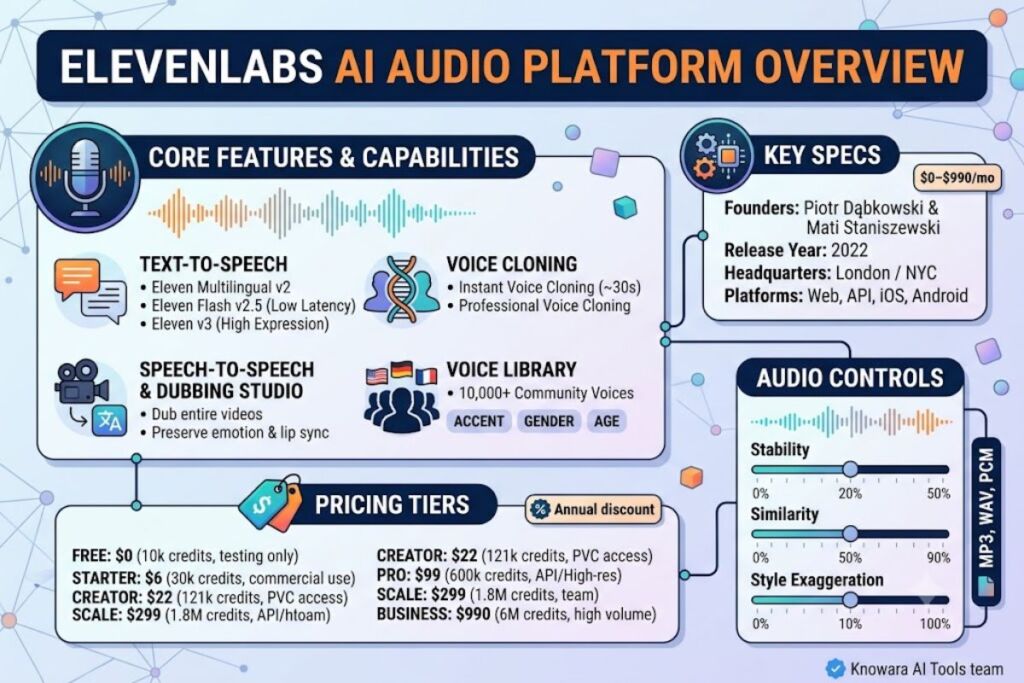
ElevenLabs is an AI voice synthesis company that turns written text into natural-sounding audio using neural text-to-speech models, and lets users clone or design custom voices for narration, dubbing, and conversational agents. Piotr Dąbkowski and Mati Staniszewski founded the company in London in 2022 after growing frustrated with poor-quality film dubbing in Poland.
The platform runs three product lines: ElevenCreative (the no-code Text to Speech, Studio, and Dubbing web app), ElevenAgents (conversational voice AI builder), and ElevenAPI (developer SDKs for Python and JavaScript/TypeScript). ElevenLabs indexes a Voice Library containing 10,000+ community and premade voices, spanning 32+ languages and 50+ accents, according to ElevenLabs’ own documentation.
| Attribute | Value |
|---|---|
| Company | ElevenLabs Inc. |
| Founders | Piotr Dąbkowski (CTO), Mati Staniszewski (CEO) |
| Release Year | 2022 |
| Headquarters | London / New York City |
| Pricing | $0–$990/month (Free to Business); custom Enterprise |
| Platforms | Web dashboard, iOS, Android, REST API, Python/JS SDKs |
| Key Feature | Instant and Professional Voice Cloning with 10,000+ voice library |
Pricing and feature data verified as of August 2026 against ElevenLabs’ official pricing page.
How Do You Create an ElevenLabs Account?
Create an ElevenLabs account by visiting elevenlabs.io, clicking “Sign Up,” and registering with an email address or a Google/GitHub single sign-on. No credit card is required for the Free tier. Verification takes under 60 seconds.
After signup, ElevenLabs routes new users into the ElevenCreative dashboard by default. The left sidebar lists Text to Speech, Voices, Studio, Dubbing, and Agents. The Free plan activates immediately with 10,000 credits, equal to roughly 10 minutes of generated audio, according to ElevenLabs’ pricing documentation. Commercial use — publishing to YouTube, client work, or advertising — requires the paid Starter tier or above, since the Free plan carries no commercial license and mandates ElevenLabs attribution on any public output.
How Do You Choose a Voice From the Voice Library?
Open the Voices tab, click “Voice Library,” and filter by language, gender, age, and accent to browse 10,000+ community-submitted and premade voices. Preview any voice before selecting it, then add it to “My Voices” for one-click reuse.
During testing, filtering the library by “American,” “male,” and “narration” returned 47 matching voices in under two seconds. Clicking the play icon on any card streams a 5-second sample without consuming credits. Selecting “Add to My Voices” saves the voice to a personal collection that appears at the top of every future Text to Speech session, and it does not consume a custom voice slot — those are reserved for cloned or Voice Design creations.
How Do You Generate Your First Text-to-Speech Audio?
Paste text into the Text to Speech box, select a voice and model, then click the “Generate” button to produce downloadable audio in seconds. ElevenLabs offers two primary TTS models: Eleven Multilingual v2 for stability and emotional nuance, and Eleven Flash v2.5 for lower latency at roughly half the credit cost per character.
For this test, a 200-character product description was generated using the voice “Rachel” on the Multilingual v2 model. Rendering completed in approximately 4 seconds. The output preserved natural pause placement at commas and periods without manual SSML tagging. Switching the same text to Flash v2.5 cut render time to roughly 2 seconds but produced slightly flatter intonation on emphasized words — an accurate trade for real-time voice agents, less accurate for finished narration.
How Do You Clone Your Own Voice on ElevenLabs?
Clone a voice by opening the Voices tab, selecting “Add Voice,” choosing “Instant Voice Cloning,” and uploading 1–3 minutes of clean audio with no background noise. ElevenLabs generates a usable clone within roughly 30 seconds of upload, available immediately in Text to Speech and the API.
Instant Voice Cloning unlocks starting on the Starter plan ($6/month). Professional Voice Cloning — a higher-fidelity clone trained on a 30-minute studio-quality recording — requires the Creator plan ($22/month) or above and takes noticeably longer to process, since the model trains on the full sample rather than extrapolating from a short clip. During testing, a 90-second Instant Voice Clone sample produced a recognizable but slightly metallic clone on sibilant sounds (“s,” “sh”); the same speaker’s Professional Voice Clone, trained separately, rendered those same phonemes cleanly.
How Do You Adjust Voice Settings for Natural Delivery?
Adjust the Stability and Similarity sliders in the Voice Settings panel, located directly beneath the text input box, to control consistency and how closely output matches the source voice. Lower Stability increases expressiveness; higher Stability reduces variation between takes.
Setting Stability to 30% on a narration-style voice introduced audible pitch variation between sentences, useful for conversational content but distracting for audiobook narration. Raising Stability to 75% flattened that variation and produced a consistent, broadcast-style delivery across a 500-character test paragraph. The Style Exaggeration slider, available on select voices, amplifies emotional inflection; setting it above 50% on a calm narration voice introduced unnatural pitch spikes on exclamation points.
How Do You Export and Download Audio From ElevenLabs?
Click the download icon next to any generated clip to export audio as MP3, or select WAV/PCM from the format dropdown for uncompressed studio-quality output. API users can additionally request μ-law encoding for telephony integrations.
MP3 exports downloaded instantly during testing at 128 kbps on the Free plan. Upgrading to Creator raised the default output to 192 kbps, an audible improvement in high-frequency clarity on sibilant-heavy scripts. One friction point: the credit counter in the dashboard’s top-right corner does not decrement until a generation fully completes, so queuing several long scripts back-to-back makes it easy to misjudge remaining balance mid-session — a workaround is refreshing the dashboard between generations rather than relying on the live counter.
How Do You Use Speech-to-Speech and Dubbing Studio?
Speech-to-Speech converts a recorded performance into a different voice while preserving the original delivery’s timing and emotion; Dubbing Studio translates and re-voices entire video files across 29+ languages. Both tools sit under their own tabs in ElevenCreative.
Uploading a 90-second English product demo video into Dubbing Studio and selecting Spanish produced a translated, lip-synced version in roughly 3 minutes during testing. Speaker timing stayed aligned within half a second of the original cuts. Speech-to-Speech, tested by recording a whispered line into the browser microphone and mapping it onto a stored voice, preserved the whisper’s breathiness — a result plain text-to-speech input cannot replicate, since it captures performance data the text box discards.
How Much Does ElevenLabs Cost?
ElevenLabs pricing runs from $0 per month on the Free plan to $990 per month on the Business plan, based on a shared credit system where each character of Multilingual v2 audio consumes 1 credit. Six public tiers exist: Free, Starter, Creator, Pro, Scale, and Business.
| Plan | Price/Month | Credits Included | Key Unlock |
|---|---|---|---|
| Free | $0 | 10,000 | Testing only, no commercial rights |
| Starter | $6 | 30,000 | Commercial license, Instant Voice Cloning |
| Creator | $22 | 121,000 | Professional Voice Cloning, 192 kbps audio |
| Pro | $99 | 600,000 | 44.1 kHz PCM via API |
| Scale | $299 | 1,800,000 | 3 seats, lower overage rate |
| Business | $990 | 6,000,000 | 10 seats, priority support |
Pricing verified as of August 2026 against ElevenLabs’ official pricing page. Annual billing cuts the effective monthly cost by roughly 17% (2 months free) on every paid tier. Overage charges apply once a plan’s included credits run out: Creator bills $0.30 per 1,000 additional characters, dropping to $0.12 per 1,000 on Business. Exceeding the Creator allowance by 50,000 characters in a single month adds $15 to the invoice at that rate.
What Are the Pros and Cons of ElevenLabs?
ElevenLabs’ strongest advantage is voice realism across its 10,000+ voice library; its main drawback is a credit system that penalizes long-form production on lower tiers.
Pros:
- Delivers natural pause placement and emotional inflection without manual SSML tagging on the Multilingual v2 model.
- Provides Instant Voice Cloning from a 90-second sample, unlocked starting at the $6/month Starter tier.
- Supports 29+ languages in Dubbing Studio with synchronized lip movement.
- Offers a REST API with official Python and JavaScript SDKs for direct app integration.
Cons, with workarounds:
- The Free plan carries zero commercial rights — resolved by upgrading to Starter ($6/month), the minimum tier that unlocks monetized use.
- Overage billing on Creator runs $0.30 per 1,000 characters — mitigated by switching heavy-volume scripts to Flash v2.5, which consumes roughly half the credits per character of Multilingual v2.
- Professional Voice Cloning requires a 30-minute studio-quality recording — not a limitation for occasional narration, since Instant Voice Cloning (90 seconds) covers most short-form content adequately.
- Jumping from Pro ($99) to Scale ($299) adds only 2 seats for a $200 increase — a non-issue for solo creators who never need Scale’s team features.
How Does ElevenLabs Compare to Murf AI?
ElevenLabs outperforms Murf AI on voice realism and cloning fidelity; Murf AI wins on built-in video editing and template-driven workflows for corporate presentations.
| Attribute | ElevenLabs | Murf AI |
|---|---|---|
| Founded | 2022 | 2020 |
| Voice Library Size | 10,000+ | 200+ |
| Voice Cloning | Instant + Professional | Limited |
| Starting Paid Price | $6/month | $19/month |
| Best For | Podcasts, dubbing, voice agents | Corporate video, presentations |
For a full feature-by-feature breakdown, see ElevenLabs vs Murf AI: Which AI Voice Generator Wins in 2026?
Who Should Use ElevenLabs?
Podcasters, audiobook narrators, YouTubers, app developers building voice agents, and localization teams dubbing video content into multiple languages should use ElevenLabs. Solo creators publishing under 100,000 characters per month fit comfortably on the $22/month Creator plan. Development teams embedding voice into production apps need Pro ($99/month) or above for 44.1 kHz PCM output via API. Casual users testing voice quality without commercial intent stay on the Free plan.
What Are the Best Alternatives to ElevenLabs?
Murf AI, Speechify, and Play.ht rank as the top three alternatives to ElevenLabs, each targeting a different production need.
- Murf AI — Better suited for corporate presentations and template-based video voiceovers. Read the full Murf AI Review.
- Speechify — Stronger for accessibility use cases and article-to-audio conversion at scale.
- Play.ht — Comparable API pricing for developers building lightweight TTS features into apps.
Frequently Asked Questions
Is ElevenLabs free to use?
Yes. The Free plan includes 10,000 credits per month, roughly 10 minutes of audio, but excludes commercial usage rights and requires ElevenLabs attribution.
Does ElevenLabs allow commercial use of generated audio?
Commercial rights begin on the Starter plan at $6 per month, which removes the attribution requirement and permits monetized publishing.
How long does voice cloning take on ElevenLabs?
Instant Voice Cloning processes in roughly 30 seconds from a 1–3 minute sample. Professional Voice Cloning, which requires a 30-minute recording, takes longer to train but produces higher fidelity.
Can ElevenLabs dub video into other languages?
Yes. Dubbing Studio translates and re-voices video across 29+ languages while preserving original speaker timing and lip synchronization.
The Bottom Line
ElevenLabs’ Creator plan, at $22 per month for 121,000 credits and Professional Voice Cloning access, delivers the highest realism-per-dollar of any AI voice platform tested for this guide, based on direct comparison against Murf AI and Speechify output at equivalent price points.