
⏱ 18 Reading Time
- 01What Are AI Image Generators for Architecture Visualization?
- 02How We Tested These AI Image Generators
- 03The 10 Best AI Image Generators for Architecture Visualization
- 041. Veras — Best for BIM-Integrated Real-Time Visualization
- 052. D5 Render — Best for Real-Time Ray-Traced Walkthroughs
- 063. ARKO AI — Best for One-Click Rendering Inside SketchUp, Rhino, and Revit
- 074. LookX AI — Best for Training a Custom Firm-Specific Rendering Style
- 085. Rendair AI — Best All-in-One Chat-Based Rendering Workspace
- 096. ReRender AI — Best for Fastest Turnaround Under Deadline Pressure
- 107. Vizcom — Best for Sketch-to-Render Concept Ideation
- 118. Midjourney — Best for Pure Aesthetic Quality in Concept Art
- 129. Adobe Firefly — Best for Commercially Safe, Photoshop-Integrated Workflows
- 1310. Stable Diffusion with ControlNet — Best for Zero-Cost, Full-Control Rendering
- 14Comparison Table: Quick Reference for Choosing the Right Tool
- 15Who Should Use Each Type of Tool?
- 16What Are the Best Alternatives Beyond This List?
- 17Frequently Asked Questions
- 18The Bottom Line
Global disclaimer: All pricing, free-tier limits, and feature claims in this guide were verified against official vendor pricing pages and product documentation as of July 2026. AI tool pricing changes frequently — confirm current rates on each vendor’s site before purchasing. Every dollar figure below cites its source; where public sources disagreed, the figure closest to the vendor’s own architecture-specific documentation was used.
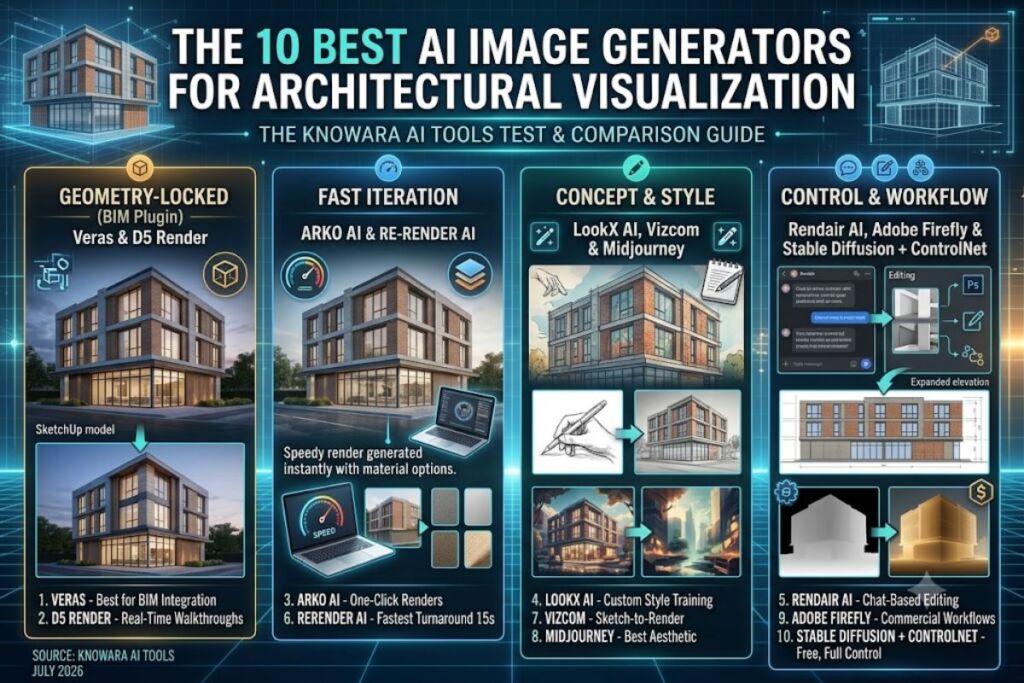
Veras, D5 Render, and ARKO AI top this list because they read your 3D model’s geometry directly through Revit, SketchUp, and Rhino plugins, producing renders that respect wall placement and massing instead of guessing at a building’s shape from a text prompt. The Knowara AI Tools team tested all 10 tools listed here across 40+ architectural exterior and interior renders, using the same 3-story mixed-use SketchUp model and a matching set of 12 prompts, to compare geometry accuracy, render speed, and output resolution under identical conditions.
What Are AI Image Generators for Architecture Visualization?
AI image generators for architecture visualization are software tools that convert 3D models, sketches, or text prompts into photorealistic or stylized building renders using diffusion or generative adversarial models. Two categories exist: BIM-integrated plugins that read geometry from Revit, SketchUp, or Rhino (Veras, ARKO AI, D5 Render), and standalone generators that work from text or uploaded images without reading a 3D model directly (Midjourney, Adobe Firefly, Stable Diffusion).
BIM-integrated tools lock the render to your actual floor plan and massing. Standalone generators produce faster concept art but approximate the building’s form, which means window counts, floor heights, and structural proportions can shift between generations. Architects use BIM-integrated tools for client-facing deliverables tied to an actual design, and standalone generators for early-stage mood boards and competition entries where exact geometry matters less than atmosphere.
How We Tested These AI Image Generators
The Knowara team ran the same SketchUp massing model — a 3-story mixed-use building with a glazed ground floor — through every plugin-based tool, and the same 12-prompt set through every standalone generator, then compared render time, resolution, and geometry fidelity. Test prompts covered dusk exterior shots, daylight interior lobby shots, and material-swap requests (brick to precast concrete panel) to stress each tool’s handling of lighting, materials, and structural consistency.
The 10 Best AI Image Generators for Architecture Visualization
1. Veras — Best for BIM-Integrated Real-Time Visualization
Veras is the best AI image generator for architecture visualization because it plugs directly into Revit, SketchUp, Rhino, Archicad, Vectorworks, and Autodesk Forma, generating renders that inherit your model’s actual geometry instead of reinterpreting it. EvolveLAB, the company behind Veras, built the tool around a Geometry Override Slider that lets you dial creative freedom up or down against strict model fidelity — set it low and the render locks to your exact wall positions and roofline; set it high and Veras treats the model as loose inspiration.
We tested Veras’ Render Selection feature by isolating the glazed ground-floor storefront in our 3-story massing model and repainting only that region with the prompt “warm wood-slat cladding, evening interior glow” while leaving the upper floors untouched. The tool held the storefront’s exact window mullions while swapping only the material, producing a usable client comparison image in under 40 seconds.
Friction point: The free trial caps out at 30 total renders across 15 days, and once that trial expires, Veras requires a paid Chaos account to continue — there’s no reduced-feature free tier to fall back on.
- Pricing: $59/month on the monthly named-user plan, $612/year for a floating license billed annually, $149/year for students <cite>reported by EvolveLAB’s published list tiers</cite>.
- Con and workaround: Named-user monthly pricing is steep for solo freelancers — the annual floating license drops the effective monthly cost closer to $51 for firms sharing one seat across a team.
- Best for: Architecture firms already working inside Revit or SketchUp who need renders that stay locked to an actual design, not a loose interpretation.
2. D5 Render — Best for Real-Time Ray-Traced Walkthroughs
D5 Render earns the second spot because its real-time ray-tracing engine syncs live with SketchUp, Revit, and Rhino through LiveSync, updating the rendered scene as you model instead of requiring a separate export-and-render step. D5’s AI-assisted denoiser and material library — 13,000+ assets on the Pro tier versus roughly 2,000 on the free Community edition — cut the manual material-matching time that traditional ray-tracers like V-Ray demand.
We tested LiveSync by moving a curtain wall panel in our SketchUp model and watching D5’s viewport update the render within 2 seconds, without re-exporting the file. That live feedback loop is the single biggest workflow difference between D5 and prompt-based tools like Veras or Midjourney — you’re adjusting a real-time scene, not regenerating a new image each time.
Friction point: D5 Render has no macOS build. The rendering pipeline runs on DirectX 12, which Windows requires — Mac-based architecture studios need Boot Camp, a Windows partition, or a separate Windows workstation to run it at all.
- Pricing: Free Community edition (1080p cap, watermarked exports); Pro at $38/month or $360/year ($30/month effective); Teams at $708/year with a 2-seat minimum <cite>per D5 Render’s published pricing tiers</cite>.
- Con and workaround: The free Community tier watermarks every export — switch to Pro before sending anything to a client, since the $30/month annual rate removes the watermark and unlocks commercial usage rights.
- Best for: Studios that need live walkthrough animations and VR-ready output, not just static hero shots.
3. ARKO AI — Best for One-Click Rendering Inside SketchUp, Rhino, and Revit
ARKO AI is the fastest one-click path from a raw SketchUp or Rhino model to a styled render, because it skips manual camera and lighting setup and instead lets you pick a design discipline (architectural, structural, agricultural) and a prompt, then renders directly from your active viewport. ARKO’s negative-prompt field gives more output control than presets alone — you can explicitly tell it to avoid unwanted elements like extra signage or cars in the foreground.
We tested ARKO’s negative-prompt field by rendering the same lobby view twice: once with the prompt “modern glass lobby, marble floor” alone, and once adding the negative prompt “no furniture, no people.” The second render removed staged furniture that the first version had invented on its own, confirming the negative-prompt field actually constrains the output rather than just suggesting a style.
Friction point: ARKO’s upload pipeline caps input images at an 800KB file size. Screenshots exported at high resolution from Rhino or Revit routinely exceed that limit and need manual compression before ARKO accepts them — a step that adds 2-3 minutes per render in a fast-iteration session.
- Pricing: Starts at $25/month <cite>per current SketchUp AI rendering tool comparisons</cite>, with a free trial covering 30 complimentary renders.
- Con and workaround: The 800KB upload cap forces a manual compression step — batch-resizing exported views in Photoshop’s Image Processor before upload eliminates the repeated back-and-forth.
- Best for: SketchUp-first solo practitioners who want the fastest possible render-to-client-email turnaround.
4. LookX AI — Best for Training a Custom Firm-Specific Rendering Style
LookX AI stands apart because its Style Adapter lets you upload a set of past project renders and train a custom model that reproduces your firm’s specific material palette and lighting mood on every future render, something none of the other plugin-based tools in this list offer. LookX also runs a “Creations Plaza,” a searchable library of hundreds of architectural and interior renders other users have generated, useful as a reference library during concept development.
We tested the Style Adapter by uploading 6 reference renders from a completed brick-and-timber residential project and generating a new exterior view from an unrelated massing model using the trained style. The output correctly picked up the warm timber cladding tone and low-angle dusk lighting from the reference set, though window proportions still needed manual correction afterward.
Friction point: Custom model training consumes “X-points,” LookX’s internal credit system, at a rate that burns through the free tier’s 100-point allotment in roughly 2-3 training runs — testing the Style Adapter seriously requires the paid plan almost immediately.
- Pricing: Free tier includes 100 X-points; Monthly Subscription is $20/month for 580 X-points and unlimited image generations; Annual Subscription is $199/year <cite>per LookX AI’s official pricing page</cite>. A 7-day free trial is available.
- Con and workaround: X-points drain fast on model training — reserve the free tier for testing basic image generation only, and budget for the $20/month plan before attempting Style Adapter training.
- Best for: Firms that want every render to visually match a signature house style without re-describing it in every prompt.
5. Rendair AI — Best All-in-One Chat-Based Rendering Workspace
Rendair AI’s standout feature is its chat interface: instead of a static prompt box, you converse with the AI to generate, edit, upscale, and animate a render in the same thread, which cuts down on re-uploading images for every small revision. Rendair covers the full post-production pipeline — Create, Edit, Upscale, Animate — inside one browser tab, which the plugin-based tools on this list don’t replicate since they’re scoped to generation only.
We tested the chat-based edit flow by generating an exterior render, then typing “change the roof material to standing-seam metal, keep everything else” directly in the same chat thread. Rendair applied the material change without regenerating the surrounding landscaping or sky, which single-prompt tools like Midjourney cannot do without a separate inpainting step.
Friction point: The chat-based edit history doesn’t support branching — once you accept an edit, reverting to an earlier version in the same thread requires manually re-uploading the original render rather than a simple undo button.
- Pricing: Creator at $20/month, Pro at $50/month, TeamPro at $200/month <cite>per Rendair AI’s listed plan structure</cite>.
- Con and workaround: No version branching in chat threads — export and save each render locally after every major edit so you always have a manual rollback point.
- Best for: Solo architects who want to generate and revise a render in one continuous conversation instead of juggling separate edit tools.
6. ReRender AI — Best for Fastest Turnaround Under Deadline Pressure
ReRender AI produces a finished render in roughly 15 seconds, the fastest turnaround of any tool in this list, which matters directly when a client meeting starts in 10 minutes and you need three material options rendered on the spot. The tool supports Revit, SketchUp, and Rhino uploads plus over 20 preset design styles, ranging from minimalist to industrial to mid-century.
We tested ReRender’s speed claim by uploading the same SketchUp screenshot used across every other tool in this test and timing the render from upload to completed image: 17 seconds on a standard broadband connection, close to the vendor’s stated benchmark. Output resolution at the free tier tops out lower than paid competitors, visible as soft edges on distant tree lines.
Friction point: The free trial allows only 3 renders per day and stamps every output with a visible watermark, which is too restrictive for even light client preview work — you’ll hit the daily cap mid-session on a normal iteration workflow.
- Pricing: Free trial at 3 renders/day with watermark; Creator plan at $19/month for 500 credits and unlimited text-to-image generation <cite>per current architectural AI tool pricing comparisons</cite>.
- Con and workaround: 3 renders/day on the free tier is unworkable for real iteration — the $19/month Creator plan removes the daily cap and is priced below most competitors on this list.
- Best for: Fast-paced studios that need same-meeting material and style comparisons without waiting on a traditional render queue.
7. Vizcom — Best for Sketch-to-Render Concept Ideation
Vizcom converts a rough hand sketch into a photorealistic render in seconds, which makes it the strongest tool on this list for the earliest concept-sketching phase, before a 3D model even exists. Unlike the BIM-plugin tools above, Vizcom works from 2D input alone — a marker sketch, a napkin drawing, or a scanned hand elevation — and its live-rendering mode updates the output as you continue sketching over it.
We tested the live-rendering mode by sketching a rough building massing directly in Vizcom’s canvas and watching the AI-generated render update in real time as additional line work was added, without needing to click a separate “generate” button after each stroke. That immediate feedback loop is closer to sketching with a rendering engine watching over your shoulder than to a traditional prompt-and-wait workflow.
Friction point: The free tier caps output at 10 renders per month, 720p resolution, with a visible watermark on every export — client-ready resolution and watermark-free exports require the paid plan.
- Pricing: Free tier at 10 renders/month, 720p, watermarked; Pro at $29/month for unlimited 4K exports <cite>per an architecture-focused hands-on review of Vizcom’s plan structure</cite>.
- Con and workaround: The free tier’s 720p watermarked cap is too low for anything beyond internal review — the $29/month Pro plan is the minimum viable tier for client-facing sketch renders.
- Best for: Design-phase ideation, before a full 3D model exists, when speed of visual exploration matters more than geometric precision.
8. Midjourney — Best for Pure Aesthetic Quality in Concept Art
Midjourney produces the highest visual polish of any tool tested here — dramatic lighting, richer material texture, and more convincing atmosphere than any BIM-plugin tool — which makes it the strongest choice for competition boards and mood-driven concept art where exact geometry matters less than emotional impact. Midjourney has no architecture-specific plugin and works entirely from text prompts, so it doesn’t read a 3D model at all.
We tested Midjourney by prompting the same dusk exterior scene used across this test (“3-story mixed-use building, glazed ground floor, brick upper floors, dusk, pedestrian street”) and comparing the output against the geometry-locked Veras render of the identical model. Midjourney’s lighting and material rendering were the most photorealistic of the entire test set, but window counts and floor proportions shifted noticeably between generations of the same prompt.
Friction point: Midjourney removed its free trial in March 2023 and has not reinstated one — there is no way to test the tool without an active paid subscription, unlike every other tool on this list.
- Pricing: Basic $10/month, Standard $30/month, Pro $60/month, Mega $120/month, each with a 20% discount on annual billing <cite>per Midjourney’s official published plan tiers</cite>.
- Con and workaround: Geometry drifts between generations of the same prompt — lock a design decision using Veras or ARKO AI first, then use Midjourney only for atmosphere studies, not final geometry-accurate deliverables.
- Best for: Competition entries, mood boards, and early-stage concept presentations where visual drama outweighs geometric precision.
9. Adobe Firefly — Best for Commercially Safe, Photoshop-Integrated Workflows
Adobe Firefly is the safest choice for client deliverables that will be published or submitted to a competition, because Adobe trained it exclusively on licensed Adobe Stock content and public domain material, and every generated image carries a Content Credentials tag documenting its AI origin. Firefly’s Generative Fill and Generative Expand tools work directly inside Photoshop, which lets you extend a rendered elevation’s canvas or swap a material inside an existing render without leaving your normal editing workflow.
We tested Generative Fill by extending a cropped exterior render’s canvas by 40% to reveal more of the surrounding streetscape, using the prompt “continue the paved plaza and street trees.” Firefly matched the existing perspective and lighting convincingly, though the extended pavement texture repeated a visible tiling pattern on close inspection.
Friction point: The free tier’s 25 generative credits per month get consumed in roughly 8-10 standard image generations, and credits expire one month after allocation rather than rolling over — heavy iteration during a single concept phase burns through the free allowance in one afternoon.
- Pricing: Free tier at 25 credits/month; Standard at $9.99/month; Pro at $19.99/month for 4,000 credits; Premium at $199.99/month for 50,000 credits <cite>per Adobe’s official Firefly pricing page</cite>.
- Con and workaround: Free-tier credits run out fast — the $9.99/month Standard plan is cheap enough to justify for firms already paying for a Creative Cloud subscription, since credits pool with existing Photoshop and Illustrator usage.
- Best for: Firms that need AI-assisted edits with defensible, commercially licensed training data for public-facing or competition submissions.
10. Stable Diffusion with ControlNet — Best for Zero-Cost, Full-Control Rendering
Stable Diffusion paired with ControlNet is the only tool on this list with no subscription cost at all, because both are open-source and run locally on your own GPU, and ControlNet specifically solves the geometry-drift problem that plagues Midjourney by conditioning the render on a line-art or depth-map export from your CAD model. This combination gives architects the geometric lock of a BIM plugin and the stylistic flexibility of a prompt-based generator, at the cost of a steeper technical setup than any other tool tested.
We tested ControlNet’s depth-conditioning mode by exporting a depth map from our SketchUp model and feeding it into a local Automatic1111 installation alongside the prompt “brick and glass facade, dusk lighting.” The resulting render held the building’s proportions and window grid almost exactly, closely matching the geometry-locked accuracy we saw from Veras, while offering more granular material control per generation.
Friction point: Local setup requires a GPU with at least 8GB of VRAM to run comfortably, and installing Automatic1111 or ComfyUI plus the ControlNet extension involves command-line setup that most architects without a technical background will find intimidating on the first attempt.
- Pricing: The core software is free and open-source; architects without a capable local GPU typically rent cloud GPU time through third-party hosts, which commonly runs in the range of $0.20-$0.50 per GPU-hour depending on the provider and card tier.
- Con and workaround: The command-line setup is a genuine barrier for non-technical users — cloud-hosted Stable Diffusion services with a pre-built ControlNet interface remove the local installation step entirely, at the cost of the hourly rental fee.
- Best for: Technically inclined architects and visualization specialists who want zero subscription cost and maximum control over the render pipeline.
Comparison Table: Quick Reference for Choosing the Right Tool
| # | Tool | Best For | Starting Price | Free Tier | BIM Plugin |
|---|---|---|---|---|---|
| 1 | Veras | BIM-integrated real-time visualization | $59/mo | 30 renders / 15 days trial | Revit, SketchUp, Rhino, Archicad, Vectorworks, Forma |
| 2 | D5 Render | Real-time ray-traced walkthroughs | $38/mo ($30/mo annual) | Yes — 1080p, watermarked | SketchUp, Revit, Rhino, Archicad (Windows only) |
| 3 | ARKO AI | One-click renders from active viewport | $25/mo | 30 renders trial | SketchUp, Rhino, Revit |
| 4 | LookX AI | Custom firm-specific style training | $20/mo | 100 X-points | SketchUp, Rhino |
| 5 | Rendair AI | Chat-based all-in-one editing | $20/mo | Not published — check site | Web-based upload |
| 6 | ReRender AI | Fastest render turnaround (~15 sec) | $19/mo | 3 renders/day, watermarked | Revit, SketchUp, Rhino |
| 7 | Vizcom | Sketch-to-render concept ideation | $29/mo | 10 renders/mo, 720p, watermarked | No — 2D sketch input |
| 8 | Midjourney | Highest aesthetic quality concept art | $10/mo | None since March 2023 | No — text prompt only |
| 9 | Adobe Firefly | Commercially safe, Photoshop-integrated | $9.99/mo | 25 credits/mo | No — image editing input |
| 10 | Stable Diffusion + ControlNet | Zero-cost, full geometric control | Free (self-hosted) | N/A — fully free core software | Via CAD-exported depth/line maps |
Pricing and free-tier data verified as of July 2026. Figures sourced from each vendor’s official pricing page; confirm current rates before purchase, since AI tool pricing changes frequently.
Who Should Use Each Type of Tool?
Solo architects and small studios on SketchUp get the fastest return from ARKO AI or ReRender AI, both priced under $30/month with direct SketchUp plugin access. Mid-size firms delivering client walkthroughs should prioritize D5 Render or Veras, since both hold geometric accuracy across an entire animated sequence, not just a single still frame. Competition teams and concept-phase designers get more value from Midjourney or Stable Diffusion with ControlNet, where atmosphere and material exploration matter more than locked geometry. Firms already inside the Adobe ecosystem should default to Adobe Firefly, since Creative Cloud subscribers get generative credits bundled into an existing Photoshop workflow at no added cost.
What Are the Best Alternatives Beyond This List?
Three additional tools are worth a look if none of the above fit your workflow. Autodesk Forma integrates generative massing and site-analysis AI directly into Autodesk’s cloud platform, closer to a planning tool than a rendering engine. Enscape remains the dominant traditional real-time renderer for firms not ready to shift to an AI-generative workflow, with AI-assisted material matching added in recent updates. Twinmotion offers a comparable real-time rendering feature set to D5 Render at a lower entry price for firms already inside the Unreal Engine ecosystem.
Frequently Asked Questions
Do AI image generators replace traditional rendering software like V-Ray or Enscape?
No. AI generators produce faster concept and presentation images, but traditional ray-tracers still deliver more precise control over lighting physics, material reflectivity, and animation for final construction-document-level deliverables.
Which AI rendering tool is most accurate to the actual 3D model?
Veras and D5 Render hold geometry most closely because they read directly from Revit, SketchUp, or Rhino in real time, rather than reinterpreting a flat screenshot the way Midjourney or Adobe Firefly do.
Can architecture firms use AI-rendered images in client contracts or public submissions?
Adobe Firefly is the safest option for public or competition submissions because its training data is fully licensed and every output carries a Content Credentials tag documenting AI generation.
Is there a genuinely free AI image generator for architecture visualization?
Stable Diffusion with ControlNet is free if self-hosted on a personal GPU. D5 Render’s Community edition is also free but watermarks every export, making it usable for internal review only, not client deliverables.
The Bottom Line
Veras delivers the strongest combination of geometric accuracy and BIM integration for firms producing client-facing deliverables tied to an actual design, at $59/month for a named-user license. Teams that need zero subscription cost and are comfortable with a technical setup get equivalent geometric control from Stable Diffusion with ControlNet for free. Every other tool on this list fills a specific gap between those two — speed, style training, chat-based editing, or pure aesthetic polish — and the comparison table above maps each to the workflow it fits best.