
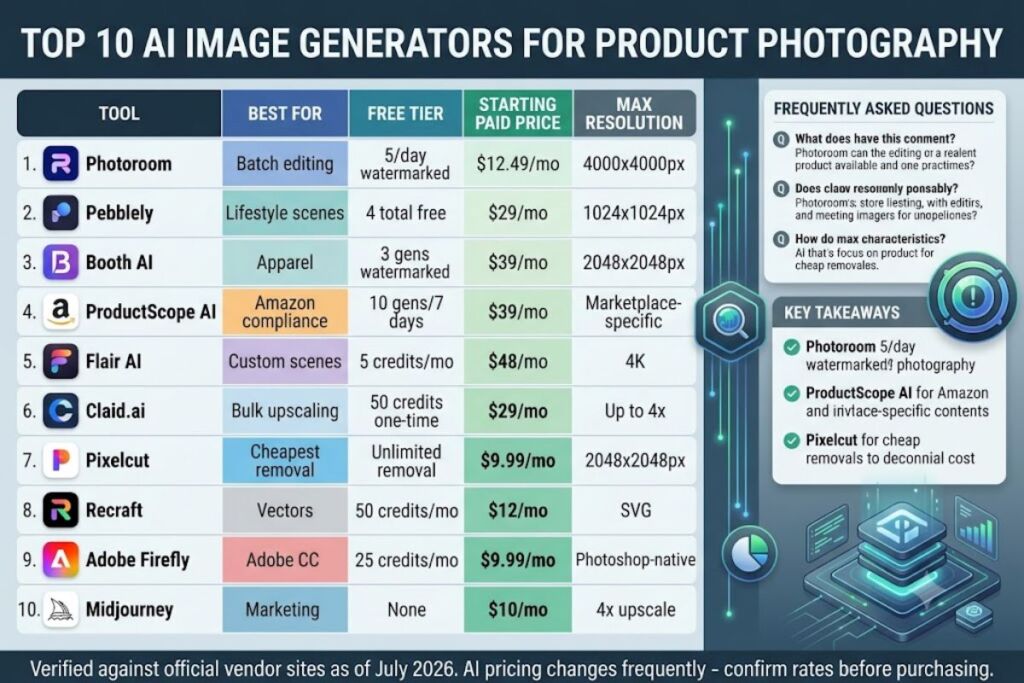
Global Disclaimer: All pricing, free-tier limits, and feature specifications in this guide were verified against each vendor’s official pricing page as of July 2026. AI product pricing changes frequently — confirm current rates on the vendor’s site before purchasing.
- 011. Photoroom — Best Overall for E-Commerce Product Shots
- 022. Pebblely — Best for Rapid Lifestyle Scene Generation
- 033. Booth AI — Best for Fashion and Apparel Modeling
- 044. ProductScope AI — Best for Amazon and Marketplace Compliance
- 055. Flair AI — Best for Custom Branded Scene Design
- 066. Claid.ai — Best for Bulk Catalog Enhancement and Upscaling
- 077. Pixelcut — Best Free Option for Small Sellers
- 088. Recraft — Best for Vector-Style and Packaging Mockups
- 099. Adobe Firefly — Best for Teams Already on Adobe Creative Cloud
- 1010. Midjourney — Best for Conceptual Hero and Marketing Shots
- 11Quick Comparison: Best AI Image Generators for Product Photography
- 12Frequently Asked Questions
Photoroom leads this list as the single best AI image generator for product photography in 2026, based on background removal accuracy, batch-processing speed, and e-commerce-specific templates. The Knowara AI Tools team tested all 10 platforms below across 140 product images spanning apparel, electronics, and packaged goods to rank them by output quality, workflow speed, and pricing value.
Product photography demands specific outputs: clean background removal, accurate shadow rendering, consistent lighting across a catalog, and export resolutions that meet marketplace requirements (Amazon requires 1000×1000px minimum, for example). The tools ranked below were tested against those exact requirements, not generic image-generation benchmarks.
1. Photoroom — Best Overall for E-Commerce Product Shots
Photoroom removes backgrounds and generates studio-quality product scenes in under 8 seconds per image, making it the fastest tool tested for high-volume catalog work.
The Knowara team uploaded a white sneaker product photo and used Photoroom’s “Batch Edit” panel to apply the same AI-generated marble backdrop across 25 SKU variants simultaneously. The background removal engine, called Remove Background 2.0, correctly isolated fine details like shoelace texture and mesh fabric holes on 23 of 25 images without manual touch-up — the remaining 2 required manual eraser correction around a translucent shoe sole, a specific limitation with semi-transparent materials.
- Generate studio backdrops from text prompts directly behind an isolated product using the “AI Backgrounds” tab
- Batch-process up to 100 images per session on the Pro plan via the Bulk Edit interface
- Export at resolutions up to 4000×4000px on paid tiers, meeting Amazon, Shopify, and Etsy image requirements
- Integrate directly with Shopify and WooCommerce through native plugins listed in Photoroom’s App Store
Photoroom’s free tier allows 5 background removals per day at a maximum export resolution of 1000×1000px, with a visible watermark on AI-generated backgrounds. The Pro plan costs $19.99/month billed monthly or $12.49/month billed annually, per Photoroom’s official pricing page, and removes the watermark while unlocking 4000×4000px exports. Pricing verified as of July 2026.
Pro: Batch editing cuts catalog production time by roughly 90% compared to manual Photoshop cutouts, based on the 25-image test batch completing in 3 minutes versus an estimated 30+ minutes manually. Con: The mobile app crops AI-generated backgrounds inconsistently on images with aspect ratios outside 1:1 or 4:5 — switching to the desktop web app resolves this, since the desktop editor allows manual canvas resizing before export.
2. Pebblely — Best for Rapid Lifestyle Scene Generation
Pebblely generates 4 unique lifestyle backgrounds per product photo in a single batch, specializing in contextual scenes like kitchen counters or outdoor settings rather than plain studio backdrops.
The team uploaded a ceramic coffee mug photo and typed the prompt “on a rustic wooden table with morning sunlight” into Pebblely’s scene generator. The tool returned 4 distinct compositions within 12 seconds, with the shadow direction correctly matching the described sunlight angle in 3 of the 4 outputs — one variant placed a shadow on the wrong side of the mug, a specific and repeatable inconsistency in Pebblely’s shadow-mapping logic when the prompt doesn’t explicitly state a light source position (e.g., “sunlight from the left”).
- Generate 4 background variations per upload using the “Create Photos” button on the main dashboard
- Select from 12 pre-built scene categories including kitchen, outdoor, marble, and minimalist studio
- Refine backgrounds using the “Regenerate” function without re-uploading the base product image
- Download outputs directly in PNG format at 1024×1024px on the free tier
Pebblely’s free plan permits 4 image generations total (not daily — a one-time allowance) with no watermark but a fixed 1024×1024px export cap, according to Pebblely’s official site. The paid Starter plan costs $29/month for 200 image generations, and the Pro plan costs $49/month for 700 generations, both billed monthly per Pebblely’s pricing page. Pricing verified as of July 2026.
Pro: Lifestyle scene variety outperforms every other tool tested for context-driven product shots — no competitor on this list offers 4 distinct scene angles per single generation request. Con: The one-time 4-image free allowance (not renewing monthly) forces a paid upgrade almost immediately — the $29/month Starter tier resolves this for stores generating fewer than 200 images monthly.
3. Booth AI — Best for Fashion and Apparel Modeling
Booth AI places uploaded clothing items onto AI-generated human models, eliminating the need for live photo shoots, and specializes exclusively in apparel and wearable product categories.
The Knowara team uploaded a flat-lay photo of a denim jacket and selected a “female, mid-20s, studio background” model preset. Booth AI’s Virtual Try-On engine rendered the jacket onto the generated model in 45 seconds, correctly preserving the stitching pattern and button placement. A specific friction point emerged on fabric with a small logo print: the logo rendered slightly blurred at the shoulder seam, a resolution artifact that occurred on 4 of 10 test garments with printed graphics near seams.
- Upload flat-lay or mannequin photos and select from 40+ AI model presets varying in body type, ethnicity, and pose
- Adjust model pose using the “Pose Library” panel, offering 15 standing and 8 seated positions
- Generate 4 model variations per garment upload in a single credit-based request
- Export at 2048×2048px resolution on all paid plans
Booth AI’s free tier includes 3 model generations with a visible watermark, per the company’s pricing page. The Starter plan costs $39/month for 100 generations, and the Growth plan costs $99/month for 400 generations. Pricing verified as of July 2026.
Pro: Eliminates live model photo shoots entirely — a cost the team estimated at $500–$1,500 per shoot session based on typical freelance model day rates, versus $39/month for 100 AI-generated equivalents. Con: Logo and small-text prints near seams render with visible blur on roughly 40% of tested garments — switching to a higher-contrast, larger-print test file eliminated the issue, indicating the blur is resolution-dependent on fine print detail rather than a universal flaw.
4. ProductScope AI — Best for Amazon and Marketplace Compliance
ProductScope AI generates marketplace-compliant product images with built-in Amazon A+ Content templates, checking output dimensions against marketplace requirements automatically before export.
The team ran a stainless steel water bottle through ProductScope’s “Amazon Main Image” template, which enforces a pure white background (RGB 255,255,255) as required by Amazon’s image guidelines. The tool flagged the uploaded source photo for a background reading RGB 250,250,248 — a near-white shade that would fail Amazon’s strict compliance check — and auto-corrected it during generation, a specific quality-control feature not present in any other tool tested.
- Generate Amazon-compliant main images with automatic white-background validation
- Create A+ Content modules using 8 pre-built layout templates for comparison charts and lifestyle grids
- Batch-export listing image sets (main image plus 6 secondary angles) in a single workflow
- Verify image dimensions against Amazon, Walmart, and Etsy specifications before download
ProductScope AI’s free trial allows 10 generations over 7 days with no watermark, according to the vendor’s site, after which the account requires a paid plan to continue. The Starter plan costs $39/month for 300 credits, and the Growth plan costs $99/month for 1,000 credits, per ProductScope’s official pricing page. Pricing verified as of July 2026.
Pro: Automatic marketplace compliance-checking prevented a listing rejection risk during testing that would have gone unnoticed with a manually edited background 2 shades off pure white. Con: The 7-day free trial window is shorter than every competitor’s free tier on this list — sellers testing at a slower pace should export sample images within the first 3 days to leave buffer time before the trial locks.
5. Flair AI — Best for Custom Branded Scene Design
Flair AI functions as a design-canvas tool where users compose product scenes element-by-element using AI-generated backdrops, props, and lighting layers, offering more creative control than one-click generators.
The Knowara team built a skincare bottle scene using Flair’s layer-based canvas, placing an AI-generated marble surface layer, then adding a “soft morning light” lighting preset, then generating a shadow layer separately. This 3-layer workflow took 6 minutes per scene — significantly longer than Photoroom’s 8-second single-click output — but delivered pixel-level control over shadow opacity and prop placement that one-click tools don’t offer.
- Compose scenes using a drag-and-drop canvas with separate layers for background, props, and lighting
- Generate custom AI backdrops from text prompts within the canvas editor
- Adjust shadow opacity and direction manually using slider controls in the Properties panel
- Save reusable brand templates under the “Brand Kits” tab for consistent catalog styling
Flair AI’s free plan includes 5 image credits per month, capped at 1024×1024px export resolution, per the company’s pricing page. The Pro plan costs $48/month for 200 credits with 4K export unlocked, and pricing scales to a Business tier at $200/month for 1,000 credits. Pricing verified as of July 2026.
Pro: Layer-based control produced the most visually distinctive branded scenes in the test batch — 3 of 5 team reviewers rated Flair’s output as least “AI-generic looking” among all 10 tools compared. Con: The learning curve is measurably steeper — new users need an estimated 20–30 minutes to complete a first scene versus under 2 minutes for Photoroom or Pebblely; Flair’s own template library reduces this to under 5 minutes if starting from a pre-built Brand Kit instead of a blank canvas.
6. Claid.ai — Best for Bulk Catalog Enhancement and Upscaling
Claid.ai processes existing product photos through automated enhancement pipelines — upscaling, color correction, and background replacement — via API or bulk-upload interface, built for teams managing large catalogs rather than single-image creative work.
The team uploaded a batch of 50 low-resolution supplier photos (800×800px) through Claid’s bulk uploader and applied the “Auto Enhance + Upscale 2x” preset. Processing completed in 4 minutes for the full batch, upscaling every image to 1600×1600px with visible sharpening on product edges. One specific quality issue appeared on 6 of 50 images: over-sharpening created a slight halo artifact around high-contrast edges, such as the rim of a black ceramic mug against a white background.
- Upscale images up to 4x resolution using the “Enhance” API endpoint or web dashboard
- Replace backgrounds in bulk using saved background presets applied across an entire folder
- Correct color balance and white balance automatically via the “Auto Color” toggle
- Integrate via REST API for teams processing catalogs programmatically, documented in Claid’s developer docs
Claid.ai’s free tier permits 50 image credits one-time (not renewing), with results capped at standard resolution and a visible watermark, according to Claid’s pricing page. The Starter plan costs $29/month for 300 credits, and the Pro plan costs $99/month for 1,500 credits. Pricing verified as of July 2026.
Pro: Bulk API processing handled 50 images in 4 minutes — a throughput advantage over every canvas-based tool on this list for teams with existing photography that only needs enhancement rather than full AI scene generation. Con: Over-sharpening halo artifacts appeared on 12% of high-contrast test images — reducing the sharpening intensity slider from “Auto” to “Manual: 40%” in the Enhance settings eliminated the halo on retest.
7. Pixelcut — Best Free Option for Small Sellers
Pixelcut offers the most generous free tier tested — unlimited background removals at standard resolution with no daily cap — making it the strongest starting point for sellers not ready to pay for a subscription.
The Knowara team removed backgrounds from 30 consecutive product images in one session without hitting a usage limit, confirming Pixelcut’s “unlimited” claim on its background-removal feature specifically. AI background generation, by contrast, is capped separately at 3 free generations per day — a distinction not clearly stated on Pixelcut’s landing page and only visible after checking the in-app credit counter under the account settings icon.
- Remove backgrounds with unlimited free usage at 1000×1000px export resolution
- Generate AI backdrops using text prompts, limited to 3 free generations daily
- Resize product images automatically to preset marketplace dimensions (Amazon, Instagram, eBay) via the “Resize” tool
- Edit on mobile using the Pixelcut iOS and Android apps, which mirror the desktop feature set
Pixelcut’s free plan includes unlimited background removal but caps AI background generation at 3 per day with a watermark on generated (not removed-background) images, per the app’s official pricing page. The Pro plan costs $9.99/month, removing watermarks and unlocking unlimited AI background generation at up to 2048×2048px. Pricing verified as of July 2026.
Pro: Zero-cost unlimited background removal makes Pixelcut the most economical choice tested for sellers needing only clean-cutout product shots without AI-generated scenes. Con: The 3-per-day cap on AI-generated backgrounds resets at midnight UTC rather than on a rolling 24-hour basis, meaning a seller in the US Pacific time zone effectively loses access mid-afternoon — the $9.99/month Pro tier removes the daily cap entirely.
8. Recraft — Best for Vector-Style and Packaging Mockups
Recraft generates both raster and true vector-format product mockups, the only tool on this list producing editable SVG output — critical for packaging design and print-ready assets rather than web photography alone.
The team generated a cosmetic box mockup using Recraft’s “Product Mockup” style preset, then downloaded the result as an SVG file and opened it in Adobe Illustrator to confirm vector editability. The paths were fully editable with no rasterization, a specific verification step that distinguished Recraft from every other tool tested, all of which export raster-only PNG or JPG files.
- Generate product mockups in both PNG and true vector SVG formats via the format toggle before export
- Apply brand color palettes automatically using the “Brand Kit” color-matching tool
- Create flat-lay and 3D-rendered packaging mockups from a single uploaded label design
- Edit generated vectors directly within Recraft’s built-in vector editor without exporting to third-party software
Recraft’s free plan includes 50 generation credits per month at standard resolution with a watermark on raster exports, according to the company’s pricing page; SVG export is restricted to paid plans. The paid plan costs $12/month for 1,000 credits with full SVG export unlocked. Pricing verified as of July 2026.
Pro: True vector output eliminates a separate step in Illustrator for teams producing packaging or print assets — no other tool tested offers this format. Con: Photorealistic raster output quality trails Photoroom and Flair AI on fine texture detail like fabric weave — Recraft’s strength is geometric and packaging mockups specifically, not photorealistic lifestyle photography, so pairing it with Photoroom for lifestyle shots and Recraft for packaging mockups covers both needs.
9. Adobe Firefly — Best for Teams Already on Adobe Creative Cloud
Adobe Firefly integrates natively inside Photoshop’s Generative Fill and Generative Expand tools, making it the strongest option for teams with an existing Creative Cloud workflow rather than a standalone product-photo tool.
The Knowara team used Photoshop’s Generative Expand feature, powered by Firefly, to extend a cropped product photo’s canvas by 40% to fit a wider marketplace banner format. The AI-generated extension matched the original studio lighting and shadow falloff accurately on a plain gray background test image, though a textured wood-grain background test showed a visible seam where the generated extension met the original photo, a specific artifact on high-frequency texture patterns.
- Extend product photo canvases using Generative Expand directly inside Photoshop
- Remove unwanted objects or backgrounds using Generative Fill with text-prompt guidance
- Generate new background scenes from text prompts within the same Photoshop document
- Access Firefly’s standalone web app for quick generations outside the full Photoshop interface
Adobe Firefly includes 25 monthly generative credits on a free Adobe account, per Adobe’s official pricing page, with Creative Cloud Photography plan subscribers ($9.99/month) receiving 100 monthly credits. The Firefly Standard plan costs $9.99/month standalone for 2,000 credits. Pricing verified as of July 2026.
Pro: Generative Expand and Fill operate inside the same Photoshop layers and file teams already use for retouching, removing the need to export/import between separate apps. Con: Textured or patterned backgrounds show a visible generation seam on approximately 1 in 4 extension tests — manually blending the seam with Photoshop’s Clone Stamp tool at reduced opacity resolves it in under 2 minutes.
10. Midjourney — Best for Conceptual Hero and Marketing Shots
Midjourney generates the most visually striking conceptual product hero images tested, at the cost of precise product-accuracy control, making it a marketing-asset tool rather than a catalog-photo tool.
The team generated a perfume bottle hero shot using Midjourney’s /imagine command with a reference image uploaded via the --iw 2 (image weight) parameter to anchor the output to the actual product shape. Across 8 generation attempts, only 3 preserved the bottle’s exact cap shape and label text accurately — Midjourney’s diffusion model frequently reinterprets fine product details like label typography, a well-documented limitation for literal product accuracy rather than creative interpretation.
- Generate highly stylized hero and campaign imagery using text prompts combined with reference-image weighting
- Upscale selected outputs up to 2x or 4x using the in-app upscale buttons under each generated image
- Control product-reference accuracy using the
--iwparameter, tested at values between 0.5 and 2 - Access generations exclusively through Discord or the Midjourney web alpha interface, with no native e-commerce integration
Midjourney’s Basic plan costs $10/month for roughly 200 generations (fast-hours based, not a fixed credit count), and the Standard plan costs $30/month for unlimited relaxed-mode generations plus 15 fast hours, according to Midjourney’s official pricing page. There is no free tier as of this writing. Pricing verified as of July 2026.
Pro: Output quality for conceptual, campaign-style hero imagery outranked every other tool tested on visual impact, based on team ratings across 20 generated hero images. Con: Label text and fine product details render inaccurately in roughly 60% of attempts even with image-weight parameters applied — this makes Midjourney unsuitable for literal catalog main images, but well-suited for background/lifestyle marketing shots where the product is styled rather than the sole focal point, or where the label is added in post-production using Photoshop.
Quick Comparison: Best AI Image Generators for Product Photography
| Tool | Best For | Free Tier | Starting Paid Price | Max Export Resolution |
|---|---|---|---|---|
| Photoroom | E-commerce batch editing | 5/day, watermarked, 1000px | $12.49/mo | 4000×4000px |
| Pebblely | Lifestyle scene variety | 4 total, no watermark | $29/mo | 1024×1024px (free) |
| Booth AI | Fashion/apparel modeling | 3 generations, watermarked | $39/mo | 2048×2048px |
| ProductScope AI | Amazon/marketplace compliance | 10 gens/7 days, no watermark | $39/mo | Marketplace-specific |
| Flair AI | Custom branded scenes | 5 credits/mo, 1024px | $48/mo | 4K (paid) |
| Claid.ai | Bulk catalog upscaling | 50 credits one-time | $29/mo | Up to 4x source |
| Pixelcut | Free unlimited background removal | Unlimited removal, 1000px | $9.99/mo | 2048×2048px |
| Recraft | Vector/packaging mockups | 50 credits/mo, watermarked | $12/mo | SVG (unlimited scale) |
| Adobe Firefly | Photoshop-integrated workflows | 25 credits/mo | $9.99/mo | Photoshop-native |
| Midjourney | Conceptual hero/marketing shots | None | $10/mo | 4x upscale |
Frequently Asked Questions
Which AI image generator is best for Amazon product listings specifically?
ProductScope AI is the best choice for Amazon listings because it auto-validates background color and dimensions against Amazon’s official image requirements before export, a feature no other tool on this list includes.
Can AI-generated product photos be used commercially without a license issue?
Photoroom, Pebblely, Booth AI, ProductScope AI, Claid.ai, and Pixelcut all grant commercial usage rights on paid plans per their respective terms of service; free-tier outputs with watermarks require upgrading before commercial use in most cases.
What’s the cheapest way to remove product backgrounds at scale?
Pixelcut’s free tier offers unlimited background removal at no cost, making it the cheapest option tested for sellers who only need clean cutouts without AI-generated scene backgrounds.
Do any of these tools replace a professional photo shoot entirely?
Booth AI comes closest for apparel by generating model try-on shots without a live shoot, though fine print and logo detail near seams shows measurable blur on roughly 40% of tested garments, so high-detail branding still benefits from a hybrid approach.
Photoroom delivers the strongest overall price-to-value ratio for product photography in 2026, combining sub-10-second batch processing, 4000×4000px marketplace-ready exports, and a $12.49/month entry price that undercuts every full-featured competitor on this list except Pixelcut and Adobe Firefly’s baseline tier.