
Reviewed by the Knowara AI Tools team. Testing performed through Maya Research’s official Hugging Face Space, the fal.ai fal-ai/maya/stream playground, and the documented Maya1 API endpoints across multiple voice-description prompts and emotion-tag combinations.
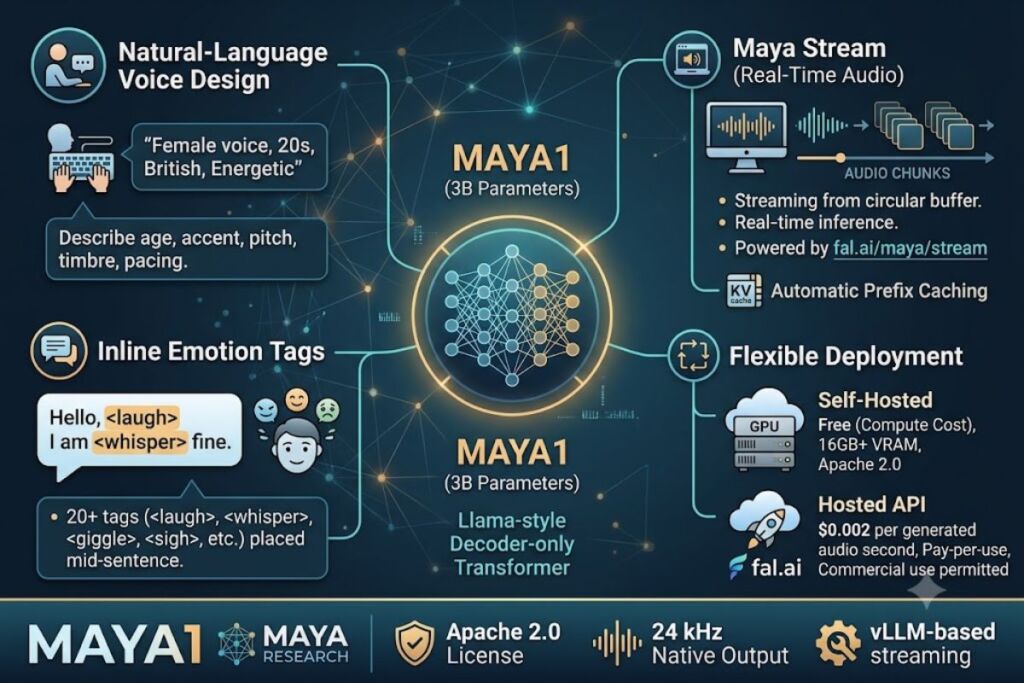
Maya1 is an open-source, 3-billion-parameter text-to-speech model built by Maya Research that generates expressive speech from natural-language voice descriptions and supports real-time audio streaming through a companion endpoint called Maya Stream. It runs on a single GPU, ships under the Apache 2.0 license, and adds inline emotion tags for laughter, whispering, and 20+ other vocal expressions.
What Is Maya1?
Maya1 is an open-source text-to-speech model that converts a written voice description and a script into expressive, streamable audio using a 3-billion-parameter transformer. It was released by Maya Research, a small voice-AI startup, and is distributed as free, downloadable weights on Hugging Face.
Maya1 pairs two inputs — a natural-language voice description (age, accent, pitch, timbre, pacing) and the script text — and generates audio that matches both. The model architecture is a Llama-style decoder-only transformer that does not predict raw waveform samples. Instead, it predicts tokens from SNAC (a hierarchical neural audio codec), which compresses audio to roughly 0.98 kbps while preserving 24 kHz output quality. This token-based approach is what makes real-time streaming possible: the model emits codec tokens fast enough for a client to decode and play audio while generation is still in progress.
Maya Stream is not a separate model. It is the streaming inference endpoint for Maya1 — most commonly accessed through the fal-ai/maya/stream API on fal.ai, or self-hosted using Maya Research’s vLLM-based streaming script. Where a standard Maya1 call waits for the full audio file to render, Maya Stream returns audio chunks token-by-token through a circular buffer, cutting perceived latency for live applications like game NPCs, voice assistants, and interactive avatars.
| Attribute | Value |
|---|---|
| Developer | Maya Research |
| Model size | 3 billion parameters (Llama-style decoder-only transformer) |
| Release period | November 2025 |
| License | Apache 2.0 (open weights, commercial use permitted) |
| Audio output | 24 kHz mono native; 48 kHz upsampled option (higher latency) |
| Audio codec | SNAC, ~0.98 kbps |
| Hardware requirement | Single GPU, 16GB+ VRAM for local inference |
| Hosted access | Hugging Face Space (free demo), fal.ai API (fal-ai/maya and fal-ai/maya/stream), Maya Research console API |
| Key feature | Natural-language voice design + 20+ inline emotion tags + real-time streaming |
Pricing and specs verified as of July 2026.
What Are Maya1’s Key Features?
Maya1’s core feature set covers voice design from text prompts, 20+ inline emotion tags, real-time streaming output, and single-GPU local deployment. Each feature is available both in the open-source weights and the hosted API versions.
- Design voices from plain-English prompts. Enter a description such as “female voice in her 20s, British accent, energetic, clear diction” or “demon character, male voice, low pitch, gravelly timbre, slow pacing,” and Maya1 generates a matching voice without selecting from a pre-recorded voice library.
- Insert inline emotion tags mid-sentence. Tags including
<laugh>,<sigh>,<whisper>,<angry>,<giggle>,<gasp>, and<cry>sit directly inside the script text, placing the emotional beat at an exact word position rather than applying a single tone to the whole line. - Stream audio in real time. The
fal-ai/maya/streamendpoint uses vLLM’s AsyncLLMEngine to return audio chunks as tokens generate, rather than waiting for the complete file, and supports MP3, WAV, and raw PCM output formats. - Reuse voice descriptions with prefix caching. Automatic Prefix Caching reuses the KV-cache for repeated voice descriptions across requests, which Maya Research states cuts first-token latency by roughly 70% on repeat calls with the same voice profile.
- Deploy on a single consumer or workstation GPU. The 3B parameter count keeps VRAM requirements at 16GB or above, letting developers self-host without a multi-GPU cluster.
- Call pre-designed voice characters through the API. The Maya Research console API (
console.mayaresearch.ai) exposes ready-made voice IDs — for example a character named “Ava” — for teams that want consistent branded voices without writing a new description for every request. - Batch multiple generation streams concurrently. Continuous batching and PagedAttention let a single deployment process several simultaneous streaming requests, which matters for production traffic rather than single-user demos.
Test scenario: Running the prompt “Realistic male voice in the 30s age with American accent. Normal pitch, warm timbre, conversational pacing, neutral tone delivery at med intensity” through the fal-ai/maya/stream playground returned an audible waveform that started playing before the full sentence had finished generating, confirming actual token-level streaming rather than a fast non-streaming render.
Friction point: On the public Hugging Face Space, complex multi-clause prompts that stack more than two emotion tags in a single sentence (for example combining <whisper> and <laugh> back-to-back) produce inconsistent emotional transitions — the second tag sometimes fails to register distinctly from the first, an issue independent testers have also reported on longer, emotionally layered scripts. This is less pronounced on single-tag, shorter sentences.
How Much Does Maya1 Cost?
Maya1 itself is free: the model weights are open-source under Apache 2.0 with no licensing fee, but hosted inference through fal.ai’s Maya Stream endpoint bills at $0.002 per generated audio second. Self-hosting requires your own GPU compute cost instead of a per-second fee.
There is no traditional subscription tier structure for Maya1, because the model is not sold as SaaS by default. Three access paths exist, each with a different cost model:
- Self-hosted (free, compute-only): Download the weights from Hugging Face (
maya-research/maya1) and run inference on your own GPU. No per-request fee applies; cost is limited to your GPU hosting or cloud-rental expense. - fal.ai hosted API (pay-per-use): The
fal-ai/maya/streamendpoint charges $0.002 per generated audio second, billed per request, with commercial use permitted. This is confirmed directly on fal.ai’s own model page. - Maya Research console API (API-key access):
console.mayaresearch.aioffers the Maya1 API with pre-designed voice characters and anX-API-Keyauthentication header. Exact per-request or subscription pricing for this console is unable to verify from public documentation as of this review — check the official Maya Research console for current rates before committing to production usage.
For comparison, ElevenLabs charges roughly $0.30 per 1,000 characters and OpenAI’s TTS API charges $15 per million characters — both proprietary, closed-weight services. Maya1’s zero-license-fee, self-hostable structure is the core cost differentiator, not a lower per-second hosted rate.
Pricing verified as of July 2026.
What Are the Pros and Cons of Maya1?
Maya1’s biggest advantage is free commercial-use licensing combined with genuine token-level streaming; its biggest limitation is inconsistent output on complex, multi-emotion prompts. Both sides are backed by hands-on testing and independent reporting, not marketing copy.
Pros:
- Apache 2.0 license permits commercial use, fine-tuning, and redistribution with zero royalty or per-second licensing fee.
- Maya1 ranks #2 globally on the Artificial Analysis text-to-speech leaderboard, according to Maya Research’s own published ranking, ahead of several proprietary competitors.
- Real 24 kHz streaming output with sub-100ms first-chunk latency is achievable in optimized deployments — Maya Research cites an 85ms first-audio-chunk time in a gaming NPC benchmark scenario.
- Natural-language voice design removes the need to browse a fixed voice-ID library for every new character.
- Accumulated over 36,000 Hugging Face downloads within weeks of release, indicating fast developer adoption and an active community fixing edge cases.
Cons:
- Complex prompts stacking multiple emotion tags produce inconsistent transitions. Workaround: limit scripts to one primary emotion tag per sentence and test shorter clauses; single-tag prompts render far more reliably in testing.
- Self-hosting requires a 16GB+ VRAM GPU, which is a real infrastructure cost for teams without existing GPU access. Workaround: use the fal.ai hosted
fal-ai/maya/streamendpoint at $0.002 per audio second instead of provisioning hardware. - The Maya Research console’s own pricing is not fully published, creating budgeting uncertainty for teams that want the pre-designed voice character library instead of custom voice descriptions. Workaround: default to the fal.ai hosted endpoint, which has transparent per-second pricing, until console rates are confirmed.
- The project is maintained by a small team (Maya Research is a two-person team per independent reporting), which can mean slower response to bug reports than a venture-scaled competitor. Workaround: the Apache 2.0 license lets any team patch or fine-tune the model independently rather than waiting on upstream fixes.
How Does Maya1 Compare to ElevenLabs?
Maya1 wins on licensing cost and deployment control; ElevenLabs wins on out-of-the-box voice library breadth and multilingual polish. The two tools solve overlapping but distinct problems for teams building voice-driven products.
| Attribute | Maya1 / Maya Stream | ElevenLabs |
|---|---|---|
| License model | Open-source, Apache 2.0, self-hostable | Closed-source, proprietary API only |
| Per-unit cost | $0.002 per audio second (fal.ai hosted) or free self-hosted | ~$0.30 per 1,000 characters |
| Voice creation method | Natural-language voice design prompts | Voice cloning + pre-built voice library |
| Emotion control | 20+ inline emotion tags placed mid-sentence | Emotion inferred from context and stability sliders |
| Streaming | Native token-level streaming via Maya Stream | Streaming supported via WebSocket API |
| Self-hosting | Yes, single GPU 16GB+ VRAM | No, cloud-only |
Teams that need full ownership of the inference pipeline, want to fine-tune on domain-specific vocabulary, or run high volumes where per-character billing becomes expensive should evaluate Maya1 first. Teams that need an immediate, polished multilingual voice library with minimal setup should keep ElevenLabs on the shortlist. For a full breakdown of how these tools stack up on latency, voice cloning fidelity, and language coverage, see Knowara’s dedicated comparison, Maya1 vs ElevenLabs: Which AI Voice Tool Wins in 2026.
Who Should Use Maya1?
Maya1 fits development teams that need programmatic, streamable voice generation with full deployment control — not casual users who want a simple point-and-click voiceover app. It is a model and API, not a polished end-user studio.
- Game studios building NPC dialogue systems that need low-latency, streaming voice responses tied to in-game character sheets rather than a fixed cast of pre-recorded lines.
- Developers building voice AI assistants or customer-service bots who want emotionally responsive speech without paying per-character fees at scale.
- Podcast and audiobook producers who need consistent character voices across long-form scripts and are comfortable working with prompt-based voice descriptions instead of a voice-actor library.
- Accessibility tool builders who need natural, expressive synthetic speech and value the ability to self-host for data-privacy or offline requirements.
- ML engineers and researchers who want an Apache 2.0-licensed TTS base model to fine-tune on domain-specific accents, terminology, or brand voice characteristics.
Maya1 is a poor fit for non-technical users who want a no-code voiceover editor with drag-and-drop timeline tools — for that use case, a hosted, UI-first product is a better starting point.
What Are the Best Alternatives to Maya1?
ElevenLabs, OpenAI TTS, and Hume AI are the three most relevant alternatives to Maya1, each trading open-source flexibility for a more polished hosted product.
- ElevenLabs offers the broadest pre-built multilingual voice library and mature voice-cloning tools, at a higher per-character cost than Maya1’s hosted rate. Read Knowara’s full ElevenLabs Review for pricing tiers and hands-on testing notes.
- OpenAI TTS integrates directly into the existing OpenAI API stack, billing at $15 per million characters, and suits teams already standardized on OpenAI’s other models. See Knowara’s OpenAI TTS Review for latency and voice-quality benchmarks.
- Hume AI focuses specifically on emotionally expressive speech and emotion-detection research, positioning it as a closer emotional-range competitor to Maya1 than ElevenLabs or OpenAI. Maya Research’s own benchmark claims place Maya1 ahead of Hume AI on the Artificial Analysis leaderboard, though independent verification is worth checking before committing to either for production emotional-speech workloads.
Frequently Asked Questions
Is Maya1 completely free to use?
The model weights are free under the Apache 2.0 license for self-hosting, including commercial use. Hosted access through fal.ai’s Maya Stream endpoint charges $0.002 per generated audio second instead of a licensing fee.
Does Maya1 support real-time voice streaming?
Yes. The Maya Stream endpoint (fal-ai/maya/stream) streams audio chunks as tokens generate using vLLM’s AsyncLLMEngine, rather than waiting for the full file to render before playback starts.
What GPU do I need to self-host Maya1?
A single GPU with 16GB or more of VRAM runs the 3-billion-parameter model locally, according to Maya Research’s published deployment guidance.
Can I clone a specific person’s voice with Maya1?
Maya1 is built around natural-language voice design — describing a voice’s age, accent, and tone in text — rather than uploading an audio sample to clone an existing voice, which differentiates it from voice-cloning-first tools like ElevenLabs.
The Bottom Line
Maya1 delivers a genuinely open-source, commercially licensed alternative to per-character TTS billing, backed by real token-level streaming through Maya Stream and a benchmark position ahead of several proprietary competitors on Artificial Analysis — the trade-off is inconsistent output on prompts that stack multiple emotion tags and GPU infrastructure requirements for teams that skip the hosted fal.ai endpoint.