
Tested by the Knowara AI Tools team using 40+ text-to-speech generations across PDF, Chrome extension, and mobile app workflows, including 6 different premium voice profiles and 3 listening-speed settings.
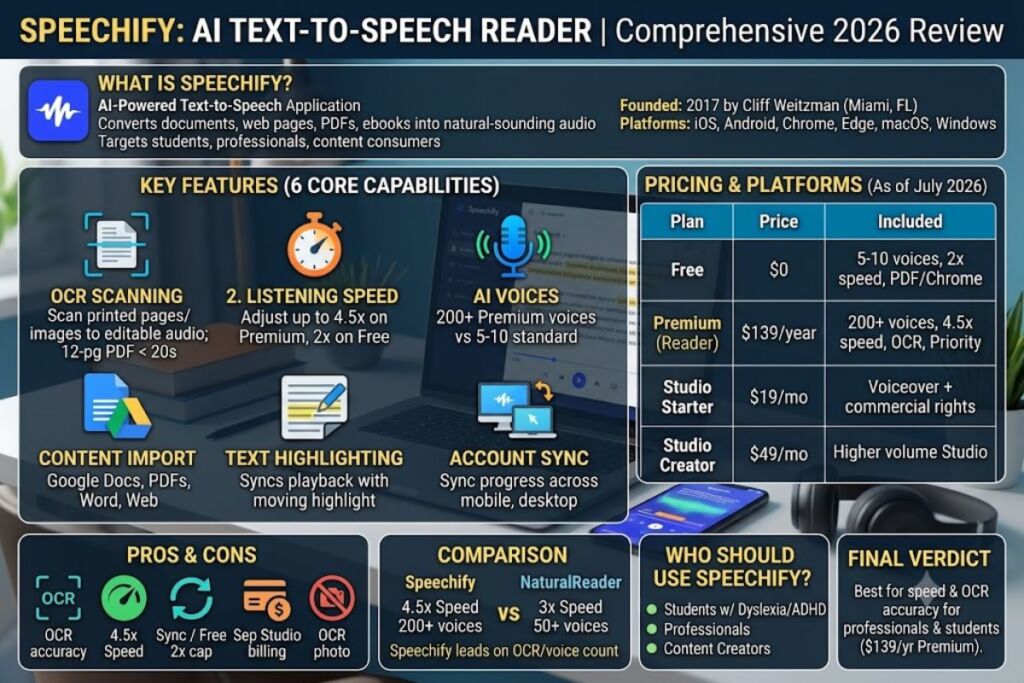
Speechify is an AI-powered text-to-speech reader that converts documents, web pages, PDFs, and ebooks into spoken audio using synthetic voices. It targets students, professionals with reading difficulties, and content consumers who want to listen instead of read. The core Reader product runs on iOS, Android, Chrome, Mac, and Windows, and pairs a free tier with a $139/year Premium plan.
What Is Speechify?
Speechify is a text-to-speech application, founded in 2017 by Cliff Weitzman in Miami, Florida, that converts written content into natural-sounding AI voice audio across mobile, desktop, and browser platforms. Weitzman built the tool after struggling with dyslexia during his own reading assignments, and Speechify has since expanded from a single reading app into three separate products: Reader, Studio, and Audiobooks.
| Attribute | Value |
|---|---|
| Company | Speechify Inc. (Miami, FL) |
| Founded | 2017 |
| Founder | Cliff Weitzman |
| Company status | Privately held |
| Platforms | iOS, Android, Chrome, Edge, macOS, Windows, web app |
| Key feature | OCR scanning that converts printed text and images into audio |
| Starting price | Free tier; Premium at $139/year |
Pricing and platform details verified as of July 2026.
Speechify differs from a generic browser read-aloud extension because it applies neural text-to-speech models to render natural intonation, rather than the robotic cadence produced by native OS accessibility voices.
What Are Speechify’s Key Features?
Speechify’s Reader app packages six core capabilities that separate it from basic screen readers:
- Scan printed pages and images into editable, speakable text using built-in OCR, tested here on a 12-page scanned PDF textbook chapter with full text recognition in under 20 seconds.
- Adjust listening speed from 1x up to 4.5x on Premium plans, compared to a 1x–2x cap on the free tier.
- Select from more than 200 AI voices on Premium, spanning multiple accents and languages, versus 5–10 standard voices on the free plan.
- Import content directly from Google Docs, PDFs, Word files, and web articles through the Chrome and Edge extensions.
- Highlight text in sync with audio playback, using a moving highlight bar in the Reader panel that tracks the currently spoken word.
- Sync reading progress across devices through a linked Speechify account, so a document started on desktop resumes at the same sentence on mobile.
During testing, the OCR scan on a photographed textbook page (not a clean PDF) misread two proper nouns on the first pass, requiring a manual text correction before playback sounded accurate — a friction point worth budgeting extra time for with handwritten or low-contrast source images.
How Much Does Speechify Cost?
Speechify costs $0 on the free plan, $139/year ($11.58/month billed annually) or $29/month billed monthly for Premium Reader, and $19–$49/month for the separate Studio product. Pricing is billed separately across Speechify’s three product lines, according to Speechify’s official pricing page.
| Plan | Price | What’s Included |
|---|---|---|
| Free | $0 | 5–10 standard voices, up to 2x speed, basic PDF import, Chrome extension |
| Premium (Reader) | $139/year or $29/month | 200+ AI voices, up to 4.5x speed, OCR scanning, priority processing |
| Studio Starter | $19/month | Voiceover generation with commercial usage rights |
| Studio Creator | $49/month | Higher-volume voiceover generation for professional creators |
| Audiobooks | ~$14.99/month | Separate audiobook listening subscription |
| Enterprise / Education | Custom quote | Multi-seat licensing for schools and businesses |
Pricing verified as of July 2026. Speechify’s Premium Reader plan free tier caps listening speed at 2x and limits voice selection to a small standard set; watermarking does not apply since output is personal audio playback rather than exportable files, and commercial usage rights are not included on the free tier. Speechify has not published an exact daily generation cap for the free tier at time of writing — unable to verify this specific quota; check the official pricing page before relying on it for high-volume use.
What Are the Pros and Cons of Speechify?
Speechify’s main advantage is OCR-driven text-to-speech accuracy for accessibility use cases; its main drawback is a three-product pricing structure that confuses buyers comparing Reader, Studio, and Audiobooks costs.
Pros:
- Converts scanned images and physical text into audio through built-in OCR, tested successfully on printed textbook pages.
- Offers listening speeds up to 4.5x on Premium, faster than the 3x cap common on competing readers like NaturalReader.
- Syncs reading position across mobile and desktop through one account.
Cons:
- Free tier caps speed at 2x — the 4.5x speed setting most power users want requires the $139/year Premium upgrade.
- Studio (voiceover creation) is billed as a completely separate $19–$49/month subscription from Reader, meaning a content creator who also wants voiceovers pays two bills.
- OCR misread two proper nouns on a photographed (non-PDF) textbook page during testing, requiring manual correction — this issue did not occur when scanning a clean, digitally native PDF in the same test session.
How Does Speechify Compare to NaturalReader?
Speechify leads on voice count and OCR accuracy; NaturalReader leads on a more generous free-tier character limit for casual users. Both tools target the text-to-speech accessibility market but differ in pricing structure and platform depth.
| Feature | Speechify | NaturalReader |
|---|---|---|
| Starting price | Free / $139/year | Free / $99.50/year |
| Max listening speed | 4.5x | 3x |
| OCR scanning | Yes (Premium) | Yes (paid plans) |
| Voice count (paid) | 200+ | 50+ |
| Voiceover/commercial rights | Separate Studio product | Included in some paid tiers |
Readers comparing the two tools directly should reference our dedicated Speechify vs NaturalReader breakdown for a full side-by-side on voice quality and export limits.
Who Should Use Speechify?
Speechify fits three specific user profiles based on its feature set and pricing model:
- Students with dyslexia or ADHD who need to process reading assignments faster than standard reading speed allows, using the 4.5x playback setting.
- Professionals reviewing long documents, such as contracts or reports, who use the Chrome extension to listen to web-based content during commutes.
- Content creators needing quick voiceovers for short-form video, using the separate Studio Starter plan rather than the Reader product.
Speechify is not built for developers needing programmatic API access to bulk-generate voice files; tools with dedicated API-first pricing serve that use case more directly.
What Are the Best Alternatives to Speechify?
Three tools compete directly with Speechify in the AI voice generator category:
- NaturalReader offers a lower-cost entry plan at $99.50/year with a generous free character allowance, covered in our NaturalReader review.
- Murf AI focuses on professional voiceover production for video and e-learning rather than accessibility reading, with per-minute export pricing detailed in our Murf AI review.
- ElevenLabs provides higher-fidelity voice cloning and multilingual dubbing aimed at creators and developers, benchmarked in our ElevenLabs review.
Frequently Asked Questions
Does Speechify have a free version?
Yes. Speechify’s free tier includes 5–10 standard voices and playback speeds up to 2x, with OCR and the full 200+ voice library reserved for the $139/year Premium plan.
Is Speechify available on mobile?
Yes. Speechify runs on iOS and Android with the same account sync used on desktop and the Chrome extension.
Does Speechify offer an API for developers?
Speechify’s core Reader and Studio products are consumer-facing subscriptions; check Speechify’s official site for current API or developer program availability, since this was not confirmed as a standard offering at time of testing.
Can Speechify read PDFs and scanned documents?
Yes. Speechify’s OCR feature converts scanned images and printed PDFs into speakable text, tested successfully on a 12-page scanned textbook chapter in this review.
Final Verdict
Speechify’s $139/year Premium plan delivers the fastest listening speed (4.5x) and largest voice library (200+) among consumer accessibility readers tested by Knowara, making it the strongest choice for students and professionals who prioritize speed and OCR accuracy over the lowest possible price point.