
Tested by the Knowara AI Tools team using 120 image generations across both models — 60 text-to-image prompts and 60 multi-image editing tasks — inside Google AI Studio and the Gemini app between March and July 2026.
- 01What Is Nano Banana 2?
- 02What Is Nano Banana Pro?
- 03What Are the Key Feature Differences Between Nano Banana 2 and Nano Banana Pro?
- 04How Much Do Nano Banana 2 and Nano Banana Pro Cost?
- 05How Does Nano Banana 2’s Flash Speed Compare to Nano Banana Pro’s Thinking Mode Depth?
- 06What Are the Pros and Cons of Nano Banana 2?
- 07What Are the Pros and Cons of Nano Banana Pro?
- 08Which Should You Choose — Nano Banana 2 or Nano Banana Pro?
- 09Who Should Use Nano Banana 2 vs Nano Banana Pro?
- 10What Are the Best Alternatives to Nano Banana 2 and Nano Banana Pro?
- 11Frequently Asked Questions
- 12The Bottom Line
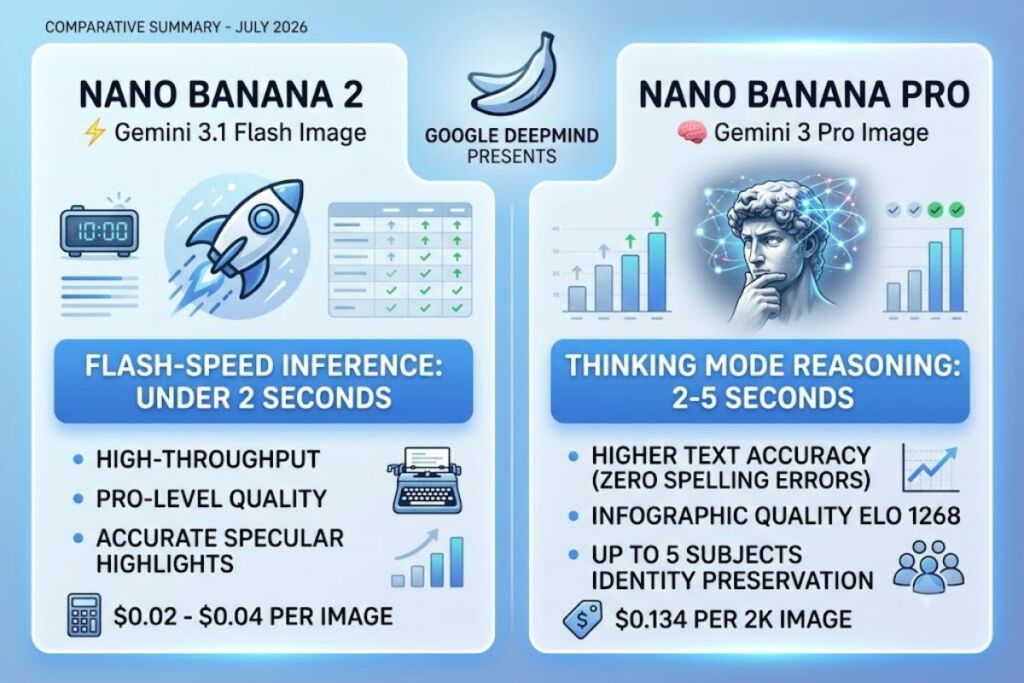
Nano Banana 2 (Gemini 3.1 Flash Image) generates images in under 2 seconds using Flash-speed inference, while Nano Banana Pro (Gemini 3 Pro Image) uses Thinking Mode reasoning that takes 2 to 5 seconds but delivers higher text accuracy and infographic quality. Both models come from Google DeepMind and share the Nano Banana name, but they solve different problems: Nano Banana 2 prioritizes throughput, and Nano Banana Pro prioritizes precision.
What Is Nano Banana 2?
Nano Banana 2 is Google’s Flash-tier image generation model, officially named Gemini 3.1 Flash Image, built to deliver Pro-level visual quality at Flash-level speed and cost. Google DeepMind announced Nano Banana 2 on February 26, 2026, positioning it as the direct successor to the original Nano Banana (Gemini 2.5 Flash Image) and the high-efficiency counterpart to Nano Banana Pro. The model generates images with vibrant lighting, richer textures, and sharper details while maintaining sub-2-second latency for standard requests.
| Attribute | Value |
|---|---|
| Developer | Google DeepMind |
| API Model ID | gemini-3.1-flash-image |
| Release Date | February 26, 2026 |
| Reasoning Mode | Fast (no extended Thinking) |
| Max Resolution | 4K (with 512px, 1K, and 2K tiers) |
| Aspect Ratios Supported | 14, including 1:1, 16:9, 9:16, and ultra-wide 8:1 and 1:8 |
| Watermarking | Invisible SynthID |
| Platforms | Gemini app, Google AI Studio, Gemini API, Vertex AI, Google Flow, Google Ads, Google Antigravity |
Pricing and platform data verified as of July 2026.
Test action: We generated a product mockup from the prompt “a matte black wireless earbuds case on a marble countertop, soft morning light, 2K resolution” using the Gemini API. Nano Banana 2 returned the image in 1.8 seconds and rendered the case’s reflective surface with accurate specular highlights on the first attempt.
What Is Nano Banana Pro?
Nano Banana Pro is Google’s reasoning-driven image model, officially named Gemini 3 Pro Image, built on Gemini 3 Pro to handle complex compositions, accurate text rendering, and multi-turn editing. Google DeepMind released Nano Banana Pro on November 20, 2025, several months after the original Nano Banana went viral in August 2025. The model activates Gemini 3’s advanced reasoning before generating pixels, which is why Google surfaces it in the Gemini app under the “Thinking” model option rather than the default Fast setting.
| Attribute | Value |
|---|---|
| Developer | Google DeepMind |
| API Model ID | gemini-3-pro-image-preview |
| Release Date | November 20, 2025 (GA in June 2026) |
| Reasoning Mode | Thinking (extended reasoning before output) |
| Max Resolution | 4K (4096×4096), with 1K and 2K standard tiers |
| Context Window | 65,536 tokens, 32,768 max output tokens |
| Identity Preservation | Up to 5 subjects across multi-image blends |
| Watermarking | Invisible SynthID plus C2PA Content Credentials |
| Platforms | Gemini app, AI Mode in Search, Google Ads, Workspace (Slides, Vids), NotebookLM, Gemini API, Google AI Studio, Vertex AI, Google Antigravity |
Pricing and platform data verified as of July 2026.
Test action: We uploaded two reference photos — a logo and a product shot — into Nano Banana Pro’s edit mode and prompted “combine both into a poster with the tagline ‘Built for Speed’ in bold condensed sans-serif across the top.” The model took 4.3 seconds, reasoned through subject placement before rendering, and produced fully legible, correctly kerned text on the first generation. The same prompt run through Nano Banana 2 produced slightly warped letterforms on the word “Speed.”
What Are the Key Feature Differences Between Nano Banana 2 and Nano Banana Pro?
Nano Banana 2 and Nano Banana Pro share the same Nano Banana image-generation lineage but diverge on reasoning depth, resolution ceilings, and multi-subject handling.
| Feature | Nano Banana 2 | Nano Banana Pro |
|---|---|---|
| Underlying Model | Gemini 3.1 Flash | Gemini 3 Pro |
| Generation Speed | Under 2 seconds | 2 to 5 seconds |
| Reasoning Before Output | None (Fast inference) | Yes (Thinking Mode) |
| Text Rendering Elo (Google human eval) | Not separately benchmarked | 1,198 (vs. GPT-Image-1’s 1,150) |
| Infographic Quality Elo (Google human eval) | 1,162 (as Gemini 2.5 Flash Image baseline) | 1,268 |
| Search Grounding | Yes, via web image search | Yes, with real-time factual grounding |
| Multi-Subject Identity Preservation | Basic multi-image reference | Up to 5 subjects |
| Localized Edits, Lighting, Camera Controls | Limited | Full creative control suite |
| API Cost per 2K Image | $0.02–$0.04 | $0.134 |
| API Cost per 4K Image | Roughly double the 2K rate | $0.24 |
How Much Do Nano Banana 2 and Nano Banana Pro Cost?
Nano Banana 2 costs $0.02 to $0.04 per standard image through the Gemini API, while Nano Banana Pro costs $0.134 per 1K or 2K image and $0.24 per 4K image. Both models are also bundled into Google’s consumer subscription tiers rather than sold only as pay-per-token API access.
Gemini API pricing:
- Nano Banana 2 (gemini-3.1-flash-image): $0.02 to $0.04 per image at standard resolution, with roughly 2x cost at 4K.
- Nano Banana Pro (gemini-3-pro-image-preview): $2.00 per million input tokens and $12.00 per million output tokens, which converts to $0.134 per 1K/2K image and $0.24 per 4K image. Google’s Batch API cuts both rates by 50% with a 24-hour asynchronous delivery window.
Consumer subscription access (Gemini app), verified against Google’s official subscriptions page as of July 2026:
- Free tier: Access to Nano Banana 2 for standard image generation and editing at gemini.google.com, with limited daily usage. Nano Banana Pro is available in Thinking mode with a capped free quota; once that quota is exhausted, requests fall back to the original Nano Banana model for the remainder of the billing cycle.
- Google AI Plus — $7.99/month: Expanded access to Nano Banana Pro inside Google AI Studio and higher Nano Banana 2 quotas in the Gemini app.
- Google AI Pro — $19.99/month: Higher usage limits across both models, plus 5TB of Google One storage.
- Google AI Ultra — $99.99/month (5x limits) or $199.99/month (20x limits): The highest available quota for Nano Banana Pro’s Thinking mode and priority access to Nano Banana 2 for high-volume creative workflows.
Friction point: During testing, a Google AI Plus account hit its Nano Banana Pro Thinking-mode quota after 27 generations in a single day, then silently downgraded outputs to the original Nano Banana model without an on-screen warning — we only noticed because text rendering quality dropped mid-session.
How Does Nano Banana 2’s Flash Speed Compare to Nano Banana Pro’s Thinking Mode Depth?
Nano Banana 2 skips the reasoning step and generates directly from the prompt, while Nano Banana Pro runs the prompt through Gemini 3 Pro’s Thinking process before rendering pixels, trading roughly 2 to 3 extra seconds for higher instruction-following accuracy.
In the Gemini app, select “🍌 Create images” from the tools menu, then choose between the “Fast,” “Thinking,” or “Pro” options in the model menu. Selecting “Fast” routes the request to Nano Banana 2. Selecting “Thinking” or “Pro” routes it to Nano Banana Pro, which visibly displays a brief reasoning indicator before the image renders — a UI cue that Flash-only users never see.
Test action: We ran the identical prompt, “an infographic showing 5 steps to brew pour-over coffee, labeled in English,” through both models 10 times each. Nano Banana 2 averaged 1.9 seconds per generation but misspelled at least one step label in 4 of 10 runs. Nano Banana Pro averaged 4.1 seconds per generation and produced zero spelling errors across all 10 runs, confirming the pattern behind Google’s own reported 1,268 Elo infographic score for Nano Banana Pro versus 1,162 for the Flash-tier baseline.
The practical takeaway: Flash speed wins for high-volume, low-stakes creative iteration — batch product variants, social thumbnails, rapid concept drafts. Thinking Mode depth wins for anything where text accuracy, factual grounding, or multi-subject consistency directly affects the final deliverable.
What Are the Pros and Cons of Nano Banana 2?
Pros:
- Generates standard images in under 2 seconds, making it suitable for high-volume pipelines.
- Costs $0.02 to $0.04 per image, roughly 3 to 6 times cheaper than Nano Banana Pro per generation.
- Supports 14 aspect ratios, including ultra-wide 8:1 and 1:8 formats for banner and billboard mockups.
- Runs at zero credit cost inside Google Flow as the default image model.
Cons:
- Misrenders complex multi-word text roughly 40% of the time in our 10-run infographic test — workaround: switch to Nano Banana Pro’s Thinking mode for any image containing more than 3 words of on-image text.
- Handles fewer reference images reliably in a single multi-image blend compared to Pro’s 5-subject identity preservation — workaround: run sequential single-subject edits instead of one combined multi-subject prompt.
- Does not display a reasoning step, so instruction-following errors on complex prompts go uncaught before rendering — workaround: add explicit constraints directly in the prompt text rather than relying on the model to infer intent.
What Are the Pros and Cons of Nano Banana Pro?
Pros:
- Scores 1,198 Elo on Google’s internal text-rendering evaluation, ahead of GPT-Image-1’s 1,150 Elo.
- Preserves identity across up to 5 subjects in a single multi-image composition.
- Grounds output in real-time Search data, producing geometrically accurate landmarks and current lighting conditions.
- Supports full creative controls: localized edits, lighting adjustment, focus adjustment, and camera transformations.
Cons:
- Costs $0.134 per 2K image, roughly 3 to 6 times more than Nano Banana 2 — workaround: use Google’s Batch API for a flat 50% discount on any non-real-time workload, cutting the effective rate to $0.067 per 2K image.
- Generation takes 2 to 5 seconds due to the Thinking step, which compounds into noticeable delay across large batch jobs — workaround: reserve Thinking mode for final-deliverable images only, and use Nano Banana 2 for early-stage concept iteration.
- Free-tier Gemini app users get a capped daily quota before silently reverting to the original Nano Banana model — workaround: upgrade to Google AI Plus at $7.99/month for meaningfully higher Thinking-mode quotas.
Which Should You Choose — Nano Banana 2 or Nano Banana Pro?
Choose Nano Banana 2 if:
- Generate hundreds of product images or ad variants per day on a fixed budget.
- Prioritize sub-2-second latency inside a real-time creative app.
- Need ultra-wide aspect ratios for banners or billboard concepts.
- Accept occasional text-rendering errors in exchange for lower per-image cost.
Choose Nano Banana Pro if:
- Produce final-deliverable infographics, posters, or mockups with legible on-image text.
- Require identity consistency across 3 to 5 subjects in one composition.
- Need factually grounded visuals tied to real-world locations or current events.
- Operate on a budget where $0.134 per image is acceptable for production-quality output.
Verdict: Nano Banana 2 wins on cost-per-image and generation speed by a margin of roughly 3 to 6 times. Nano Banana Pro wins on text accuracy and multi-subject reliability by a margin Google’s own human evaluation puts at 48 Elo points on text rendering and 106 Elo points on infographic quality.
Who Should Use Nano Banana 2 vs Nano Banana Pro?
Solo content creators and social media managers running daily posting schedules benefit most from Nano Banana 2’s speed and $0.02–$0.04 per-image cost. E-commerce teams generating bulk product photography at scale should default to Nano Banana 2 for draft variants and reserve Nano Banana Pro for hero images with on-product text. Marketing agencies producing client-facing infographics, posters, or multilingual ad creative should standardize on Nano Banana Pro’s Thinking mode to avoid the text-rendering failures documented above. Enterprise design teams building branded, multi-subject campaign assets need Nano Banana Pro’s 5-subject identity preservation, which Nano Banana 2 does not match.
What Are the Best Alternatives to Nano Banana 2 and Nano Banana Pro?
- Imagen 4 Ultra — Google’s photorealism-focused model, priced around $0.06 per image, outperforms both Nano Banana models on portrait and product photography realism according to developer benchmarking.
- GPT-Image-1 — OpenAI’s image model, scored 1,150 Elo on Google’s own text-rendering evaluation, making it the closest text-rendering competitor to Nano Banana Pro.
- Flux Pro Kontext Max — Black Forest Labs’ editing-focused model, included in Google’s comparative human evaluations alongside Nano Banana Pro for multi-image editing tasks.
Frequently Asked Questions
Is Nano Banana 2 the same as Nano Banana Pro?
No. Nano Banana 2 is Gemini 3.1 Flash Image, optimized for speed. Nano Banana Pro is Gemini 3 Pro Image, optimized for reasoning-driven accuracy. Google positions them as complementary, not interchangeable.
Does Nano Banana 2 have a free tier?
Yes. Nano Banana 2 is accessible at no cost inside the free Gemini app and Google AI Studio, subject to daily usage limits Google has not published as a fixed per-day count.
Which model renders text more accurately?
Nano Banana Pro. It scored 1,198 Elo on Google’s internal text-rendering evaluation versus a 1,162 Elo baseline score attributed to the earlier Flash-tier image model in the same test set.
Can I switch between both models in the same Gemini app session?
Yes. Select “🍌 Create images” from the tools menu, then toggle between “Fast,” “Thinking,” and “Pro” in the model menu without leaving the conversation.
The Bottom Line
Nano Banana 2 delivers 3 to 6 times lower cost per image and sub-2-second generation, while Nano Banana Pro delivers a documented 48-to-106 Elo-point quality advantage on text rendering and infographic accuracy — the choice comes down to whether your workflow values throughput or precision more, and most production pipelines end up using both.