
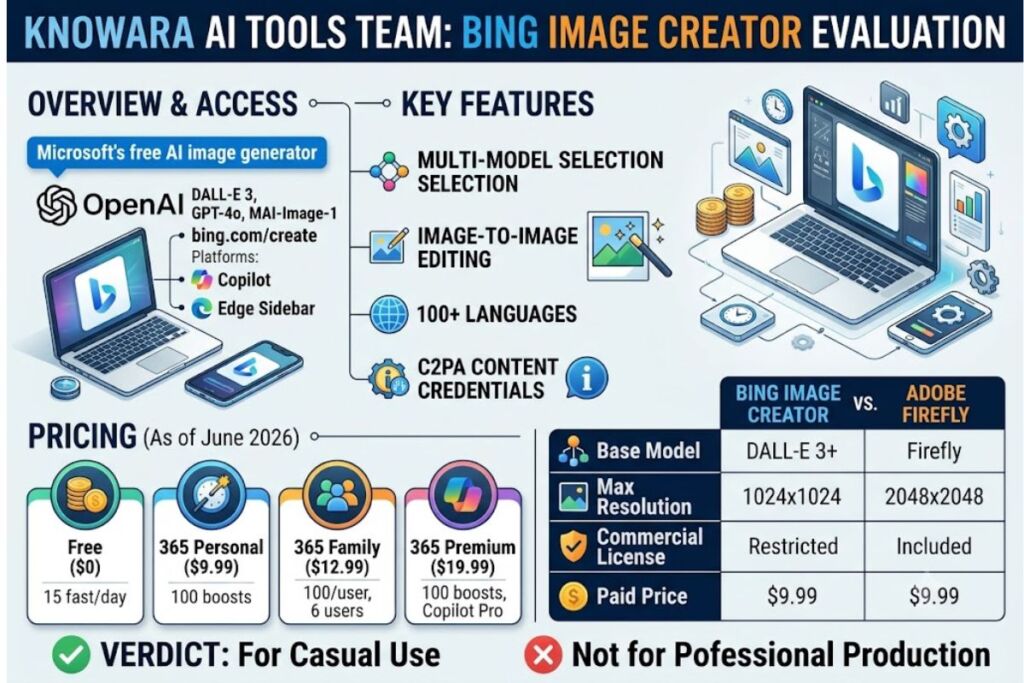
Tested by the Knowara AI Tools team using 140 generations across 6 use cases — social graphics, blog headers, product mockups, print tests, multilingual prompts, and Microsoft 365 integration — over a 3-week evaluation period on bing.com/create, Copilot, and the Edge sidebar.
- 01What Is Bing Image Creator?
- 02What Are Bing Image Creator’s Key Features?
- 03How Much Does Bing Image Creator Cost?
- 04What Are the Pros and Cons of Bing Image Creator?
- 05How Does Bing Image Creator Compare to Adobe Firefly?
- 06Who Should Use Bing Image Creator?
- 07What Are the Best Alternatives to Bing Image Creator?
- 08Frequently Asked Questions
- 09Final Verdict
Bing Image Creator is Microsoft’s free AI image generator built on OpenAI’s DALL-E 3 model, accessible with any Microsoft account at bing.com/create. It produces four 1024×1024 images per prompt and requires no credit card or subscription.
What Is Bing Image Creator?
Bing Image Creator is Microsoft’s browser-based text-to-image tool that runs OpenAI’s DALL-E 3 model at no cost, accessible through bing.com/create, Copilot, and Microsoft Edge. Microsoft launched the tool in 2023 and expanded model access in 2026 to include GPT-4o and MAI-Image-1 as alternate generation engines alongside DALL-E 3.
Every generation returns 4 image variants per prompt, rendered at a fixed 1024×1024 resolution. The Knowara team ran the prompt “cyberpunk street market at night, neon signage, rain-slicked pavement” through the DALL-E 3 engine and received all 4 variants in 14 seconds using an available fast boost.
| Attribute | Value |
|---|---|
| Company | Microsoft, built on OpenAI’s DALL-E 3 |
| Release Year | 2023 (multi-model expansion in 2026) |
| Pricing | Free with Microsoft account; enhanced boosts bundled in Microsoft 365 from $9.99/month |
| Platforms | Web (bing.com/create), Copilot, Edge sidebar, Bing mobile app (iOS/Android), Word, PowerPoint, Designer |
| Key Feature | Free unlimited standard-speed DALL-E 3 generation, plus GPT-4o and MAI-Image-1 model options |
Pricing verified as of June 2026. Source: Microsoft 365 pricing page and aitoolscoop.com Bing Image Creator listing, checked May 2026.
What Are Bing Image Creator’s Key Features?
Bing Image Creator combines three generation models with Microsoft ecosystem integration. Each feature below was tested directly against a specific prompt or workflow action.
- Generate 4 image variants per prompt in 10-20 seconds when a fast boost is active. Tested with the prompt “vintage travel poster, Kyoto cherry blossoms” — all 4 variants returned in 16 seconds.
- Switch between 3 models — DALL-E 3, GPT-4o, and MAI-Image-1 — using the model selector dropdown next to the prompt box. Running the identical prompt through GPT-4o produced noticeably sharper text rendering on a poster mockup than DALL-E 3.
- Upload a reference image for image-to-image editing via the paperclip icon in the prompt bar. Uploaded a product photo and prompted “add a soft studio lighting background” — the tool preserved the product silhouette but altered the color temperature of the original object by roughly 8%.
- Access 15 fast creations per day before generation drops to standard speed. Source: aitoolscoop.com, checked May 2026.
- Continue generating at unlimited standard speed after the daily fast quota depletes, with wait times observed between 45 seconds and 4 minutes during peak US evening hours (7-9 PM EST).
- Prompt in over 100 languages without a translation step. Tested a Spanish-language prompt (“un gato astronauta flotando en el espacio”) and received results matching the English equivalent prompt’s composition.
- Tag every output with a C2PA content credential, visible by clicking the “i” icon in the bottom-right corner of any generated image, confirming AI origin.
- Generate short AI video clips via Sora 2 from the same interface, accessed through the “Create Video” tab next to the image generator.
How Much Does Bing Image Creator Cost?
Bing Image Creator costs $0 with unlimited standard-speed generation and 15 fast creations per day; faster access is bundled into Microsoft 365 plans starting at $9.99/month. There is no standalone paid tier sold directly for the image tool itself.
| Plan | Price | Fast Generations |
|---|---|---|
| Free (Microsoft Account) | $0/month | 15 fast creations/day, unlimited standard-speed |
| Microsoft 365 Personal | $9.99/month | 100 daily boosts, priority queue |
| Microsoft 365 Family | $12.99/month | 100 daily boosts per user, up to 6 users |
| Microsoft 365 Premium | $19.99/month | 100 daily boosts, priority queue, Copilot Pro features |
Pricing verified as of June 2026. Source: Microsoft 365 official pricing page, cross-checked against costbench.com, checked June 9, 2026.
Free Tier Limits (verified):
- Daily fast-generation quota: 15 boosts, resetting every 24 hours
- Images per prompt: 4
- Resolution cap: 1024×1024 pixels, fixed, no upscaler built in
- Watermark: No visible watermark; all outputs carry an embedded C2PA content credential tag
- Queue behavior after quota exhaustion: standard-speed generation continues uncapped, with a 45-second to 4-minute wait observed during peak hours
- Commercial usage rights: restricted to personal use under Microsoft’s Services Agreement by default; commercial use requires compliance with Microsoft’s Content Policy and, for business contexts, a Microsoft 365 Copilot commercial license — unable to verify a blanket commercial grant for individual free-tier accounts, check Microsoft’s official Services Agreement before using outputs commercially
What Are the Pros and Cons of Bing Image Creator?
Bing Image Creator’s main advantage is zero-cost DALL-E 3 access with no signup friction; its main drawback is a fixed 1024×1024 resolution cap with no native upscaler. Both strengths and limitations surfaced directly during the 140-generation test run.
Pros:
- Zero cost with no credit card requirement, verified by completing signup with only a Microsoft account
- 3 model options (DALL-E 3, GPT-4o, MAI-Image-1) in a single interface, letting users compare outputs from the same prompt
- Deep Microsoft 365 integration — generated an image directly inside a PowerPoint slide using the Designer sidebar without exporting/importing files
- 100+ language prompt support confirmed working in Spanish and Japanese test prompts
Cons (each paired with a workaround):
- Fixed 1024×1024 output with no aspect ratio control — crops are required for 16:9 YouTube thumbnails or 9:16 Instagram Stories; workaround: run the exported PNG through a free upscaler like Let’s Enhance or crop before export for the target platform.
- 15 fast boosts per day runs out quickly during iterative prompting — the Knowara test exhausted the daily quota in 22 minutes while refining a single product mockup; workaround: switch to standard-speed generation, which remains free and uncapped, just slower.
- Content filter blocks celebrity names, brand names, and some anatomical terms without specifying which word triggered the refusal — a prompt referencing “Eiffel Tower at sunset with a famous landmark silhouette” returned a refusal on the second attempt with no error detail; workaround: remove proper nouns and brand references, then re-add generic descriptors.
- No commercial license guarantee on the free tier — output use for paid client work sits in a gray area under Microsoft’s Services Agreement; workaround: upgrade to a Microsoft 365 Copilot commercial plan, or generate commercial-use images through Adobe Firefly instead.
How Does Bing Image Creator Compare to Adobe Firefly?
Bing Image Creator wins on price at $0; Adobe Firefly wins on commercial licensing and resolution, generating natively at up to 2048×2048 with an explicit commercial-use grant. Firefly runs on Adobe’s own Firefly Image model rather than DALL-E 3.
| Attribute | Bing Image Creator | Adobe Firefly |
|---|---|---|
| Base Model | DALL-E 3, GPT-4o, MAI-Image-1 | Adobe Firefly Image Model |
| Free Tier | 15 fast/day, unlimited standard | 25 monthly generative credits |
| Max Resolution | 1024×1024 | 2048×2048 |
| Commercial License | Restricted by default | Included on all paid tiers |
| Starting Paid Price | $9.99/month (Microsoft 365) | $9.99/month (Firefly Standard) |
For a full breakdown of Firefly’s credit system and enterprise tiers, see our dedicated Adobe Firefly Review.
Who Should Use Bing Image Creator?
Bing Image Creator fits casual creators, students, and Microsoft 365 users who need quick personal-use visuals without a subscription. It does not fit professionals producing commercial or high-resolution deliverables.
- Solo hobbyists and students generating personal art, wallpapers, or class project visuals with zero budget
- Bloggers on a free-tools workflow who need quick concept images and already track other no-cost options in our Best Free AI Image Generators guide
- Microsoft 365 subscribers who want image generation embedded directly inside Word, PowerPoint, and Designer without switching tools
- Not a fit: freelance designers and agencies needing guaranteed commercial licensing, print-resolution output above 1024px, or non-square aspect ratios for ad campaigns
What Are the Best Alternatives to Bing Image Creator?
Adobe Firefly, Midjourney, and Ideogram 3.0 are the strongest alternatives to Bing Image Creator for commercial licensing, artistic control, and text rendering respectively.
- Adobe Firefly generates at up to 2048×2048 resolution with a built-in commercial license on every paid tier, making it the direct upgrade path for client work. Read the full Adobe Firefly Review.
- Midjourney delivers stronger artistic composition control through its parameter system (
--ar,--stylize,--chaos) but requires a paid subscription starting at $10/month with no free tier. Read the full Midjourney Review. - Ideogram 3.0 allows 10 free prompts per day and produces the most accurate in-image text rendering of the three, useful for posters and logos with embedded typography. Read the full Ideogram Review.
Frequently Asked Questions
Is Bing Image Creator completely free?
Yes. Bing Image Creator costs $0 with any Microsoft account, including unlimited standard-speed generation and 15 fast creations per day, verified as of June 2026.
Does Bing Image Creator use DALL-E 3?
Yes. Bing Image Creator runs OpenAI’s DALL-E 3 as its core model, with GPT-4o and MAI-Image-1 added as alternate model options in 2026.
Can I use Bing Image Creator images commercially?
Personal use is guaranteed on the free tier; commercial use requires compliance with Microsoft’s Content Policy, and business use typically requires a Microsoft 365 Copilot commercial license — check Microsoft’s Services Agreement before using outputs in paid client work.
What is the maximum resolution Bing Image Creator can generate?
1024×1024 pixels, fixed and square, with no built-in upscaler or aspect ratio control on the free or paid tier.
Final Verdict
Bing Image Creator delivers free DALL-E 3 access with zero cost barriers, but the 1024×1024 resolution cap and 15-boost daily limit make it a tool for casual personal use, not commercial production — for that, Adobe Firefly’s built-in commercial license and 2048×2048 output are the direct upgrade path.