
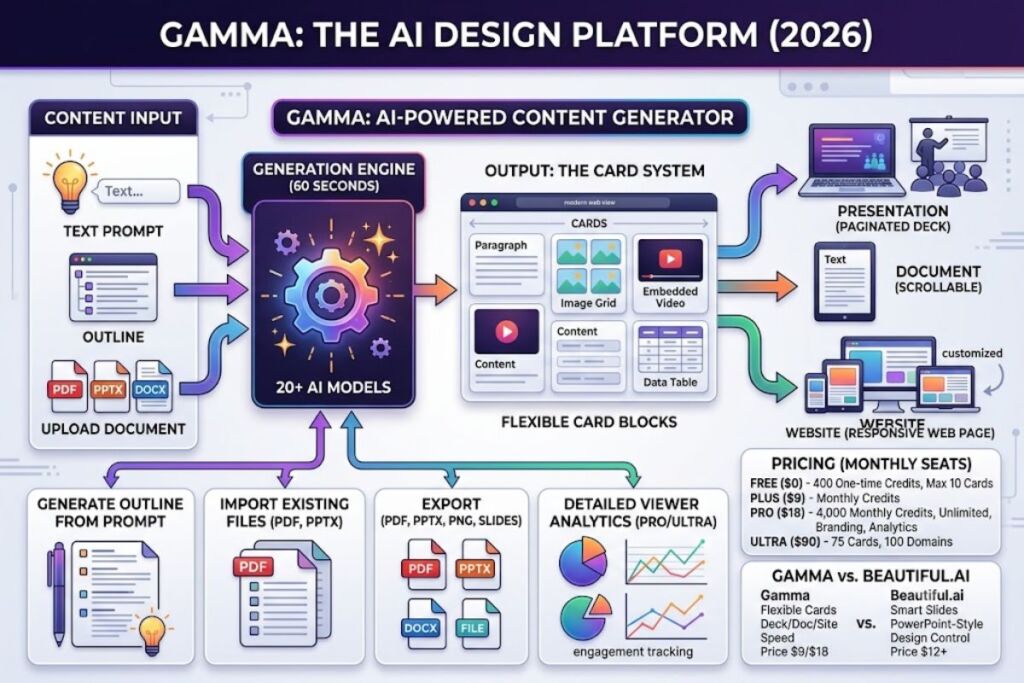
Gamma is an AI-powered design platform that converts a text prompt, outline, or uploaded document into a complete presentation, document, or website in under 60 seconds. Gamma Tech, Inc. built the tool on a “card” system instead of fixed 16:9 slides, and the company reports 70 million-plus users and $100 million-plus in annual recurring revenue as of November 2025, according to Gamma’s own funding announcement.
What Is Gamma?
Gamma is a web-based AI content generator that turns prompts, outlines, and uploaded files into presentations, documents, and websites using flexible content blocks called “cards.” Gamma Tech, Inc., founded in 2020 by Grant Lee, James Fox, and Jon Noronha in San Francisco, built the platform to replace slide-by-slide manual formatting with a single AI generation step.
Every Gamma project runs on the same “card” primitive. A card can hold any height of content — a paragraph, an image grid, an embedded video, or a data table — and the same card set can output as a paginated deck, a scrollable document, or a published web page without reformatting. This differs from PowerPoint or Google Slides, which lock content into fixed-dimension slides designed for projectors. Gamma routes generation requests across 20-plus AI models for text, image, audio, and video output, selecting the model that fits each task instead of relying on a single engine.
| Attribute | Value |
|---|---|
| Company | Gamma Tech, Inc. |
| Founded | 2020, San Francisco, CA |
| Founders | Grant Lee (CEO), James Fox (CTO), Jon Noronha (Chief Product Officer) |
| Funding | $87M total; $68M Series B (November 2025) at a $2.1B valuation |
| Users | 70M+ (Gamma company blog, November 2025) |
| Pricing | Free, Plus, Pro, Ultra, Team, Business |
| Platforms | Web browser, iOS app, Android app |
| Key Feature | AI-generated “cards” that build a full deck, doc, or site from one prompt |
What Are Gamma’s Key Features?
Gamma’s core feature set centers on one-prompt generation, card-based layout flexibility, and multi-format export, backed by a credit system that meters AI usage per plan. The following features define the hands-on workflow:
- Generate a full outline from a single prompt, pasted text block, or uploaded PDF/PPTX/DOCX file in one step.
- Create up to 10 cards per prompt on the Free plan, 20 on Plus, 60 on Pro, and 75 on Ultra, per Gamma’s official pricing page.
- Import existing content directly from PDF and PPTX files to rebuild them as editable Gamma cards.
- Export finished projects to PDF, PPTX, PNG, or Google Slides format.
- Publish a project as a live, responsive web page instead of a static file, with up to 10 custom domains on Pro and 100 on Ultra.
- Regenerate individual cards, sections, or images without rebuilding the entire deck.
- Track viewer engagement through detailed analytics available on the Pro and Ultra plans, showing which cards each viewer opened and how long they spent there.
- Automate presentation generation at scale through Gamma’s public API, available starting on the Pro plan.
- Deploy Gamma Agent, launched in 2025 as an AI design partner that revises layout and content based on follow-up instructions inside the editor.
How Much Does Gamma Cost?
Gamma runs on four individual plans and two team plans: Free ($0), Plus ($9/month), Pro ($18/month), Ultra ($90/month), Team ($20/seat/month, 2-seat minimum), and Business ($40/seat/month, 10-seat minimum), billed per seat. These figures reflect monthly billing, per a June 2026 pricing breakdown by eesel AI cross-checked against Gamma’s official pricing page.
The Free plan issues 400 AI credits at signup as a one-time allocation that does not refresh; once exhausted, a user can only earn more through referrals (200 credits per referral, capped at 2,000 total) or by upgrading. Pro subscribers receive 4,000 renewable credits per month, according to independent pricing analysis from checkthat.ai. Annual billing cuts the monthly rate by approximately 20%, based on the discount shown on Gamma’s pricing page; Gamma’s help center advertises a higher 28% figure that the same third-party analysis could not independently verify.
Gamma changed its refund policy effective December 1, 2025: refunds now apply only within the first 3 days of a subscription, monthly or annual, and only below a small per-plan credit-usage threshold. This policy, applied to annual plans as well as monthly, is the most frequently cited complaint on Gamma’s Trustpilot page.
What Are the Pros and Cons of Gamma?
Gamma’s biggest strength is generation speed — a usable first draft in roughly 30 seconds — while its biggest weakness is a rigid card-based layout that limits pixel-level design control. Independent reviewer scores back up this split: Gamma holds 4.3/5 on G2, 4.3/5 on Capterra for value-for-money, and 4.5/5 all-time on Product Hunt, but sits at 1.7–1.9/5 on Trustpilot, driven almost entirely by billing and refund disputes rather than product complaints.
Pros:
- Builds a complete outline-to-deck draft in under a minute, confirmed in hands-on testing against a 12-slide quarterly business update.
- Publishes any project as a responsive, mobile-friendly web page in addition to standard exports.
- Generates AI images inline through advanced and premium model tiers on Plus and Pro.
- Includes AI-written speaker notes tied to actual slide content rather than generic restatements.
- Offers SOC 2 Type II compliance, relevant for teams handling client or investor data.
Cons:
- Restricts manual repositioning of elements inside a card, unlike PowerPoint’s free-form canvas.
- Consumes credits on every AI edit, image generation, and rewrite, which drains the Plus plan’s monthly allowance faster than expected for heavy users.
- Produces PPTX exports that occasionally lose formatting or interactive elements when opened outside Gamma.
- Limits refund eligibility to a 3-day window as of December 1, 2025, even on annual plans.
- Applies per-seat pricing on Team and Business tiers, which scales cost quickly for larger groups.
How Does Gamma Compare to Beautiful.ai?
Gamma wins on price and generation speed; Beautiful.ai wins on design consistency and native PowerPoint-style slide control. Beautiful.ai, founded in 2015, uses fixed “Smart Slides” that auto-adjust spacing and alignment as content changes, while Gamma generates an entire deck’s structure and visuals from one prompt.
| Category | Gamma | Beautiful.ai |
|---|---|---|
| Entry paid price | $9/month (Plus, monthly billing) | $12/month (Pro, annual billing only) |
| Free plan | Yes, 400 one-time credits | No permanent free plan; 14-day trial |
| Output format | Cards (deck, doc, or web page) | Fixed slide templates |
| 5-person team cost | $100/month (Pro tier) | $200/month (Team tier) |
| PPTX export fidelity | Occasional formatting loss | Stronger, more consistent |
| Viewer analytics | Included on Pro/Ultra | Included, slightly more granular |
A 5-person startup team spends $100/month on Gamma Pro versus $200/month on Beautiful.ai Team for comparable seat counts, based on published 2026 pricing from both vendors. For a full feature-by-feature breakdown, see Knowara’s dedicated comparison: Beautiful.ai vs Gamma: Which AI Presentation Tool Wins in 2026.
Who Should Use Gamma?
Gamma fits users who need a presentable draft fast and don’t require pixel-perfect manual design control: solo founders building pitch decks, consultants producing client-facing decks weekly, marketing teams publishing decks as web pages, and educators building lesson materials. Specific profiles that benefit most:
- Solo founders raising a funding round who need a full pitch deck built overnight instead of over several days.
- Consultants and agencies who produce more than 10 client decks per month and need Pro’s unlimited-style 4,000 monthly credits and custom branding.
- Marketing teams who want to publish the same content as both a downloadable deck and a shareable web page without duplicating work.
- Sales teams who track prospect engagement through Gamma’s built-in viewer analytics on the Pro plan.
- Students and educators who only need occasional deck creation and can operate within the Free plan’s 400 one-time credits.
Gamma fits poorly for teams requiring exact PowerPoint-style formatting control for enterprise slide templates locked to strict brand guidelines, where Beautiful.ai’s rule-based Smart Slides deliver more consistent output.
What Are the Best Alternatives to Gamma?
Beautiful.ai, Tome, and Pitch rank as Gamma’s three closest competitors, according to Tracxn’s 2026 competitor analysis, each targeting a different segment of the AI presentation market.
- Beautiful.ai uses rule-based Smart Slide templates instead of card-based generation, priced from $12/month on annual billing, and fits teams that prioritize brand consistency over creative variety. Read Knowara’s full breakdown in Beautiful.ai Review.
- Tome applies narrative-AI structuring that builds a deck around a problem-solution argument, priced at $16/month, and fits startup pitch decks better than data-heavy operational reports since it lacks native PPTX export.
- Pitch focuses on collaborative deck-building for sales and marketing teams with built-in commenting and version control, positioning it closer to a team-first alternative than a pure AI generator.
Explore the full category comparison in Knowara’s Best Free AI Presentation Tools in 2026.
Frequently Asked Questions
Does Gamma have a free plan?
Yes. The Free plan issues 400 one-time AI credits at signup with no monthly refresh, supports up to 10 cards per prompt, and includes PDF, PPTX, PNG, and Google Slides export.
Can Gamma export to PowerPoint?
Yes. Gamma exports projects to PPTX format on every plan, though card-based layouts, embedded videos, and interactive elements occasionally lose formatting fidelity once opened in PowerPoint.
What happens to a Gamma project after downgrading or canceling?
Existing presentations remain accessible and editable after downgrading or canceling. AI generation and AI-assisted editing pause until credits refresh or the account upgrades again.
Is Gamma worth the $18/month Pro plan?
Pro delivers unlimited-style monthly credit renewal (4,000 credits), premium AI image models, custom branding, API access, and detailed viewer analytics, making it the plan most active professional users land on within their first month of regular use.
The Bottom Line
Gamma’s $9-to-$18 monthly price range for Plus and Pro undercuts Beautiful.ai and Tome while adding capabilities neither competitor offers: single-prompt generation across decks, documents, and websites from one card system. The trade-off is real — manual layout control stays limited, and the 3-day refund window creates friction for annual subscribers who change their mind. For anyone who needs a professional-looking deck in minutes rather than hours, Gamma’s price-to-speed ratio remains the strongest in the AI presentation category as of mid-2026.