
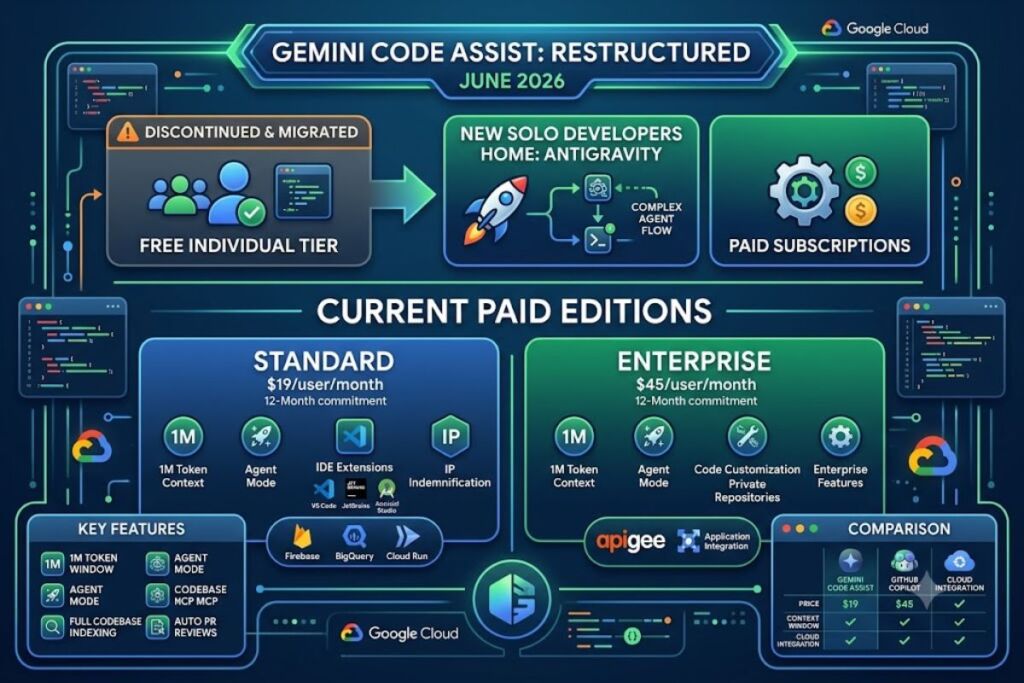
Gemini Code Assist is Google Cloud’s AI coding assistant that generates code completions, chat answers, and multi-file agentic edits inside VS Code, JetBrains IDEs, and Android Studio. Google restructured the product on June 18, 2026, ending free individual access and moving solo developers to Antigravity.
- 01What Is Gemini Code Assist?
- 02What Are Gemini Code Assist’s Key Features?
- 03How Much Does Gemini Code Assist Cost?
- 04What Are the Pros and Cons of Gemini Code Assist?
- 05How Does Gemini Code Assist Compare to GitHub Copilot?
- 06Who Should Use Gemini Code Assist?
- 07What Are the Best Alternatives to Gemini Code Assist?
- 08Frequently Asked Questions
- 09The Bottom Line
What Is Gemini Code Assist?
Gemini Code Assist is Google’s IDE-integrated AI coding assistant, built on the Gemini model family, that provides code completion, chat, and agentic multi-file editing for development teams inside Google Cloud’s ecosystem. It runs as an extension in supported IDEs and connects to Google Cloud projects for billing and license management.
Gemini Code Assist ships in two paid editions: Standard and Enterprise. Google discontinued Gemini Code Assist for individuals — the free consumer tier — on June 18, 2026, according to Google’s official deprecation notice. Individual developers who relied on the free tier now migrate to Antigravity, Google’s separate agent-orchestration platform, or purchase a Standard or Enterprise seat through Google Cloud.
| Attribute | Value |
|---|---|
| Company | Google (Google Cloud) |
| Original Release | 2024 (as a rebrand of Duet AI for Developers) |
| Current Editions | Standard, Enterprise |
| Free Individual Tier | Discontinued June 18, 2026; migrated to Antigravity |
| Context Window | 1,000,000 tokens (Gemini 3 / Gemini 2.5 Pro) |
| Supported IDEs | VS Code, JetBrains (IntelliJ, PyCharm, WebStorm, GoLand, Rider), Android Studio, Cloud Shell Editor, Cloud Workstations |
| Key Feature | Agent mode with MCP server support and Human-in-the-Loop oversight |
| Pricing (Annual Commitment) | Standard: $19/user/month; Enterprise: $45/user/month |
Google Cloud documents these facts on its official product overview and pricing pages, last updated June 29, 2026.
What Are Gemini Code Assist’s Key Features?
Gemini Code Assist bundles seven core capabilities that distinguish it from single-model autocomplete tools.
- Index the local codebase using a 1,000,000-token context window, retaining significantly more cross-file context than tools capped at 200,000 tokens.
- Generate code completions and full functions in real time as developers type, across Java, JavaScript, Python, C, C++, Go, PHP, and SQL.
- Execute multi-step agentic tasks through Agent mode, which edits multiple files, runs system tools, and connects to Model Context Protocol (MCP) servers.
- Review GitHub pull requests automatically: the consumer GitHub app processes 33 reviews per day per installation, and the enterprise version processes at least 100 reviews per day.
- Customize suggestions against private repositories in GitHub, GitLab, and Bitbucket — an Enterprise-only feature Google calls code customization.
- Predict upcoming edits throughout an open file with Next Edit Predictions, a feature that cycles through multiple suggestion candidates.
- Indemnify generated code under Google’s IP indemnification policy, included in both Standard and Enterprise editions.
A concrete example: a backend team refactoring a Cloud Run service can prompt Agent mode to update a REST endpoint, propagate the signature change across four dependent files, and generate matching unit tests in a single conversational turn, based on Google’s own agent mode documentation.
How Much Does Gemini Code Assist Cost?
Gemini Code Assist Standard costs $19 per user per month on a 12-month commitment or $22.80 per user per month billed monthly. Gemini Code Assist Enterprise costs $45 per user per month annually or $54 per user per month billed monthly.
Google Cloud’s official pricing page lists these rates as hourly license fees that convert to the monthly figures above:
| Edition | Monthly Commitment | 12-Month Commitment |
|---|---|---|
| Standard | $22.80/user/month | $19.00/user/month |
| Enterprise | $54.00/user/month | $45.00/user/month |
Standard includes code completion, chat, local codebase awareness, Agent mode, Gemini CLI access, and Gemini in Firebase, Colab Enterprise, BigQuery, and Cloud Run. Enterprise adds code customization against private repositories, Gemini in Apigee, Gemini in Application Integration, and expanded Gemini Cloud Assist features for infrastructure diagnostics.
Google discontinued the free individual tier — which previously offered 6,000 code-related requests per day and 240 chat requests per day — on June 18, 2026. Teams with an existing Standard or Enterprise license retain uninterrupted access; only individual and free-tier accounts were cut off, per Google’s deprecation FAQ.
What Are the Pros and Cons of Gemini Code Assist?
Gemini Code Assist delivers strong value for Google Cloud-centric teams but carries real limitations after the June 2026 tier changes.
Pros:
- Processes a 1,000,000-token context window, exceeding the 32,000–200,000 token range most competing tools support.
- Integrates natively with Firebase, BigQuery, Apigee, Cloud Run, and Application Integration — context general-purpose tools cannot replicate.
- Includes IP indemnification on every generated suggestion across both Standard and Enterprise editions.
- Reviews GitHub pull requests automatically at 33 reviews/day (consumer) or 100+ reviews/day (enterprise) without manual triggering.
Cons:
- No free individual tier remains as of June 18, 2026; solo developers now pay $19–$22.80/month minimum or migrate to Antigravity.
- No extension exists for Neovim or Emacs, unlike competitors with broader editor coverage.
- Code customization against private repositories requires the $45–$54/month Enterprise tier, not Standard.
- Value concentrates around Google Cloud workloads; teams outside GCP capture less of the platform-specific benefit.
How Does Gemini Code Assist Compare to GitHub Copilot?
Gemini Code Assist costs more per seat than GitHub Copilot Business but offers a larger context window and deeper Google Cloud integration; Copilot wins on price and third-party ecosystem breadth.
| Factor | Gemini Code Assist | GitHub Copilot |
|---|---|---|
| Entry Price (Individual) | No free tier as of June 2026 | Copilot Pro at $10/month |
| Team Price | Standard: $19/user/month | Business: $19/user/month |
| Context Window | 1,000,000 tokens | 128,000 tokens (GPT-4-class) to 200,000 (Claude models) |
| Cloud-Native Integration | Firebase, BigQuery, Apigee, Cloud Run | GitHub Actions, Codespaces |
| IDE Coverage | VS Code, JetBrains, Android Studio | VS Code, JetBrains, Neovim, Visual Studio |
Teams already standardized on Google Cloud infrastructure gain more from Gemini Code Assist’s native service hooks, while teams running polyglot IDE environments or seeking the lowest individual price point lean toward Copilot. Read the full breakdown in Knowara’s dedicated GitHub Copilot vs Gemini Code Assist comparison.
Who Should Use Gemini Code Assist?
Gemini Code Assist fits development teams already running production workloads on Google Cloud, plus enterprise teams requiring code customization against private repositories.
- Enterprise platform teams on GCP — squads managing Cloud Run, BigQuery, and Apigee services gain the most from cross-product Gemini integration.
- Regulated organizations needing indemnification — Standard and Enterprise both bundle IP indemnification, satisfying legal review requirements that unindemnified tools cannot meet.
- Teams standardizing on JetBrains or VS Code — full feature parity exists across both IDEs, unlike tools with a primary and secondary editor.
- Android app development teams — native integration inside Android Studio gives Gemini Code Assist an edge unavailable to editor-agnostic competitors.
Solo indie developers evaluating a free tool should look elsewhere: the free individual tier no longer exists, and Standard’s $19–$22.80/month floor exceeds cheaper single-developer alternatives.
What Are the Best Alternatives to Gemini Code Assist?
GitHub Copilot, Cursor, and Amazon Q Developer each replace Gemini Code Assist for developers outside the Google Cloud ecosystem or those needing a lower individual price point.
- GitHub Copilot — Microsoft’s assistant starts at $10/month for individuals and integrates directly with GitHub Actions and Codespaces. Read Knowara’s full GitHub Copilot review.
- Cursor — an AI-native code editor built on VS Code, priced with a Hobby, Pro, and Business tier, favored for its multi-file agentic editing inside a standalone IDE. Read Knowara’s full Cursor review.
- Amazon Q Developer — Amazon’s assistant costs $19/user/month on the Pro tier and offers the strongest native integration for teams managing AWS infrastructure instead of Google Cloud. Read Knowara’s full Amazon Q Developer review.
Frequently Asked Questions
Is Gemini Code Assist still free?
No. Google ended the free Gemini Code Assist for individuals tier on June 18, 2026. Individual developers now migrate to Antigravity or purchase a Standard seat at $19–$22.80/user/month.
Does Gemini Code Assist work in VS Code?
Yes. Gemini Code Assist installs as an extension in VS Code, alongside support for JetBrains IDEs, Android Studio, Cloud Shell Editor, and Cloud Workstations.
What context window does Gemini Code Assist use?
Gemini Code Assist processes up to 1,000,000 tokens per session using Gemini 3 and Gemini 2.5 Pro, exceeding the 200,000-token ceiling of most competing tools.
What replaced the free Gemini CLI for individuals?
Antigravity CLI replaced Gemini CLI for free-tier, Google AI Pro, and Google AI Ultra users starting June 18, 2026. Enterprise Gemini Code Assist license holders retain uninterrupted Gemini CLI access.
The Bottom Line
Gemini Code Assist Standard at $19/user/month delivers the largest context window in its category and pays off specifically for teams running Google Cloud infrastructure; teams outside that ecosystem, or solo developers who relied on the now-discontinued free tier, get better per-dollar value from GitHub Copilot or Antigravity instead.