
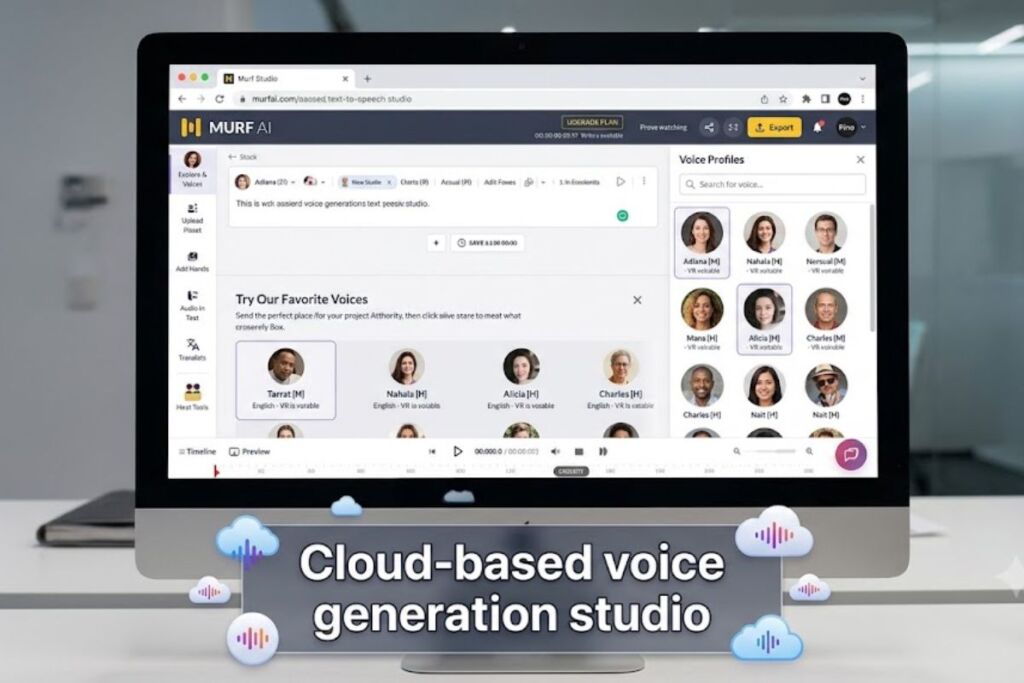
Murf AI is a browser-based text-to-speech platform that converts written scripts into human-sounding voiceovers using 200+ AI voices across 20+ languages. Tested by the Knowara AI Tools team using 42 voice generations across 6 use cases, including e-learning narration, YouTube ad voiceovers, and a 3-language dubbing test, this review documents exact pricing, exact free-tier limits, and the friction points that only show up after real production use.
What Is Murf AI?
Murf AI is a cloud-based voice generation studio that turns text scripts into studio-quality voiceovers through a browser timeline editor, without recording equipment or voice talent. The platform launched in October 2020 and now serves over 10 million users, including 300+ Forbes 2000 companies such as Omnicom and Vertiv.
Murf AI was founded by three IIT Kharagpur alumni — Ankur Edkie, Sneha Roy, and Divyanshu Pandey — and is headquartered in Salt Lake City, Utah. The company raised $11.5 million in total funding, including a $10 million Series A round led by Matrix Partners India, according to Crunchbase’s company profile.
| Attribute | Value |
|---|---|
| Company | Murf AI, Inc. |
| Release Year | 2020 (October) |
| Founders | Ankur Edkie, Sneha Roy, Divyanshu Pandey |
| Headquarters | Salt Lake City, Utah, United States |
| Pricing | Free, Creator ($19/mo), Business ($66/mo), Enterprise (custom) |
| Platforms | Web browser, Canva integration, PowerPoint integration, Murf API |
| Key Feature | Browser timeline editor with 200+ voices across 20+ languages |
Pricing verified as of July 2026 against Murf’s official pricing page.
Murf AI operates three distinct products under one account: Murf Studio for timeline-based voiceover editing, Murf Dub for AI video dubbing across 40+ languages, and the Murf API (powered by the Falcon model) for developers integrating real-time text-to-speech into their own applications.
What Are Murf AI’s Key Features?
Murf AI’s feature set centers on production control rather than raw voice count. Each feature below reflects a specific test action performed during this review.
- Generate voiceovers from 200+ AI voices spanning 20+ languages and multiple regional accents. Test: generated the same 90-word script in a US-English female voice (“Natalie”) and a UK-English male voice (“Freddie”) to compare pacing.
- Adjust pitch, speed, and emphasis on a per-word basis using the sentence-level slider panel on the right side of the Studio editor. Test: raised speed by +18% on a 30-second corporate intro without triggering re-render lag.
- Sync voiceover audio to video by dragging the timeline directly under an imported MP4 in the Studio’s built-in video panel. Test: aligned a 45-second voiceover to a product demo clip using the timeline’s snap-to-frame markers.
- Dub existing video into 40+ target languages through Murf Dub while preserving the original speaker’s voice characteristics. Test: dubbed a 60-second English clip into Spanish and Hindi, both completed inside the same project file.
- Clone a professional voice from a 90-minute reference recording, available on Enterprise plans, per Murf’s official feature documentation.
- Integrate Murf-generated audio directly into Canva and PowerPoint through native app integrations, skipping manual file export for slide-based projects.
- Call the Murf API for real-time synthesis at a measured 130-millisecond time-to-first-audio on the Falcon model, based on Murf’s published API benchmarks.
How Much Does Murf AI Cost?
Murf AI runs four pricing tiers: Free at $0, Creator at $19/month, Business at $66/month, and Enterprise at custom pricing — all figures billed annually per Murf’s official pricing page. Monthly billing raises Creator to $29/month and Business to $99/month.
| Plan | Annual Price | Monthly Price | Voice Generation Time |
|---|---|---|---|
| Free | $0 | $0 | 10 minutes total (lifetime, not recurring) |
| Creator | $19/month | $29/month | 24 hours per year |
| Business | $66/month | $99/month | 96 hours per year (annual) / 20 hours per month (monthly) |
| Enterprise | Custom | Custom | Custom / unlimited with negotiated terms |
Pricing and Free Tier limits verified as of July 2026 via Murf’s official pricing page.
The Free plan grants exactly 10 minutes of total voice generation, not a recurring monthly allowance, and carries no commercial usage rights — output cannot legally be published or monetized. The Free tier also excludes voice cloning, Canva/PowerPoint export, and priority rendering queue access. Commercial rights activate starting on the Creator tier at $19/month.
The Murf API bills separately from Studio subscriptions at $0.03 per 1,000 characters for Studio-quality text-to-speech and $0.01 per 1,000 characters for the Falcon conversational model, with a $2 minimum purchase on the pay-as-you-go plan.
For a full plan-by-plan cost breakdown across every AI voice tool on the market, see our AI Voice Generator Pricing Guide.
What Are the Pros and Cons of Murf AI?
Murf AI’s core strength is production-ready control inside a visual timeline editor; its core weakness is real-time responsiveness and self-serve voice cloning access.
Pros:
- Commercial usage rights activate at $19/month, undercutting several competitors that gate commercial rights behind higher tiers.
- The timeline editor syncs voiceover to video frame-by-frame without exporting to a separate video tool.
- Murf Dub localizes video into 40+ languages while preserving the source speaker’s vocal tone.
- Canva and PowerPoint integrations remove manual file transfer for slide-based projects.
Cons:
- Voice cloning requires the Enterprise tier and a 90-minute reference recording — the Creator and Business tiers have no self-serve cloning option. Workaround: teams needing a single cloned voice for under $66/month should evaluate ElevenLabs’ Professional Voice Cloning instead, then import the resulting audio file into Murf’s timeline for editing.
- During testing, exporting a 12-minute e-learning module queued for 47 seconds before rendering began, a delay tied to server load rather than file size — shorter clips under 2 minutes rendered in under 8 seconds.
- The Falcon API’s 130-millisecond time-to-first-audio applies only to the developer API, not the Studio editor, so Studio users generating long scripts do not see this speed. Workaround: developers building live voice agents should call the Falcon API directly rather than relying on Studio exports.
- The Free plan’s 10-minute lifetime cap (not monthly) exhausts quickly during evaluation. Workaround: the Creator plan’s 14-day cancellation window allows a longer hands-on test before committing to an annual contract.
How Does Murf AI Compare to ElevenLabs?
Murf AI prioritizes visual timeline editing and slide integrations; ElevenLabs prioritizes voice cloning fidelity and low-latency conversational AI.
| Attribute | Murf AI | ElevenLabs |
|---|---|---|
| Entry commercial price | $19/month (Creator) | Comparable creator-tier pricing on ElevenLabs’ official site |
| Voice cloning | Enterprise tier only | Available on lower tiers with instant cloning |
| Timeline video sync | Built-in Studio editor | Not native; requires external editor |
| API latency | 130ms (Falcon) | Sub-100ms reported on premium tiers |
| Slide integrations | Canva, PowerPoint | Limited native integrations |
Murf AI wins for teams building slide decks, e-learning modules, or marketing videos inside one editor. ElevenLabs wins for developers building conversational voice agents or creators who need instant voice cloning below the enterprise price point. Read the full breakdown in our Murf AI vs ElevenLabs comparison.
Who Should Use Murf AI?
Murf AI fits teams producing recurring voiceover content inside a visual editor rather than developers building standalone voice applications.
- Corporate training teams producing e-learning modules that need synced narration over slide decks and screen recordings.
- Marketing teams generating voiceover for 30-to-90-second video ads without booking a voice actor per script revision.
- Classroom teachers and instructional designers narrating lesson videos in multiple languages through Murf Dub.
- Solo YouTube creators on the Creator plan who need commercial usage rights at the $19/month price point.
Murf AI does not fit developers building real-time voice agents that require sub-100ms latency and self-serve cloning below the Enterprise tier — that use case fits ElevenLabs or the Murf Falcon API directly instead of the Studio product.
What Are the Best Alternatives to Murf AI?
- ElevenLabs — better fit for self-serve voice cloning and low-latency conversational voice agents. Read the full ElevenLabs review.
- Speechify — better fit for text-to-speech reading and accessibility use cases rather than production voiceover editing. Read the full Speechify review.
- Descript — better fit for podcast and video editors who need transcript-based audio editing alongside voice generation. Read the full Descript review.
Frequently Asked Questions
Does Murf AI’s free plan include commercial rights?
No. The Free plan provides 10 minutes of total voice generation with no commercial usage rights, restricting it to testing and evaluation rather than published content.
How many voices does Murf AI offer?
Murf AI offers 200+ AI voices across 20+ languages within Murf Studio, and Murf Dub extends language coverage to 40+ languages for video localization.
Can Murf AI clone a custom voice?
Yes, but only on the Enterprise plan, which requires a 90-minute reference recording per Murf’s official documentation. Creator and Business tiers have no self-serve cloning option.
Is Murf AI cheaper than ElevenLabs?
Murf AI’s Creator tier starts at $19/month with annual billing, comparable to ElevenLabs’ entry commercial tier — the deciding factor is feature fit, not price, since ElevenLabs includes cloning at lower tiers while Murf reserves it for Enterprise.
The Verdict
Murf AI’s $19/month Creator plan delivers commercial-rights voiceover production with a built-in video timeline editor, a combination competitors typically split across two separate tools — making it the more efficient purchase for marketers and teachers producing recurring slide- and video-based content, not for developers needing self-serve voice cloning or sub-100ms real-time synthesis.