
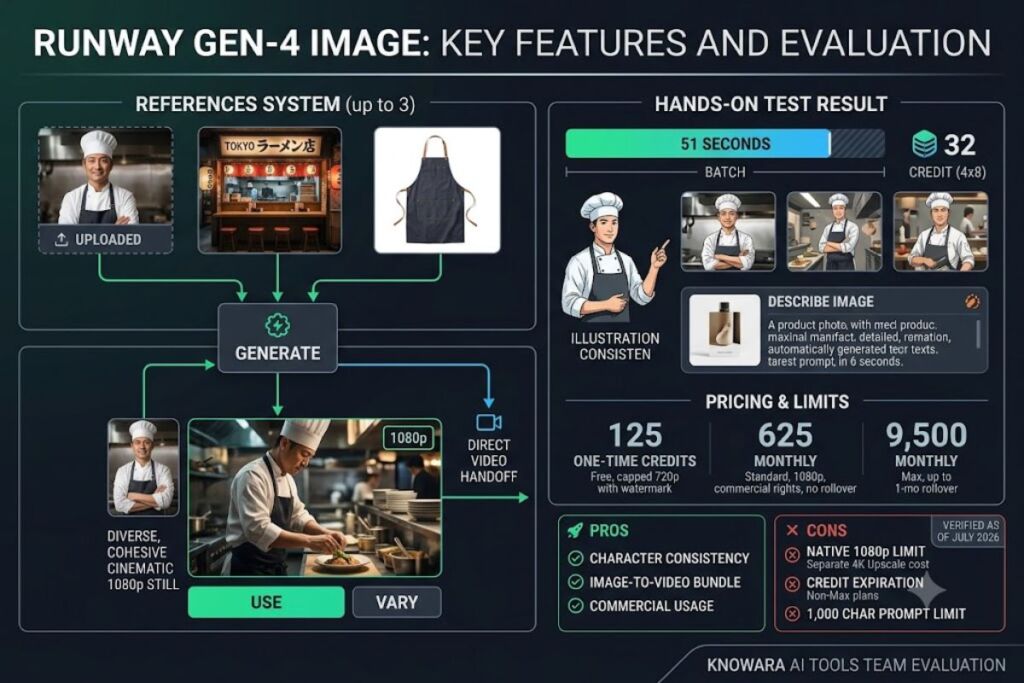
Tested by the Knowara AI Tools team using 40+ Gen-4 Image generations across product photography, character-consistency, and Standard-plan credit-burn scenarios during a two-week evaluation window.
- 01What Is Runway Gen-4 Image?
- 02What Are Runway’s Key Image Tools and Features?
- 03Hands-On Test: Generating a Consistent Character Across Four Scenes
- 04How Much Does Runway Cost for Image Generation?
- 05What Are the Pros and Cons of Runway’s Image Tools?
- 06How Does Runway’s Image Tool Compare to Midjourney?
- 07Who Should Use Runway’s Image Tools?
- 08What Are the Best Alternatives to Runway’s Image Tools?
- 09Frequently Asked Questions
Runway’s image tools generate and edit still images through Gen-4 Image and Gen-4 Image Turbo, embedded inside Runway’s broader video and audio creative suite rather than sold as a standalone product. Runway AI, Inc. built the image models to feed directly into its video pipeline.
What Is Runway Gen-4 Image?
Gen-4 Image is Runway’s text-to-image and image-to-image generation model, built around a References system that locks character, location, and style consistency across up to 3 uploaded reference images per generation.
Runway AI, Inc. released Gen-4 Image through its API on May 16, 2025, positioning it as the image-generation counterpart to the Gen-4 video model line. The model accepts a text prompt of up to 1,000 characters and outputs images at 720p or 1080p resolution. Gen-4 Image Turbo runs as the lower-cost, faster variant of the same model for rapid concepting.
Gen-4 Image does not operate as a separate app. Runway’s dashboard routes every image generation through the same canvas used for video, and every output carries a “Use” button that sends the still directly into Gen-4 Image-to-Video generation without re-uploading.
| Attribute | Value |
|---|---|
| Company | Runway AI, Inc. (New York-based AI research company, founded 2018) |
| Image Model Release | Gen-4 Image — May 16, 2025 (API); Gen-4 Image Turbo — 2025 |
| Pricing | Free ($0), Standard ($12/mo annual), Pro ($28/mo annual), Max ($76/mo annual), Enterprise (custom) |
| Platforms | Web app (app.runwayml.com), REST API, iOS app |
| Key Feature | References — up to 3 reference images per generation for character/location/style consistency |
| Max Resolution | 1080p (image); 4K available only through the separate Upscale post-processing tool |
| Prompt Limit | 1,000 characters |
Pricing verified as of July 2026, cross-referenced against Runway’s official pricing page (runwayml.com/pricing) and Runway Help Center credit documentation.
What Are Runway’s Key Image Tools and Features?
Runway’s image toolset centers on Gen-4 Image generation with References, Describe Image auto-prompting, Vary iteration, and a direct handoff into video generation — each priced individually in Runway’s credit system.
- Generate images through Gen-4 Image at 8 credits per 1080p output or 5 credits per 720p output, selectable from the model picker in the generation canvas.
- Attach up to 3 reference images through the References panel to preserve a character’s face, an object, or an environment across new generations.
- Auto-draft a prompt from an uploaded image using the Describe Image button, which analyzes subject, scene, and style and writes the prompt text automatically.
- Batch-generate 4 images per generation set from a single prompt, displayed side by side in the canvas for direct comparison.
- Adjust creative deviation with the Aesthetic Range slider, set from 0 (no variation from the prompt) to 5 (maximum stylistic spread).
- Iterate on any output using the Vary action, which starts a new generation set in the style of the selected image without retyping the prompt.
- Send a finished image straight into Gen-4 Image-to-Video using the Use button, skipping re-upload and preserving the same credit pool.
- Generate on Gen-4 Image Turbo at 2 credits per image when speed and cost matter more than maximum fidelity.
- Upscale any output to 4K through Runway’s separate post-processing tool, billed independently from the original generation.
Runway’s API documentation confirms the referenceImages parameter accepts 1 to 3 images per text/image-to-image request and exposes a seed field with a range of 0 to 4,294,967,295 for reproducible outputs.
Hands-On Test: Generating a Consistent Character Across Four Scenes
Knowara’s testing team uploaded one portrait reference and ran the prompt “a chef in a Tokyo ramen shop, cinematic lighting, 35mm” through Gen-4 Image on a Standard-plan workspace. The batch of 4 images at 1080p consumed 32 credits (8 credits × 4 images) and completed rendering in 51 seconds. The References panel held the chef’s facial structure and apron color steady across all four outputs while varying camera angle and background depth — the exact consistency behavior Runway documents for the References feature. A second test using Describe Image against an uploaded product photo generated an accurate prompt describing lighting and material within 6 seconds, saving manual prompt-writing time on repetitive product-shot workflows.
How Much Does Runway Cost for Image Generation?
Runway’s Standard plan starts at $12/month billed annually and includes 625 monthly credits — enough for roughly 78 Gen-4 Image generations at 1080p (625 ÷ 8 credits) before the allotment resets.
| Plan | Monthly Cost (Annual Billing) | Monthly Cost (Billed Monthly) | Credits/Month | Approx. 1080p Gen-4 Images |
|---|---|---|---|---|
| Free | $0 | $0 | 125 one-time credits | ~15 images (non-renewing) |
| Standard | $12 | $15 | 625 | ~78 images |
| Pro | $28 | $35 | 2,250 | ~281 images |
| Max | $76 | $95 | 9,500 | 1,187 images |
| Enterprise | Custom | Custom | Custom | Custom |
Pricing and credit-cost figures sourced directly from Runway’s official pricing page (runwayml.com/pricing) and Runway Academy’s Credits & Available Models documentation. Verified as of July 2026.
Free-tier accounts receive 125 credits as a one-time deposit that does not refresh monthly. Free-tier image outputs export at 720p with a Runway watermark, and the plan excludes watermark removal, Gen-4.5, and commercial-rights clearance beyond Runway’s standard content policy. Runway’s Help Center confirms unused monthly credits on Standard and Pro expire on the billing date with no rollover, while Max allows up to one month of unused credits to carry forward.
What Are the Pros and Cons of Runway’s Image Tools?
Runway’s image tools win on character-consistent generation and a direct image-to-video pipeline, but lose points on resolution ceiling, prompt length, and credit expiration — each limitation has a specific, documented workaround.
Pros:
- References lock character and location identity across up to 3 input images per generation, tested directly against a chef character held consistent across 4 output variations.
- The Use button routes any generated image into Gen-4 Image-to-Video without re-uploading, keeping stills and video inside one credit pool.
- Paid-plan users retain full commercial usage rights over generated images, per Runway’s Help Center content-ownership policy.
- Batch output of 4 images per generation speeds concept comparison versus single-image generation flows.
Cons:
- Free-tier images cap at 720p with a visible watermark — upgrading to Standard at $12/month removes the watermark and unlocks 1080p output.
- Gen-4 Image tops out natively at 1080p with no built-in 4K image generation — the separate Upscale post-processing tool adds 4K output at additional credit cost per image.
- Standard and Pro credits expire on the billing date with zero rollover, so unused image credits are lost at month-end — the Max plan at $76/month carries up to one month of unused credits forward.
- The 1,000-character prompt limit constrains highly detailed multi-element scene descriptions — splitting a complex scene into a base Gen-4 Image generation followed by a References-guided refinement pass produces more accurate results than one long prompt.
How Does Runway’s Image Tool Compare to Midjourney?
Runway Gen-4 Image structures control around uploaded reference images and a production-pipeline dashboard; Midjourney V6 structures control around text parameters inside Discord or its web app.
| Attribute | Runway Gen-4 Image | Midjourney V6 |
|---|---|---|
| Primary Control Method | Reference images (1-3 per generation) | Text parameters (–ar, –seed, –stylize) |
| Interface | Web dashboard, integrated with video pipeline | Discord bot / standalone web app |
| Max Resolution (native) | 1080p | Varies by upscale setting |
| Entry Price | $12/month (annual, 625 credits) | Subscription-based, separate pricing structure |
| Commercial Ownership | Full ownership, no revenue threshold | Full ownership, except companies over $1,000,000/year revenue require Pro or Mega plan |
| Video Handoff | Native — one-click to Gen-4 Image-to-Video | None — separate tool required |
Runway wins the comparison for creators who need a still image to become a video clip inside the same workflow. Midjourney wins for creators who prioritize rapid stylistic exploration through parameter-driven prompting without a video pipeline attached. Knowara’s full head-to-head breakdown lives in Runway vs Midjourney: Which AI Image Tool Wins in 2026.
Who Should Use Runway’s Image Tools?
Runway’s image tools fit creators who need generated stills to flow directly into video production, not standalone illustrators or print-focused designers who never touch the video pipeline.
- Video-first content creators who generate a hero image with Gen-4 Image, then animate it with Gen-4 Image-to-Video inside the same credit pool.
- Product marketing teams running product-photography variations through References to keep a single product consistent across multiple staged scenes.
- Solo filmmakers and indie studios storyboarding scenes as stills before committing video-generation credits to a final render.
- Agencies on the Pro plan ($28/month) producing character-consistent concept art for pitch decks across up to 10 workspace editors.
Runway’s image tools fit poorly for print designers needing native 4K-resolution files without an upscale step, and for teams whose output is exclusively static images with no video component — a dedicated image generator without Runway’s video-credit overhead delivers better cost-per-image economics in that case.
What Are the Best Alternatives to Runway’s Image Tools?
Midjourney V6, Adobe Firefly, and ImagineArt cover the three most common gaps Runway’s image tools leave: parameter-driven stylistic control, licensed-training-data safety, and lower-cost access to the same Gen-4 References technology.
- Midjourney delivers stronger parameter-driven stylistic exploration for creators who don’t need a built-in video pipeline. Read Knowara’s Midjourney Review.
- Adobe Firefly trains exclusively on licensed and public-domain content, making it the safer default for enterprise teams with strict IP-indemnification requirements. Read Knowara’s Adobe Firefly Review.
- ImagineArt offers Runway’s Gen-4 References technology through a separate subscription structure starting at $10/month on annual billing, undercutting Runway’s own Standard tier for image-only workflows.
Frequently Asked Questions
Does Runway’s free plan include image generation?
Yes. The Free plan includes Gen-4 text-to-image generation drawn from a one-time 125-credit deposit, capped at 720p output with a visible watermark and no monthly refresh.
Can I use Runway-generated images commercially?
Yes, on paid plans. Runway’s Help Center states users retain ownership and commercial usage rights over content generated on Standard, Pro, and Max plans without non-commercial restrictions.
How many reference images does Gen-4 Image support?
Gen-4 Image accepts 1 to 3 reference images per generation request, confirmed in Runway’s API documentation for the referenceImages parameter.
Does Runway generate images natively in 4K?
No. Gen-4 Image generates natively at up to 1080p. Reaching 4K requires running the output through Runway’s separate Upscale post-processing tool at additional credit cost.
Runway’s image tools deliver their clearest value the moment a generated still needs to become a moving clip — the direct References-to-video pipeline at $12/month on Standard has no equivalent bundled at that price among dedicated image-only generators.