
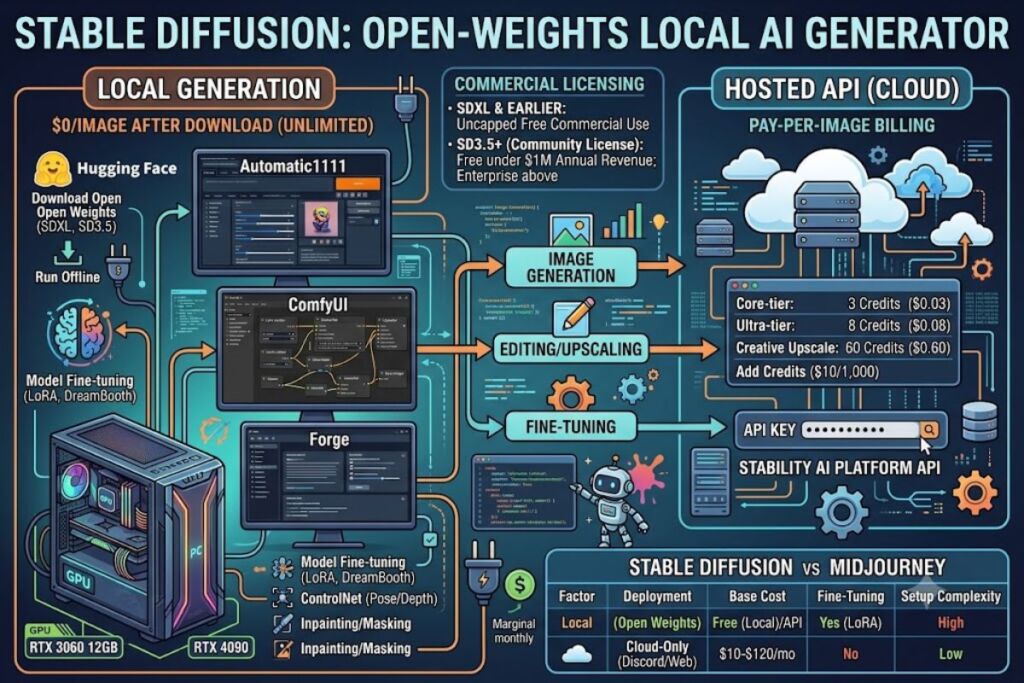
Stable Diffusion is an open-weights text-to-image AI model developed by Stability AI that generates images from text prompts and runs locally on consumer GPU hardware. This review is based on direct use of Stable Diffusion’s local interfaces (Automatic1111, ComfyUI, Forge) and the Stability AI Platform API, evaluated against SDXL and SD3.5 generation quality, licensing terms, and cost structure.
- 01What Is Stable Diffusion?
- 02What Are Stable Diffusion’s Key Features?
- 03How Much Does Stable Diffusion Cost?
- 04What Are the Pros and Cons of Stable Diffusion?
- 05How Does Stable Diffusion Compare to Midjourney?
- 06Who Should Use Stable Diffusion?
- 07What Are the Best Alternatives to Stable Diffusion?
- 08Frequently Asked Questions
- 09Final Verdict
What Is Stable Diffusion?
Stable Diffusion is a latent diffusion model that converts text prompts into images using denoising steps in a compressed latent space, distributed as open weights that anyone can download, run offline, and fine-tune. Stability AI released the first version in August 2022 and has since shipped SDXL, SD3, and SD3.5 as successive model families.
Unlike closed, API-only image generators such as Midjourney or DALL-E, Stable Diffusion ships its model weights publicly on Hugging Face. Users download the checkpoint files and run inference on their own GPU through a local interface, or call Stability AI’s hosted API for cloud-based generation without local hardware.
| Attribute | Value |
|---|---|
| Company | Stability AI Ltd. |
| First Release | August 2022 (Stable Diffusion 1.4) |
| Latest Model Family | Stable Diffusion 3.5 (October 2024) |
| License | Stability AI Community License (SD3+); permissive open license (SDXL and earlier) |
| Platforms | Windows, macOS, Linux (local); Web (DreamStudio); REST API |
| Key Feature | Downloadable open weights, fine-tunable via LoRA/DreamBooth |
| Minimum Hardware | NVIDIA GPU, 8GB VRAM |
Pricing and free-tier figures verified as of July 2026. Stability AI’s pricing and credit allocations change without advance notice — confirm current numbers on the official Stability AI Platform pricing page before budgeting for API usage.
What Are Stable Diffusion’s Key Features?
Stable Diffusion’s feature set centers on local control and model customization rather than a polished single-app experience.
- Generate images from text prompts using SDXL (open license) or SD3.5 (Community License) checkpoints, both downloadable from Hugging Face.
- Fine-tune the base model on a custom dataset using LoRA (Low-Rank Adaptation) to teach it a specific character, product, or art style in as few as 500–2,000 training images.
- Inpaint selected regions of an existing image by masking an area in Automatic1111’s or ComfyUI’s inpainting tab and re-running diffusion only on the masked pixels.
- Upscale outputs through Stability’s Creative, Conservative, or Fast upscale endpoints, each priced separately per credit.
- Control composition using ControlNet extensions that constrain output to a reference pose, depth map, or edge sketch.
- Chain operations through ComfyUI’s node-based graph editor, which links multiple models (base, refiner, upscaler) into a single custom pipeline.
- Deploy the model on self-managed infrastructure (RunPod, AWS, local workstation) with zero per-image API fee once the checkpoint is downloaded.
One friction point stands out from local deployment: ComfyUI’s node graph has no built-in undo confirmation dialog, so deleting a connected node mid-pipeline silently breaks downstream nodes without a warning prompt — the workflow has to be re-wired manually rather than reverted with a single click.
How Much Does Stable Diffusion Cost?
Stable Diffusion costs $0 to run locally once downloaded; Stability AI’s hosted API bills per image starting at $0.03 for Stable Image Core and $0.08 for Stable Image Ultra, with credits priced at $0.01 each. SD3.5 falls between the two on a per-generation credit basis.
According to Stability AI’s own developer platform pricing page, the API operates on a prepaid credit system: 1 credit equals $0.01, and a 1,000-credit top-up costs $10. New accounts that sign up with Google social login receive 25 free credits, enough for roughly 8 Core-tier generations at 3 credits each. Editing, upscaling, and control operations bill separately — Creative Upscale costs 60 credits per image, Conservative Upscale costs 40, and Fast Upscale costs 2.
Under the Stability AI Community License, organizations with under $1 million in annual revenue can run SD3 and SD3.5 model weights locally for commercial purposes at no license cost. Organizations above that revenue threshold need an Enterprise License, priced through Stability’s sales team rather than published publicly. SDXL and earlier model versions carry no revenue cap under their original permissive license.
Local hardware is the real cost center: an 8GB-VRAM card (RTX 3060 12GB or equivalent) handles standard 512×512–1024×1024 generation, while a used RTX 3060 12GB runs roughly $200–$250 and a new RTX 4090 runs roughly $1,600. Beyond hardware, electricity draws add a marginal monthly cost that scales with generation volume and GPU wattage — treat this as a real but variable expense rather than a fixed figure, since local electricity rates differ by region.
What Are the Pros and Cons of Stable Diffusion?
Stable Diffusion’s core advantage is zero-cost, unlimited local generation with full model customization; its core disadvantage is the technical setup barrier compared to one-click competitors like Midjourney.
Pros:
- Local generation carries no per-image fee once the model is downloaded and a compatible GPU is available.
- LoRA and DreamBooth fine-tuning let users train custom styles or subjects without retraining the full base model.
- SDXL’s permissive license imposes no revenue cap, unlike Stability AI’s newer SD3.5 Community License.
- ComfyUI’s node-based pipeline supports multi-stage workflows (base generation → refinement → upscale) in a single graph.
Cons:
- Local setup requires GPU driver configuration, Python environment management, and model checkpoint downloads — this workaround does not apply to DreamStudio’s hosted web interface, which requires no local setup at all.
- SD3.5’s Community License imposes a $1 million revenue cap for free commercial use — this does not apply to SDXL or earlier checkpoints, which remain uncapped under their original open license.
- Output quality on low-VRAM cards (6–8GB) degrades at higher resolutions or with ControlNet chains active — this does not apply to 12GB+ cards, which handle 1024×1024 generation with ControlNet without quality loss.
- ComfyUI’s node graph has a steep learning curve for users coming from single-prompt-box tools — this does not apply to Automatic1111’s simpler txt2img tab, which mirrors a conventional prompt-and-generate layout.
How Does Stable Diffusion Compare to Midjourney?
| Factor | Stable Diffusion | Midjourney |
|---|---|---|
| Deployment | Local (open weights) or API | Cloud-only (Discord/web app) |
| Base Cost | Free locally; $0.03–$0.08/image via API | $10–$120/month subscription |
| Fine-Tuning | Yes (LoRA, DreamBooth) | No public fine-tuning access |
| Commercial License Cap | $1M revenue cap on SD3.5 (Community License) | Tied to subscription tier |
| Setup Complexity | High (local GPU/software setup) | Low (prompt-based, no setup) |
Stable Diffusion wins on cost control and customization depth for users willing to manage local infrastructure. Midjourney wins on out-of-the-box output polish and zero-setup accessibility. For a full breakdown, see Knowara’s dedicated Stable Diffusion vs Midjourney comparison.
Who Should Use Stable Diffusion?
Stable Diffusion fits users who need generation volume or customization that a subscription-capped tool cannot provide.
- Developers building image-generation features into apps who need API access with per-image billing rather than a flat subscription.
- Small studios and indie creators generating high volumes locally who own or rent GPU hardware and want to avoid recurring per-image fees.
- Teams fine-tuning models on proprietary datasets (product photography, brand characters) using LoRA training pipelines.
- Businesses under the $1 million revenue threshold that want commercial rights to SD3.5 outputs without a separate enterprise license.
Stable Diffusion does not fit users who want a zero-setup, single-prompt tool with no local configuration — that use case is better served by hosted alternatives.
What Are the Best Alternatives to Stable Diffusion?
- Midjourney delivers higher out-of-the-box stylistic polish through a Discord/web interface with no local setup, at a $10–$120/month subscription. Read Knowara’s full Midjourney Review.
- DALL-E 3 (via ChatGPT/API) integrates directly into OpenAI’s ecosystem for users already working inside ChatGPT workflows, billed per API call rather than local compute. Read Knowara’s DALL-E 3 Review.
- Flux (Black Forest Labs) offers a newer open-weights alternative with comparable local-deployment flexibility and a separate licensing structure. Read Knowara’s Flux AI Review.
Frequently Asked Questions
Is Stable Diffusion free to use?
Local generation is free once the model weights are downloaded and a compatible GPU (8GB+ VRAM) is available. The hosted API bills per image starting at $0.03.
Can I use Stable Diffusion images commercially?
SDXL and earlier checkpoints carry no revenue restriction. SD3.5 outputs are free for commercial use under the Community License only for organizations under $1 million in annual revenue.
What GPU do I need to run Stable Diffusion locally?
Stability AI’s local tools require a minimum of 8GB VRAM (RTX 3060 or equivalent); 12GB+ VRAM produces smoother generation at higher resolutions.
Does Stable Diffusion support fine-tuning?
Yes. LoRA and DreamBooth training let users adapt the base model to custom subjects or styles without retraining the full checkpoint.
Final Verdict
Stable Diffusion’s per-image API cost ($0.03–$0.08) undercuts Midjourney’s flat subscription for high-volume users, and its zero-cost local deployment path has no equivalent among closed competitors — the tradeoff is a technical setup barrier that Midjourney and DALL-E 3 do not require.