
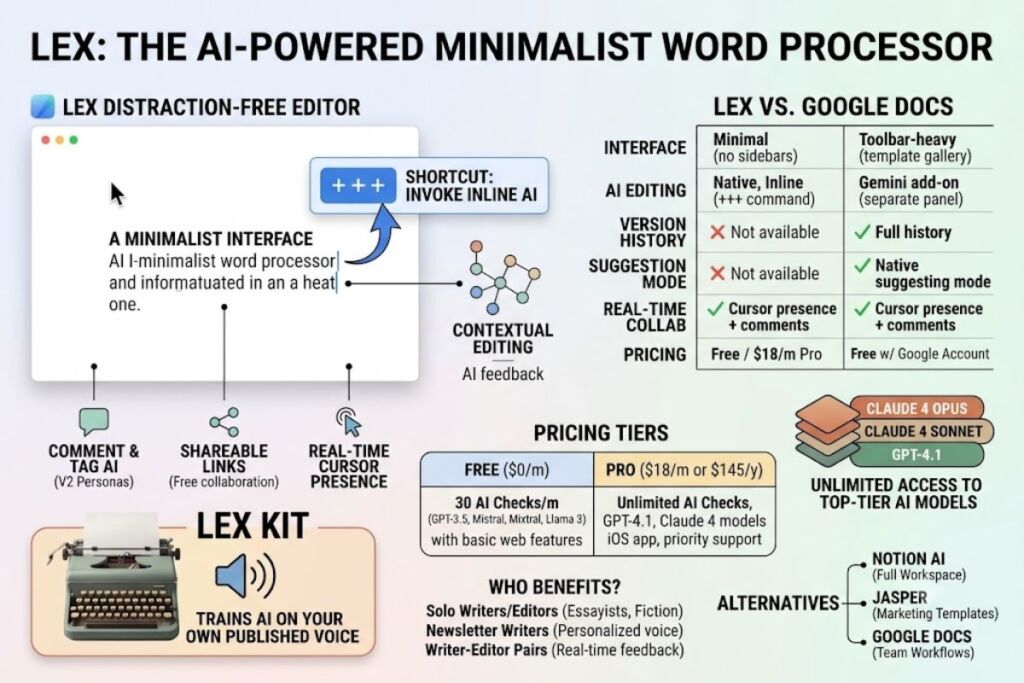
Lex is an AI-powered word processor that replaces cluttered writing interfaces with a blank page, inline AI commands, and real-time collaboration. Lex targets writers who want AI feedback without leaving a distraction-free editor.
What Is Lex?
Lex is a minimalist, AI-integrated word processor built by Lex, Inc. that lets writers draft, edit, and collaborate on documents while invoking AI assistance directly inside the text. Nathan Baschez, cofounder of the media company Every and former first employee at Substack, created Lex over nights and weekends in the fall of 2022 as an incubation project within Every. Baschez started building Lex in the summer of 2022, before ChatGPT existed, when AI discussion centered mostly on image generation. The public launch generated immediate demand: Lex signed up around 25,000 users in its first 24 hours. Lex later spun out of Every into its own venture-backed company, and announced a $2.75 million seed round led by True Ventures in August 2023.
The editor pairs a stripped-down interface with access to multiple large language models. According to Lex’s official pricing page, Lex uses models from OpenAI, Anthropic, and TogetherAI through their respective enterprise APIs, and the company states that Lex is not training language models on user writing and has no immediate plans to do so.
| Attribute | Value |
|---|---|
| Company | Lex, Inc. (spun out of Every) |
| Founder/CEO | Nathan Baschez |
| Public Release | October 2022 |
| Pricing | Free tier; Pro at $18/month or $145/year |
| Platforms | Web app, iOS app (Pro tier) |
| AI Model Providers | OpenAI, Anthropic, TogetherAI |
| Key Feature | Inline AI commands via +++ shortcut inside the document |
| Seed Funding | $2.75 million, led by True Ventures (August 2023) |
What Are Lex’s Key Features?
Lex concentrates its feature set on writing flow instead of document management. Every feature ties back to one goal: keep the writer inside a single page.
- Invoke AI inline by typing
+++in the document, which prompts the model to generate a few sentences based on what comes before the cursor. - Select any passage and trigger a rewrite without copying text into a separate chat window.
- Comment on a specific selection and tag the AI directly inside the comment thread to request edits or feedback on that passage alone.
- Share a document via link so collaborators can edit with no app download required.
- View collaborator cursors in real time and see what each other are typing as changes happen.
- Distribute a read-only link when a document only needs to be read, not edited.
- Generate cover ideas, synonyms, and outlines through built-in AI shortcuts.
- Train the AI on a writer’s own voice through Lex Kit, which uses a writer’s existing newsletter archive to reproduce their structural and tonal patterns rather than a generic style summary.
- Switch between AI “Personas,” a feature added in Lex V2 that gives writers different perspectives on their draft and addresses common LLM sycophancy.
How Much Does Lex Cost?
Lex runs on a two-tier model: a free plan with a capped number of monthly AI checks, and a Pro plan priced at $18 per month or $145 per year. The free plan includes 30 AI checks per month with access to GPT-3.5, Mistral, Mixtral, and Llama 3 models. The Pro plan removes that cap and adds premium model access. Lex’s own pricing page confirms Pro subscribers get access to the biggest and best AI models, like GPT 4.1 and Claude 4 Opus and Sonnet, along with early access to new features, the iOS app, and priority email support.
Collaboration does not require a paid plan. Lex’s FAQ states that it is totally free to share and collaborate on Lex documents, with a separate Lex Teams add-on available for organizations that need unlimited group use of shared folders. Lex also offers a refund policy: subscribers who do not want to keep Lex after a month can request a refund.
| Plan | Price | AI Checks | Models Included |
|---|---|---|---|
| Free | $0 | 30/month | GPT-3.5, Mistral, Mixtral, Llama 3 |
| Pro | $18/month or $145/year | Unlimited | GPT-4.1, Claude 4 Opus, Claude 4 Sonnet |
| Teams add-on | Custom | Unlimited (shared folders) | Same as Pro |
What Are the Pros and Cons of Lex?
Lex trades feature breadth for writing focus. That trade produces clear strengths and equally clear limits.
Pros:
- Distraction-free editor with no sidebars, templates, or dashboard metrics competing for attention.
- Unlimited AI checks on the Pro plan with no per-document word limit.
- Access to top-tier models (Claude 4 Opus, Claude 4 Sonnet, GPT-4.1) without separate subscriptions to OpenAI and Anthropic.
- Free real-time collaboration with cursor presence and inline comments.
- Lex Kit personalizes AI output to a writer’s existing voice using their own published work.
Cons:
- No version history and no suggestion mode comparable to Google Docs’ suggesting feature.
- No approval workflows, making Lex unsuitable for editorial teams that require sign-off chains.
- Free tier caps AI checks at 30 per month, which limits testing before upgrading.
- Publishing routes through Lex’s own platform rather than integrating with a third-party CMS.
- Smaller feature roadmap than venture-scaled competitors, since Lex intentionally keeps its team small.
How Does Lex Compare to Google Docs?
Lex functions as a Google Docs replacement for solo writers and writer-editor pairs, but Google Docs still wins on team-scale collaboration infrastructure. Lex users describe the product directly against Docs: one reviewer called Lex their Google Docs replacement, but better, because the minimalist interface allows focus while the AI capabilities serve as a real-time editor. Lex matches Docs on auto-save, link-based sharing, and live cursor collaboration, but it does not yet match Docs on granular permission controls or a native suggestion/track-changes mode.
| Factor | Lex | Google Docs |
|---|---|---|
| Interface | Minimal, distraction-free | Toolbar-heavy, template gallery |
| AI editing | Native, inline (+++ command) |
Gemini add-on, separate panel |
| Version history | Not available | Full version history |
| Suggestion mode | Not available | Native suggesting mode |
| Real-time collaboration | Yes, cursor presence + comments | Yes, cursor presence + comments |
| Pricing | Free / $18 per month | Free with Google account |
For a deeper breakdown of collaborative document tools, see our dedicated Google Docs AI Features Review.
Who Should Use Lex?
Lex fits writers whose output goes through a deliberate editing pass rather than mass content generation. Specific profiles include:
- Essayists and newsletter writers who publish long-form pieces on a recurring schedule and want AI as a thinking partner instead of a first-draft generator.
- Academic writers preparing manuscripts for journal submission, where Lex’s approach avoids generating hollow filler content that plagues AI-assisted academic writing.
- Writer-editor pairs who draft together in real time and want inline AI feedback without switching to a separate chat tool.
- Fiction writers who need a second pair of eyes on a manuscript once they have grown too close to the material, a use case Lex names directly on its own pricing page.
Lex is not built for content teams running multi-stage approval workflows or marketers needing dozens of campaign templates.
What Are the Best Alternatives to Lex?
Three tools cover the gaps Lex leaves open, from workspace integration to template-driven marketing copy.
- Notion AI — AI embedded inside a full workspace of notes, databases, and projects, better suited to teams already organizing content in Notion. Read our full Notion AI Review.
- Jasper — A marketing-focused AI writing platform built around templates for ads, emails, and social posts rather than long-form drafting. Read our full Jasper AI Review.
- Google Docs (with Gemini) — The stronger choice for teams that need version history, granular permissions, and enterprise document management alongside AI assistance. Read our full Google Docs AI Features Review.
Frequently Asked Questions
Is Lex free to use?
Yes. Lex offers a free plan with 30 AI checks per month on models including GPT-3.5 and Llama 3. Upgrading to Pro at $18 per month unlocks unlimited checks and premium models.
Does Lex train its AI models on user documents?
No. Lex’s official FAQ states the company does not use customer writing to train language models and will notify users by email before changing that policy.
Can multiple people edit a Lex document at the same time?
Yes. Lex supports real-time collaboration with visible cursors and inline comments, and sharing a document link requires no paid subscription.
Does Lex have a mobile app?
Yes. Pro subscribers get access to Lex’s iOS app in addition to the web-based editor.
The Verdict
Lex delivers unlimited access to Claude 4 Opus, Claude 4 Sonnet, and GPT-4.1 for $18 per month inside a single distraction-free editor, undercutting the combined cost of separate ChatGPT Plus and Claude Pro subscriptions for writers who only need editing and drafting assistance, not coding or data tools.