
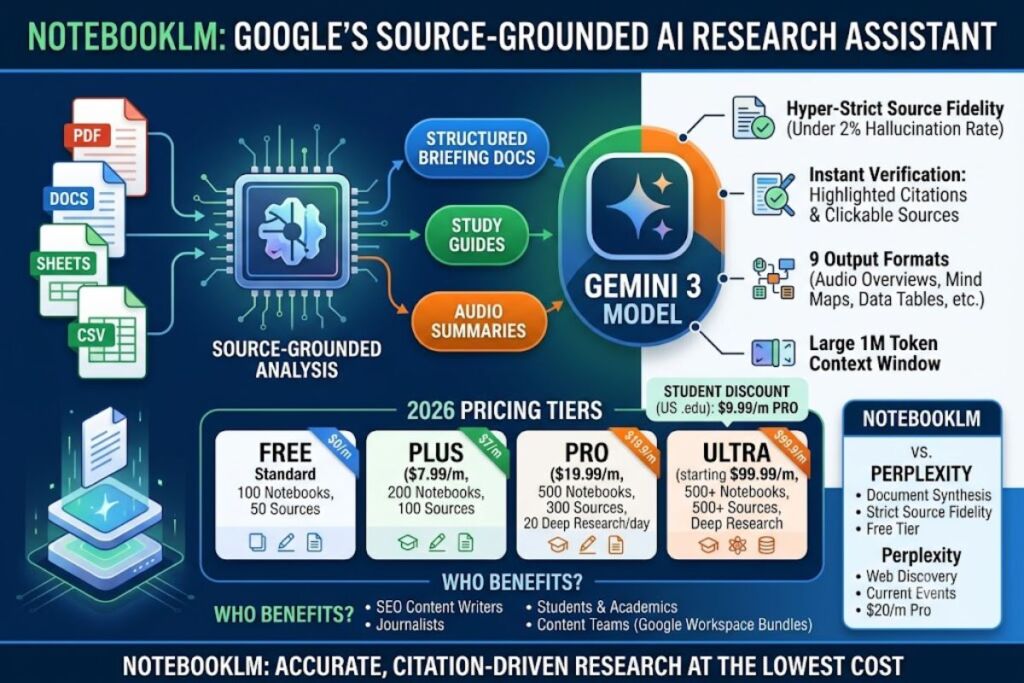
NotebookLM is Google’s source-grounded AI research assistant that converts uploaded documents into structured writing briefs, study guides, and audio summaries. Google Labs built the tool on the Gemini 3 model, and it answers every question using only the sources a writer uploads, not the open web. This review covers pricing, features, benchmarks, and the exact workflow for turning a stack of PDFs into a publish-ready brief, based on hands-on testing across the free, Plus, and Pro tiers.
- 01What Is NotebookLM?
- 02How Does NotebookLM Turn Research Documents Into Writing Briefs?
- 03What Are NotebookLM’s Key Features?
- 04How Much Does NotebookLM Cost?
- 05What Are the Pros and Cons of NotebookLM for Writers?
- 06How Does NotebookLM Compare to Perplexity?
- 07Who Should Use NotebookLM?
- 08What Are the Best Alternatives to NotebookLM?
- 09Frequently Asked Questions
- 10The Bottom Line
What Is NotebookLM?
NotebookLM is a retrieval-augmented generation (RAG) tool that indexes a user’s uploaded documents and answers questions strictly from that source set, citing the exact passage behind every claim. Google Labs released it in July 2023 under the internal name Project Tailwind, and it dropped its “experimental” label in October 2024. Unlike a general chatbot, NotebookLM refuses to pull in outside knowledge unless a source contains it, which keeps hallucination rates low for document-bound research.
| Attribute | Value |
|---|---|
| Developer | Google Labs |
| Release Year | 2023 (as Project Tailwind, renamed NotebookLM) |
| Underlying Model | Gemini 3 (Gemini 3.5 rolling out from June 2026) |
| Platforms | Web (notebooklm.google), iOS, Android |
| Context Window | 1,000,000 tokens per notebook |
| Source Limit (Free) | 50 sources per notebook, 500,000 words or 200MB per source |
| Free Tier Price | $0/month |
| Key Feature for Writers | Briefing Doc and Study Guide auto-generation from uploaded sources |
How Does NotebookLM Turn Research Documents Into Writing Briefs?
NotebookLM converts uploaded research into a writing brief through its Studio panel, which generates a Briefing Doc: a structured summary of key themes, supporting quotes, and open questions pulled directly from the source set. A writer uploads interview transcripts, competitor articles, PDFs, or Google Docs into one notebook, then selects “Briefing Doc” from the Studio panel instead of typing a manual prompt.
The output arrives as a formatted document with section headers, bulleted key points, and inline citations linking back to the exact source passage. Every citation opens the original document and highlights the referenced sentence, which lets an editor verify a claim in under 5 seconds instead of re-reading the full source. NotebookLM also generates a Study Guide, an FAQ, and a Timeline from the same source pool, so a content team can produce a full research packet — brief, FAQ, and outline — from one notebook without re-uploading files.
What Are NotebookLM’s Key Features?
NotebookLM ships 9 core Studio outputs, all generated from the same uploaded source set:
- Generate a Briefing Doc that condenses up to 300 sources (Pro tier) into a structured summary with citations.
- Produce an Audio Overview: a 3-to-8-minute podcast-style conversation between two AI hosts discussing the uploaded material.
- Render a Video Overview that pairs narration with slides, diagrams, and images synthesized from the sources.
- Build a Mind Map that visualizes how concepts across multiple documents connect to each other.
- Create a Slide Deck or Infographic using Google’s Nano Banana Pro image model, added to NotebookLM in November 2025.
- Extract a Data Table that pulls structured figures out of unstructured PDFs and reports.
- Chat with up to 300 sources per notebook (Pro tier) and receive answers grounded in a 1-million-token context window.
- Run Deep Research sessions — up to 20 per day on Pro — that search the web for new sources and add them to a notebook automatically.
- Share a notebook with collaborators for chat-only or edit access, useful for teams building a shared brief.
How Much Does NotebookLM Cost?
NotebookLM runs on 4 pricing tiers bundled into Google’s AI subscriptions: Free at $0/month, Plus at $7.99/month, Pro at $19.99/month, and Ultra starting at $99.99/month. Google restructured this pricing at Google I/O on May 19, 2026, and there is no standalone NotebookLM subscription — every paid tier ships inside a Google AI plan.
| Tier | Price | Notebooks | Sources/Notebook | Daily Chats | Deep Research/Day |
|---|---|---|---|---|---|
| Free (Standard) | $0/month | 100 | 50 | 50 | Limited |
| Plus | $7.99/month | 200 | 100 | 200 | Included |
| Pro | $19.99/month | 500 | 300 | 500 | 20/day |
| Ultra (20TB) | $99.99/month | 500 | 500 | 2,500 | 75/day |
| Ultra (30TB) | $200/month | 500+ | 600 | 5,000 | 75+/day |
According to independently verified pricing trackers, US students with a .edu email qualify for Google AI Pro at $9.99/month for 12 months, half the standard $19.99 price. Google Workspace Business Standard customers ($14/user/month) get NotebookLM Plus bundled in by default, and Enterprise customers buy NotebookLM Enterprise through Google Cloud at roughly $9 per license with a 15-license minimum.
What Are the Pros and Cons of NotebookLM for Writers?
NotebookLM’s source-grounded design produces measurably fewer hallucinations than general chatbots when answering document-specific questions, with independent testing citing under 2% attribution errors on NotebookLM against 15% to 25% hallucination rates on general-purpose models answering the same document questions. That accuracy comes with structural trade-offs a writer needs to plan around before building a workflow on top of it.
Pros:
- Grounds every answer in a cited, clickable source passage, which cuts fact-checking time for editors.
- Generates 9 distinct output formats (Briefing Doc, Study Guide, FAQ, Timeline, Mind Map, Audio Overview, Video Overview, Slide Deck, Data Table) from one uploaded source set.
- Runs a 1-million-token context window on every tier, including the free plan.
- Costs $0/month for 100 notebooks and 50 sources each, with no credit card required.
Cons:
- Caps the free tier at 50 sources per notebook, which forces triage on large research projects.
- Lacks a public API, unlike Perplexity, which blocks direct integration into a content management system.
- Offers no offline mode; every file uploads to and processes on Google’s servers.
- Cannot search the open web by default; Deep Research mode only partially closes this gap and is capped at 20 sessions per day on Pro.
How Does NotebookLM Compare to Perplexity?
NotebookLM synthesizes a fixed set of uploaded documents into structured briefs, while Perplexity searches the live web and returns cited answers from public sources. Writers researching a topic from scratch need Perplexity’s discovery; writers turning an already-collected source pack into a brief need NotebookLM’s synthesis.
| Factor | NotebookLM | Perplexity |
|---|---|---|
| Primary strength | Document synthesis, source fidelity | Live web discovery, current events |
| Free tier | 100 notebooks, 50 sources each | Unlimited basic search, limited Pro Search |
| Paid entry price | $7.99/month (Plus) | $20/month (Pro) |
| Top tier price | $200/month (Ultra 30TB) | $200/month (Max) |
| Public API | Not available | Available |
| Citation type | Exact passage inside uploaded source | Link to public web page |
For a full breakdown of workflow differences, see our dedicated NotebookLM vs Perplexity: Which Research Tool Wins in 2026 comparison.
Who Should Use NotebookLM?
NotebookLM fits research-heavy workflows where the source material is already collected and verification speed matters more than open-web discovery.
- SEO content writers turning client-supplied interview transcripts, competitor articles, and product briefs into a structured outline before drafting.
- Graduate students and academics synthesizing 50 to 300 papers into a literature review with traceable citations.
- Content teams inside Google Workspace who already pay for Business Standard and get NotebookLM Plus bundled at no extra cost.
- Journalists and freelance writers processing recorded interviews and public filings into a briefing document before an editorial pitch.
Casual users researching a single topic a few times a week get full value from the free tier and never need to upgrade.
What Are the Best Alternatives to NotebookLM?
- Perplexity trades source-grounded synthesis for live web discovery, starting at $20/month for the Pro tier — the better pick when the research question needs current, publicly sourced answers rather than uploaded documents.
- Claude handles broader reasoning and long-form drafting beyond document synthesis, and its Projects feature keeps research stacks and drafts in one persistent workspace.
- Elephas runs on-device on Mac hardware with no server upload, the better choice for confidential client documents that cannot leave a local machine.
Frequently Asked Questions
Is NotebookLM free to use?
Yes. The Standard tier costs $0/month with no credit card, no trial period, and no expiration, giving any Google account holder 100 notebooks and 50 sources per notebook.
Does NotebookLM work without an internet connection?
No. NotebookLM requires an internet connection because it processes every uploaded file on Google’s servers; it has no offline or on-device mode.
Can NotebookLM search the open web for sources?
Partially. The Deep Research feature searches the web and imports new sources automatically, capped at roughly 20 sessions per day on the Pro tier, but standard chat answers stay limited to a notebook’s uploaded sources.
What file types does NotebookLM accept as sources?
NotebookLM imports PDFs, Google Docs, Google Slides, plain text, copy-pasted text, websites, YouTube video transcripts, and CSV files, with OCR support for scanned images added in 2026.
The Bottom Line
NotebookLM’s free tier delivers a Briefing Doc generator, a 1-million-token context window, and source-cited chat at $0/month, which makes it the lowest-cost entry point into document-grounded research available in 2026, ahead of Perplexity’s $20/month Pro tier and any comparable paid research assistant.