
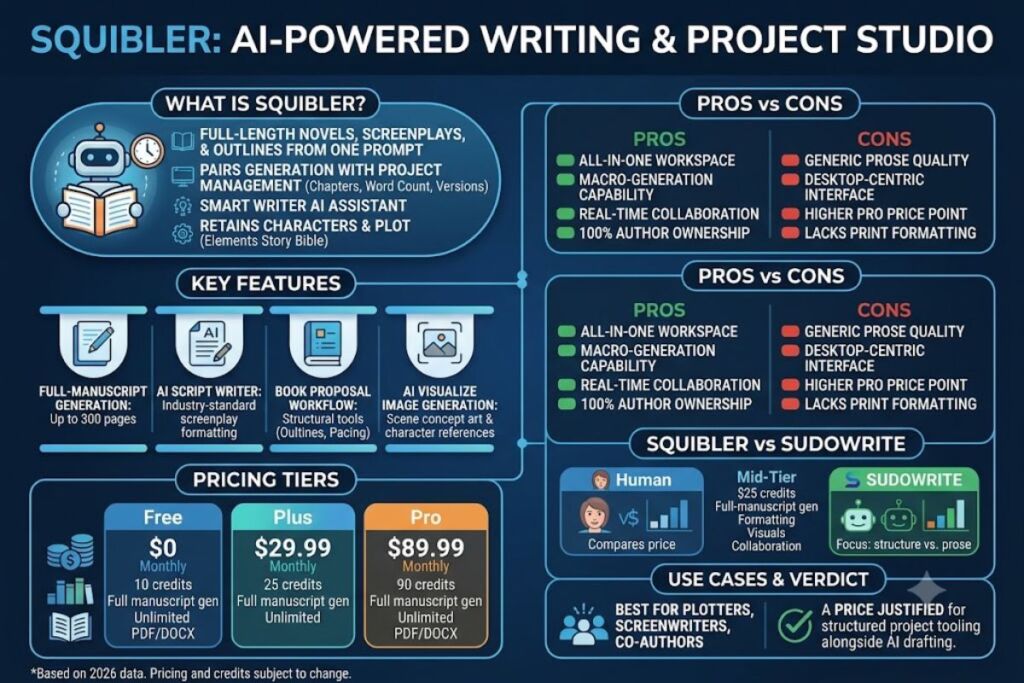
Squibler is an AI-powered writing platform that generates full-length novels, screenplays, and story outlines from a single prompt. The platform combines a Smart Writer AI assistant with structural tools — Book Proposal setup, Elements story bible, corkboard outlining, and AI Visualize image generation — to produce and organize long-form fiction up to 300 pages. Squibler.io launched in 2018 and released its AI-centric application in November 2023. This review documents hands-on testing of the Free, Plus, and Pro tiers across manuscript generation, screenplay formatting, and story-planning workflows.
What Is Squibler?
Squibler is a browser-based AI writing studio that turns story prompts into structured novel and screenplay drafts while managing characters, outlines, and plot elements in one workspace. Unlike single-purpose AI text generators, Squibler pairs generation with project management: every manuscript lives inside a dashboard that tracks chapters, word-count goals, and version history.
Squibler occupies the AI-assisted creative-writing category, distinct from general-purpose chatbots like ChatGPT, which generate text without persistent story structure. Squibler retains character names, settings, and plot points across an entire project through its Elements feature, then references that data when generating new scenes.
| Attribute | Value |
|---|---|
| Company | Squibler, Inc. |
| Founded | 2018 (San Diego, CA) |
| AI Product Launch | November 2023 |
| Pricing | Free / $29.99 per month (Plus) / $89.99 per month (Pro) |
| Platforms | Web browser only (no iOS or Android app) |
| Key Feature | Full-manuscript generation up to 300 pages via the Book Proposal workflow |
| Founder | Joshua Fechter (CEO) |
| Users | Over 20,000 writers, per Squibler’s official pricing page |
What Are Squibler’s Key Features?
Squibler’s core feature set covers manuscript generation, screenplay formatting, story organization, and visual storytelling, unlocked in tiers based on a monthly AI-credit allowance. The Free tier includes 1,000 AI credits per month; Plus includes 10,000 credits per month; Pro includes unlimited credits.
- Generate a full-length manuscript of up to 300 pages from one Book Proposal prompt that specifies genre, tone, POV, and key plot points.
- Draft industry-formatted screenplays with scene headings, action lines, and dialogue blocks through the AI Script Writer.
- Build automatic story outlines that map structure, pacing, and character progression before or after drafting.
- Organize characters, settings, and plot details inside Elements, a searchable story bible with 8 element types on the Free tier.
- Visualize scenes, characters, and book covers through AI Visualize’s text-to-image generation, unlimited on Plus and Pro.
- Track daily word-count goals and chapter completion with the built-in progress tracker.
- Export finished manuscripts to PDF and DOCX for direct upload to self-publishing platforms.
- Collaborate with co-authors in real time through cloud sync and shared editing permissions.
During testing, the Book Proposal step reduced mid-draft plot drift: providing at least 20 words of scene context in Guided mode kept character motivation consistent across chapters, matching the workflow Squibler documents in its own knowledge center.
How Much Does Squibler Cost?
Squibler runs 3 pricing tiers: Free, Plus, and Pro, billed monthly or annually, according to Squibler’s official pricing page. Annual billing cuts the monthly rate by 45% on both paid tiers.
- Free — $0 per month. Includes 1,000 AI credits per month, 1 active project, 15 files, and 30-day version history.
- Plus — $29.99 per month, or $15.83 per month billed annually at $189.96 per year. Includes 10,000 AI credits per month, full-length manuscript generation up to 300 pages, unlimited AI editing, and PDF/DOCX export.
- Pro — $89.99 per month, or $49.17 per month billed annually at $590.04 per year. Includes unlimited AI credits, unlimited books and screenplays, and priority access for multi-project authors.
Squibler switched its consumption model from unlimited AI words to a credit system in 2026: 1,000 credits on Free, 10,000 credits on Plus, and unlimited credits on Pro. Writers comparing Squibler to word-count-based tools need to convert credit allocations before assuming feature parity between plans.
What Are the Pros and Cons of Squibler?
Squibler’s strongest advantages are full-manuscript generation and built-in project organization; its main drawbacks are a credit-limited Plus tier and prose that reads generically on emotionally complex scenes. Both strengths and weaknesses stem directly from the platform’s structure-first design.
Pros:
- Generates a complete 200-300 page manuscript from one prompt through the Book Proposal workflow.
- Bundles outlining, story-bible, and visual-generation tools into one subscription instead of 3 separate apps.
- Offers a permanent free tier with 1,000 AI credits per month and no credit card requirement.
- Supports real-time collaboration for co-authors, a feature Sudowrite does not offer on any tier.
- Retains 100% author ownership over generated content, per Squibler’s terms and conditions.
Cons:
- Provides no dedicated mobile app; the interface works in a phone browser but is optimized for desktop use.
- Caps Plus-tier usage at 10,000 AI credits per month, requiring an upgrade to Pro for unlimited generation.
- Produces prose that testers and independent reviewers describe as flat on emotionally nuanced scenes, with dialogue like “Raveena told him a lie because she loved him” cited as an example of generic phrasing.
- Prices Pro at $49.17 per month billed annually, higher than Sudowrite’s Professional tier at $22 per month for comparable fiction-focused AI assistance.
- Lacks advanced print-formatting controls found in dedicated formatting tools such as Atticus.
How Does Squibler Compare to Sudowrite?
Squibler wins on project organization and full-manuscript output; Sudowrite wins on prose quality and per-credit pricing for active drafting, based on official pricing pages from both companies. Writers who need visual storyboarding and screenplay structure lean toward Squibler; writers who prioritize sentence-level craft lean toward Sudowrite.
| Factor | Squibler | Sudowrite |
|---|---|---|
| Entry price (annual) | Free tier; Plus at $15.83/mo | No permanent free plan; Hobby at $10/mo |
| Mid tier (annual) | Pro at $49.17/mo, unlimited credits | Professional at $22/mo, 1,000,000 credits |
| Full-manuscript generation | Yes, up to 300 pages | No, scene-by-scene only |
| Screenplay formatting | Yes, built-in AI Script Writer | No dedicated screenplay mode |
| Visual generation | Yes, AI Visualize included | Not offered |
| Collaboration | Real-time co-author editing | Not offered |
| Underlying model focus | General-purpose AI tuned for structure | Muse, a proprietary model fine-tuned on published fiction |
For a full feature-by-feature breakdown, see Knowara’s dedicated Squibler vs Sudowrite: Which AI Writing Tool Fits Your Workflow comparison.
Who Should Use Squibler?
Squibler fits writers who plan before they draft: plotters organizing multi-threaded novels, screenwriters formatting scripts, and co-authors managing shared manuscripts. It fits less well for writers who want fast, isolated scene generation without project overhead.
- Plotters and outliners who want corkboard visualization and a persistent story bible before drafting a single scene.
- Screenwriters who need industry-standard formatting generated automatically instead of manually applying script templates.
- Co-authors and writing teams who require real-time cloud collaboration on a single manuscript.
- Beginners battling writer’s block who need a full first-draft manuscript to revise rather than a blank page.
- Self-publishing authors who want direct PDF and DOCX export into KDP or IngramSpark workflows.
Squibler fits poorly for pantsers who draft scene-by-scene without structure, and for writers who prioritize literary prose quality over organizational tooling.
What Are the Best Alternatives to Squibler?
The 3 strongest alternatives to Squibler are Sudowrite, NovelAI, and Dabble, each optimized for a different stage of the fiction-writing process. Selection depends on whether a writer needs prose polish, world-building depth, or lightweight outlining.
- Sudowrite specializes in scene-level prose generation through its proprietary Muse model, fine-tuned specifically on published fiction, and suits writers who prioritize sentence craft over full-manuscript automation. Read Knowara’s full Sudowrite Review for pricing and testing results.
- NovelAI focuses on long-context story generation and world-building for genre fiction, with a subscription model built around token-based context length rather than manuscript templates.
- Dabble offers a distraction-free writing environment with plot and timeline tools but limits AI generation compared to Squibler’s full-manuscript workflow, making it a better fit for writers who want structure without heavy AI drafting.
Frequently Asked Questions
Is Squibler free to use?
Squibler offers a permanent Free tier with 1,000 AI credits per month, 1 active project, and no credit card requirement, according to Squibler’s official pricing page.
Can Squibler write an entire novel by itself?
Squibler generates a complete draft manuscript up to 300 pages from a Book Proposal prompt, but the output requires human editing for voice, emotional depth, and continuity before publication.
Does Squibler work for screenwriting, not just novels?
Squibler includes a dedicated AI Script Writer that generates screenplay-formatted scenes with proper scene headings, action lines, and dialogue blocks for film and TV formats.
Who owns the content Squibler generates?
Squibler’s terms state that writers retain 100% ownership and authorship rights over all content created on the platform, including AI-generated text.
Is Squibler available on mobile devices?
Squibler runs in any desktop or mobile browser but has no dedicated iOS or Android app, and the interface is built primarily for desktop use.
Verdict
Squibler’s Pro tier costs $49.17 per month billed annually for unlimited AI credits, full-manuscript generation, and screenplay formatting in one subscription — a price justified for plotters and screenwriters who need organizational tooling alongside AI drafting, but not for writers who only need scene-level prose generation, where Sudowrite’s $22-per-month Professional tier delivers stronger sentence-level output at lower cost.