
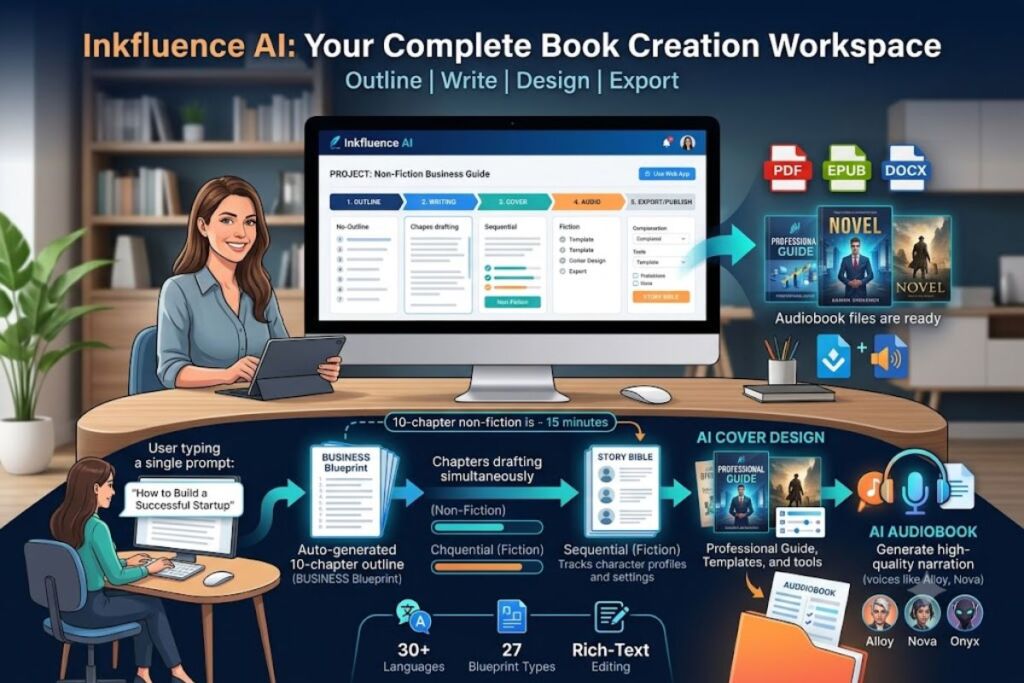
Inkfluence AI is a web-based AI book writer that converts a single topic prompt into a complete manuscript with an auto-generated outline, sequential chapter drafting, cover design, and export to PDF, EPUB, and DOCX. Testing confirms it completes a 10-chapter non-fiction book in under 15 minutes.
- 01What Is Inkfluence AI?
- 02What Are Inkfluence AI’s Key Features?
- 03How Much Does Inkfluence AI Cost?
- 04What Are the Pros and Cons of Inkfluence AI?
- 05How Does Inkfluence AI Compare to SidekickWriter?
- 06Who Should Use Inkfluence AI?
- 07What Are the Best Alternatives to Inkfluence AI?
- 08Frequently Asked Questions
What Is Inkfluence AI?
Inkfluence AI is an all-in-one ebook and book creation platform that generates outlines, writes full chapters, designs covers, and exports publish-ready files inside one workspace. Sam May founded the platform in 2024 to replace the fragmented workflow of separate writing, design, and formatting tools.
The platform accepts a one-sentence book description, detects the genre, and builds a chapter-by-chapter outline before writing a single word of prose. Non-fiction chapters generate simultaneously, so a 10-chapter business book finishes in under 15 minutes. Fiction chapters generate in sequence, since each chapter must read the ones before it to preserve plot continuity and character detail. Inkfluence AI maintains this continuity through a story bible that tracks character names, settings, and plot threads across the entire manuscript.
| Attribute | Value |
|---|---|
| Company / Founder | Inkfluence AI, founded by Sam May (2024) |
| Free Tier | 5 chapters to start + 5 chapters/month, PDF export only |
| Paid Tiers | Creator: $9.99/mo · Premium: $19.99/mo |
| Platforms | Web app, iOS (iPhone and iPad) |
| Export Formats | PDF, EPUB, DOCX |
| Languages Supported | 30+ |
| Blueprint Types | 27 genre/format templates |
| Key Feature | Sequential chapter generation with story-bible continuity tracking |
What Are Inkfluence AI’s Key Features?
Inkfluence AI bundles seven core capabilities into one workflow instead of requiring separate tools for each stage of book production.
- Generate a full chapter-by-chapter outline from a single topic sentence, with genre detection across 27 blueprint types (fiction, self-help, business, cookbooks, devotionals, and more).
- Draft complete chapters using sequential generation for fiction and simultaneous generation for non-fiction, cutting a 10-chapter draft to under 15 minutes.
- Track character names, settings, and plot threads through a built-in story bible that feeds prior chapters back into context before writing the next one.
- Design a cover using the AI cover generator, which draws from a library of 50+ templates.
- Edit any section inside the built-in rich-text editor without leaving the platform.
- Export finished manuscripts to PDF, EPUB, or DOCX, each formatted to Amazon KDP submission specifications.
- Narrate chapters into audiobook files using 9 AI narrator voices — Alloy, Ash, Coral, Echo, Fable, Nova, Onyx, Sage, and Shimmer — available on Creator and Premium plans.
- Publish finished ebooks directly to Etsy or Gumroad with one click, including AI-drafted title, description, price, and tags.
How Much Does Inkfluence AI Cost?
Inkfluence AI runs on 3 pricing tiers: Free, Creator at $9.99 per month, and Premium at $19.99 per month, according to the platform’s official pricing page.
The Free plan costs $0 and includes 5 chapters to start plus 5 additional chapters every month, 3 Smart Continue generations per day, basic templates, a basic cover designer, cloud storage, and PDF export only. No credit card is required to start.
The Creator plan costs $9.99 per month, or $89 per year ($7.42/month effective), and adds 35 chapter credits per month, EPUB and DOCX export, custom watermark removal, all premium templates, priority support, and AI audiobook generation.
The Premium plan costs $19.99 per month, or $179 per year ($14.92/month effective), and unlocks unlimited chapter generation, one-click publishing to Etsy and Gumroad, batch operations, custom branding, and priority AI processing.
Beyond the subscription tiers, Inkfluence AI sells one-time chapter credit top-ups: 15 credits for $9.99, 25 credits for $12.99, and 50 credits for $24.99. These credits never expire and apply to any plan.
What Are the Pros and Cons of Inkfluence AI?
Inkfluence AI’s biggest strength is workflow consolidation; its biggest weakness is depth of manuscript-level control compared to fiction-specialist tools.
Pros:
- Combines outline generation, chapter drafting, cover design, and export into 1 platform instead of 4-5 separate tools.
- Generates a full 10-chapter non-fiction manuscript in under 15 minutes, based on simultaneous chapter processing.
- Includes AI audiobook narration with 9 voice options on paid plans — a feature most competing AI book writers omit entirely.
- Supports 30+ languages for direct book generation, not just post-hoc translation.
- Retains 100% commercial rights for the creator on every tier, including the free plan.
Cons:
- Fiction-specific continuity tools are lighter than dedicated fiction platforms; Inkfluence AI tracks character and plot details through a story bible, but it does not offer a structured, user-editable World Bible or Character Bible interface.
- Free plan exports PDF only — EPUB and DOCX require the $9.99/month Creator tier.
- AI-generated chapters require human editing before KDP submission; the platform itself states that no AI output should go straight to publication.
- Print-on-demand features remain basic — dedicated formatting tools like Atticus or Vellum offer more granular control over trim size, bleed, and gutter margins.
How Does Inkfluence AI Compare to SidekickWriter?
Inkfluence AI wins on price and workflow breadth; SidekickWriter wins on manuscript-level fiction control through its World Bible and Character Bible system.
| Attribute | Inkfluence AI | SidekickWriter |
|---|---|---|
| Entry paid tier | $9.99/mo | $12/mo (Starter) |
| Top tier | $19.99/mo (unlimited chapters) | $24/mo (Plus) |
| Cover design | Included (50+ templates) | Not included |
| Audiobook generation | Included (9 voices) | Not included |
| Language support | 30+ languages | English only |
| Fiction continuity system | Story bible (automatic) | World Bible / Character Bible (structured, user-built) |
| Export formats | PDF, EPUB, DOCX | Manuscript-focused, no built-in cover/audio export |
For a full side-by-side breakdown of writing quality and pricing tiers, see our dedicated Inkfluence AI vs Sudowrite comparison.
Who Should Use Inkfluence AI?
Inkfluence AI fits creators who need a finished, exportable book fast — not writers who need deep manuscript control over a single novel.
- Non-fiction self-publishers producing business guides, health content, or how-to books for Amazon KDP benefit most, since Inkfluence AI generates all chapters simultaneously for these formats.
- Coaches and course creators use the platform to turn expertise into lead magnets, workbooks, and client deliverables without hiring a separate designer.
- Solo indie authors on a budget get cover design and audiobook narration bundled into a single $9.99-$19.99/month subscription instead of stacking 3-5 separate paid tools.
- Marketing teams generate downloadable PDF guides for email-capture funnels at a fixed monthly rate rather than commissioning each guide from a freelance writer.
- Fiction writers with complex, large-cast novels are better served by a dedicated fiction tool with structured character databases, since Inkfluence AI’s story bible runs automatically rather than offering manual, granular editing.
What Are the Best Alternatives to Inkfluence AI?
Three tools cover the gaps Inkfluence AI leaves for specific use cases.
- Sudowrite focuses on fiction prose refinement and sentence-level rewriting rather than a complete outline-to-export pipeline. Read our full Sudowrite Review.
- SidekickWriter offers a structured World Bible and Character Bible for novelists managing large casts, at a higher price and without cover or audiobook tools.
- NovelAI specializes in interactive fiction generation and AI image creation but lacks a structured, chapter-by-chapter book creation workflow.
Frequently Asked Questions
Does Inkfluence AI require a credit card to start?
No. The free plan activates with email or Google sign-in in under 30 seconds and includes 5 chapters plus 5 more every month, with no credit card required.
Can Inkfluence AI maintain character consistency across a full novel?
Yes. The platform’s story bible tracks character names, plot threads, and world-building details across every chapter, feeding prior chapters back into context before generating the next one.
What export formats does the free plan include?
The free plan exports PDF only. EPUB and DOCX export require the Creator plan at $9.99/month or the Premium plan at $19.99/month.
Does Inkfluence AI publish directly to Amazon KDP?
Inkfluence AI does not publish directly to KDP, but it exports KDP-ready EPUB and print-ready PDF files formatted to Amazon’s technical submission specifications for manual upload.
Inkfluence AI’s $9.99-per-month Creator tier delivers outline generation, chapter drafting, cover design, and audiobook narration in one subscription — a bundle that costs $40-$90 per month when assembled from separate BYOK tools, cover software, and narration services.