
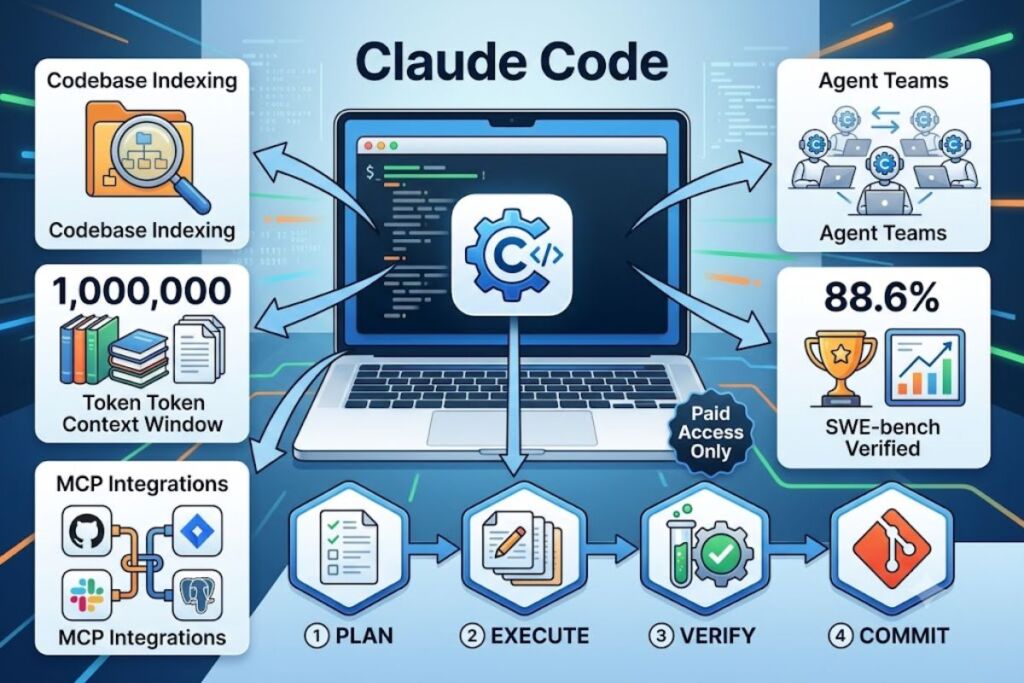
Claude Code is Anthropic’s agentic coding tool that runs in the terminal, reads an entire codebase, plans multi-file changes, executes them, runs tests, and commits results without manual line-by-line prompting. It requires a paid Claude plan or API credits — there is no free tier.
What Is Claude Code?
Claude Code is Anthropic’s terminal-native AI coding agent that autonomously reads, edits, tests, and commits code across a full codebase, built on the Claude Opus and Sonnet model families. It is not an autocomplete plugin. It operates through a command-line interface, executing multi-step engineering tasks end to end.
Anthropic built Claude Code as the agentic counterpart to Claude.ai, targeting developers who want a model to operate directly inside their development environment instead of a chat window. The tool indexes project files, maintains a persistent memory file called CLAUDE.md, and connects to external systems through the Model Context Protocol (MCP).
| Attribute | Value |
|---|---|
| Company | Anthropic |
| Current model | Claude Opus 4.8 (Sonnet 5 and Haiku 4.5 selectable) |
| Pricing (individual) | $17–$20/month (Pro), $100 or $200/month (Max) |
| Pricing (team) | $20–$25/seat (Standard), $100–$125/seat (Premium) |
| Platforms | Terminal CLI (macOS, Linux, Windows), VS Code extension, JetBrains plugin, desktop app, web (claude.ai/code), iOS, Chrome extension (beta) |
| Context window | 1,000,000 tokens |
| Key feature | Plan Mode with a Plan → Execute → Verify → Report agent loop |
| Free tier | None — requires Pro, Max, Team, Enterprise, or API credits |
What Are Claude Code’s Key Features?
Claude Code’s core features are full-codebase indexing, a 1-million-token context window, Plan Mode, MCP integrations, and sub-agent orchestration through Agent Teams. Each feature targets a distinct stage of the development workflow.
- Index the entire repository on session start, mapping file relationships across the project instead of reading files in isolation.
- Hold up to 1,000,000 tokens of context, enough to keep an entire mid-sized codebase loaded during a single session.
- Plan every multi-file change before execution: Plan Mode displays which files it will modify and in what sequence, and waits for developer approval.
- Verify changes automatically through a four-step loop — Plan, Execute, Verify, Report — that runs the test suite before reporting a task complete.
- Connect to external tools through MCP servers, including GitHub, Slack, Jira, Notion, and Postgres, without custom API glue code.
- Persist project conventions across sessions through a CLAUDE.md file, which Claude Code reads automatically at the start of every session.
- Spawn parallel sub-agents through Agent Teams, an experimental feature that runs multiple Claude instances on different parts of a codebase simultaneously.
- Score 88.6% on SWE-bench Verified running Claude Opus 4.8, based on Anthropic’s self-reported benchmark results as tracked by llm-stats.com in June 2026.
How Much Does Claude Code Cost?
Claude Code costs $17 to $20 per month on the Pro plan, $100 or $200 per month on Max, $20 to $125 per seat on Team plans, and variable pay-per-token rates through the API. Anthropic’s official pricing page lists four subscription paths plus direct API billing.
- Pro: $20/month billed monthly, or $17/month billed annually. Includes Claude Code access with a standard token budget on a rolling 5-hour session window.
- Max 5x: $100/month. Delivers 5 times the Pro usage allowance, aimed at developers who exceed Pro limits more than twice a week.
- Max 20x: $200/month. Delivers 20 times the Pro allowance, built for daily heavy use and Agent Teams workflows.
- Team Standard: $20–$25 per seat/month. Covers collaboration features but excludes Claude Code access.
- Team Premium: $100–$125 per seat/month. Adds Claude Code access on top of Team Standard features.
- Enterprise: Custom per-seat annual pricing through Anthropic’s sales team, including a 500,000-token context window, SSO, SCIM, audit logs, and HIPAA-readiness.
- API pay-as-you-go: Sonnet 5 charges $2 per million input tokens and $10 per million output tokens through August 31, 2026 (reverting to $3/$15 afterward). Opus 4.8 charges $5 per million input tokens and $25 per million output tokens. Batch API usage cuts both rates in half.
No free plan includes terminal Claude Code access. The free Claude.ai tier covers browser chat only.
What Are the Pros and Cons of Claude Code?
Claude Code’s main advantage is benchmark-leading code quality at 88.6% on SWE-bench Verified; its main drawback is unpredictable token consumption that can exhaust a Max plan’s weekly cap in a single long session. Both sides come from the same architectural choice: full-context, multi-step autonomy.
Pros:
- Scores 88.6% on SWE-bench Verified running Opus 4.8, among the highest self-reported scores of any coding agent as of June 2026, per llm-stats.com.
- Plan Mode keeps a human in the loop before any file gets modified, reducing the risk of unreviewed production changes.
- The 1-million-token context window removes the need to manually chunk large files or repositories.
- MCP support connects directly to GitHub, Jira, Slack, and Postgres without custom integration scripts.
Cons:
- No free tier — every path into the tool requires a paid plan or API credits.
- A single retry-heavy prompt can consume 50,000 to 300,000 tokens, and users have reported single prompts burning 30–90% of a 5-hour Max budget, according to community-reported GitHub issue analysis.
- Agent Teams multiplies token consumption roughly 7 times per 3-agent session compared to a standard single-agent run.
- Locked to Anthropic’s models — Claude Code cannot swap in GPT or Gemini as the underlying engine.
How Does Claude Code Compare to Cursor?
Claude Code runs as a terminal agent with autonomous multi-file execution, while Cursor operates as a full IDE fork of VS Code with inline AI-assisted editing. The two tools solve overlapping problems through different interaction models.
| Attribute | Claude Code | Cursor |
|---|---|---|
| Interface | Terminal CLI + IDE extensions | Standalone IDE (VS Code fork) |
| Underlying models | Claude only (Opus, Sonnet, Haiku) | Claude, GPT, Gemini, and in-house Composer |
| SWE-bench Verified | 88.6% (Opus 4.8) | Not officially reported |
| Starting price | $17–$20/month | Varies by tier — see the dedicated comparison |
| Best for | Autonomous multi-file agentic tasks | Inline, IDE-native AI-assisted coding |
Developers who want model choice and a full IDE environment typically lean toward Cursor. Developers who want a single, benchmark-leading model operating autonomously across an entire repository lean toward Claude Code. Read the full breakdown in our Claude Code vs Cursor comparison.
Who Should Use Claude Code?
Claude Code fits solo developers automating repetitive engineering tasks, engineering teams running production codebases that need supervised autonomy, and enterprises requiring SSO and audit logging on top of agentic coding. Fit depends on workflow style, not team size alone.
- Solo indie developers who want an agent to handle full features — from planning to test execution — without maintaining a separate IDE subscription.
- Engineering teams on production codebases where Plan Mode’s review-before-execution step matters more than raw speed.
- Enterprise teams on regulated infrastructure that need the 500,000-token Enterprise context window, SCIM provisioning, and HIPAA-readiness.
- CI/CD pipeline builders who pair a Pro or Max subscription for interactive coding with API-key billing for headless, automated runs.
Claude Code is not the right fit for teams that need to switch between multiple model providers inside one interface — that use case points toward Cursor instead.
What Are the Best Alternatives to Claude Code?
The strongest alternatives to Claude Code are Cursor, GitHub Copilot, and Gemini CLI, each optimized for a different priority: IDE flexibility, ecosystem integration, or free-tier usage limits.
- Cursor runs as a full IDE with model choice across Claude, GPT, and Gemini, making it the pick for developers who want to swap models mid-project. Read our full Cursor AI review.
- GitHub Copilot integrates directly into the GitHub ecosystem and switched to usage-based billing with GitHub AI Credits in June 2026, making it the pick for teams already standardized on GitHub. Read our full GitHub Copilot review.
- Gemini CLI offers the most generous free tier in the category — 60 requests per minute and 1,000 requests per day via personal Google OAuth — making it the pick for cost-sensitive developers. Compare it in our Best Free AI Coding Tools roundup.
Frequently Asked Questions
Does Claude Code have a free plan?
No. Claude Code requires at least a Pro subscription ($17–$20/month) or API credits. The free Claude.ai tier covers browser chat only and excludes terminal Claude Code access.
What model powers Claude Code by default?
Claude Code runs Claude Opus 4.8 by default as of June 2026, with Sonnet 5 and Haiku 4.5 selectable for cost-sensitive or simpler tasks.
What is Plan Mode in Claude Code?
Plan Mode displays a structured list of files Claude Code intends to modify and the sequence of changes before execution begins, requiring developer approval prior to any autonomous edit.
Can Claude Code work with an existing IDE?
Yes. Claude Code ships as a VS Code extension and a JetBrains plugin in addition to its native terminal CLI, letting developers keep their existing editor while running the agent.
Claude Code’s $17-to-$20 entry price and 88.6% SWE-bench Verified score make it the highest-scoring agentic coding tool available on a standard subscription as of June 2026 — the trade-off is a token-consumption model that requires active monitoring to avoid exceeding the weekly usage cap on Max plans.