
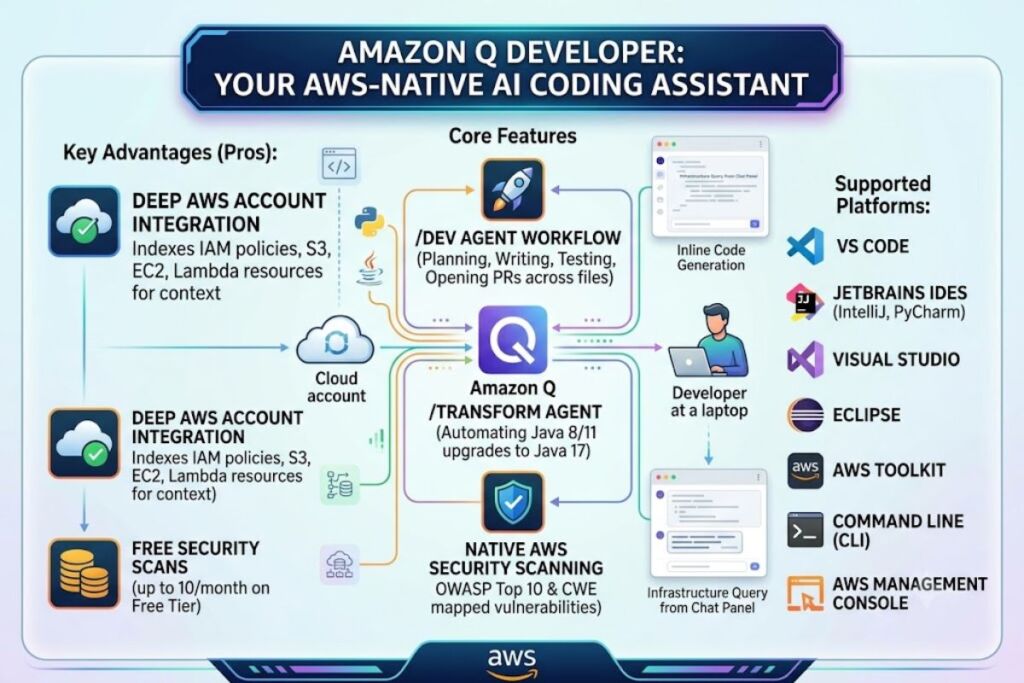
Amazon Q Developer is an AI coding assistant built by AWS for developers who write, deploy, and maintain code inside the AWS ecosystem. It generates code, reviews security vulnerabilities, and automates multi-step software tasks through agentic workflows.
- 01What Is Amazon Q Developer?
- 02What Are Amazon Q Developer’s Key Features?
- 03How Much Does Amazon Q Developer Cost?
- 04What Are the Pros and Cons of Amazon Q Developer?
- 05How Does Amazon Q Developer Compare to GitHub Copilot?
- 06Who Should Use Amazon Q Developer?
- 07What Are the Best Alternatives to Amazon Q Developer?
- 08Frequently Asked Questions
- 09Final Verdict
What Is Amazon Q Developer?
Amazon Q Developer is AWS’s generative AI assistant for the software development lifecycle, covering code generation, code review, security scanning, and cloud infrastructure automation. AWS launched it in April 2024 as the successor to Amazon CodeWhisperer, folding CodeWhisperer’s autocomplete engine into a broader agentic system.
Amazon Q Developer connects directly to AWS services. It reads AWS documentation, indexes IAM policies, and generates code that references live AWS resources inside a developer’s account. This distinguishes it from general-purpose coding assistants like GitHub Copilot or Cursor, which lack native AWS account context.
| Attribute | Value |
|---|---|
| Company | Amazon Web Services (AWS) |
| Release Year | 2024 (rebrand of Amazon CodeWhisperer, originally released 2022) |
| Pricing | Free tier and Pro tier at $19 per user per month |
| Platforms | VS Code, JetBrains IDEs, Visual Studio, Eclipse, AWS Toolkit, command line (CLI), AWS Management Console |
| Key Feature | Agentic feature-development workflow that plans, writes, tests, and opens pull requests across multiple files |
Source: AWS Amazon Q Developer pricing page.
What Are Amazon Q Developer’s Key Features?
Amazon Q Developer’s core features center on inline code suggestions, autonomous multi-file coding agents, and native AWS security scanning integrated directly into the IDE.
- Generate inline code completions in real time across 15+ programming languages, including Python, Java, JavaScript, TypeScript, C#, Go, Rust, and PHP.
- Execute autonomous “/dev” agent tasks that break a feature request into a implementation plan, write code across multiple files, and generate a pull request for review.
- Scan codebases for security vulnerabilities using Amazon Q’s integration with Amazon CodeGuru, flagging issues mapped to the OWASP Top 10 and CWE weakness categories.
- Transform Java applications through the
/transformagent, which upgrades codebases from Java 8 or Java 11 to Java 17 automatically. - Query AWS infrastructure directly from the chat panel, asking about EC2 instance configurations, IAM permissions, or CloudFormation stack status without leaving the IDE.
- Document code automatically by generating README files, docstrings, and unit tests through the
/testand/docagent commands. - Reference the AWS Well-Architected Framework during code generation, flagging deviations from AWS best practices for security, cost, and reliability.
Each feature draws context from a developer’s connected AWS account, which sets Amazon Q Developer apart from IDE-only assistants that operate without cloud-account awareness.
How Much Does Amazon Q Developer Cost?
Amazon Q Developer offers 2 pricing tiers: a Free tier with limited monthly usage and a Pro tier priced at $19 per user per month. AWS bills the Pro tier through the AWS Management Console alongside existing cloud infrastructure costs.
The Free tier includes 50 agentic chat interactions per month, unlimited inline code suggestions, and 10 security scans per month per user, according to AWS’s official pricing documentation. The Pro tier removes these caps, adds single sign-on (SSO) integration through AWS IAM Identity Center, and increases the monthly agentic request limit to 1,000 interactions per user.
Enterprise AWS teams pay the Pro tier cost on top of standard AWS compute and storage charges, since Amazon Q Developer does not bundle infrastructure usage into its subscription price. A 20-developer team on the Pro tier pays $380 per month before any AWS infrastructure costs.
What Are the Pros and Cons of Amazon Q Developer?
Amazon Q Developer’s biggest advantage is native AWS account integration; its biggest limitation is weaker performance outside the AWS ecosystem compared to general-purpose competitors.
Pros:
- Indexes live AWS account resources (IAM roles, S3 buckets, Lambda functions) for context-aware code generation.
- Includes free security scanning with zero additional cost on the Free tier, up to 10 scans monthly.
- Automates Java version upgrades through the
/transformagent, which AWS reports has saved enterprise customers thousands of developer hours during Java 17 migrations. - Ships a CLI-based agent that runs inside terminal environments, supporting infrastructure-as-code workflows in Terraform and AWS CDK.
Cons:
- Scores lower than GitHub Copilot and Cursor on general-purpose coding benchmarks outside AWS-specific tasks, based on independent developer testing across non-AWS codebases.
- Limits agentic requests to 1,000 per user per month even on the Pro tier, which throttles heavy multi-file refactoring workloads.
- Supports fewer IDEs than Cursor, excluding Neovim and Sublime Text as of the current release.
- Requires an AWS Builder ID or IAM Identity Center setup, adding onboarding friction for teams outside the AWS ecosystem.
How Does Amazon Q Developer Compare to GitHub Copilot?
Amazon Q Developer outperforms GitHub Copilot on AWS-specific tasks through native cloud-account integration, while GitHub Copilot outperforms Amazon Q Developer on general-purpose coding across non-AWS stacks.
| Attribute | Amazon Q Developer | GitHub Copilot |
|---|---|---|
| Pro Tier Price | $19/user/month | $19/user/month (Business tier) |
| AWS Account Integration | Native (IAM, EC2, Lambda, CloudFormation) | None |
| Java Auto-Upgrade Agent | Yes (/transform) |
No |
| Supported IDEs | 6 (VS Code, JetBrains, Visual Studio, Eclipse, CLI, Console) | 10+ (including Neovim, Xcode) |
| Free Tier Security Scans | 10/month | Not included |
Teams choosing between the two based purely on cost pay identical Pro-tier pricing at $19 per user per month. AWS-centric infrastructure teams gain more value from Amazon Q Developer’s account-level context, while teams working across multiple cloud providers or diverse tech stacks get broader IDE and language support from GitHub Copilot. Read the full breakdown in our dedicated comparison: Amazon Q Developer vs GitHub Copilot.
Who Should Use Amazon Q Developer?
Amazon Q Developer serves enterprise teams already operating inside AWS infrastructure, particularly those managing Java application migrations, IAM-heavy environments, or multi-account AWS organizations.
- AWS-native enterprise teams managing production workloads across EC2, Lambda, and ECS gain direct account context that generic assistants cannot access.
- Java development teams running legacy applications on Java 8 or Java 11 use the
/transformagent to automate upgrades to Java 17 without manual dependency rewrites. - DevOps and platform engineering teams writing Terraform or AWS CDK scripts query live infrastructure state directly from the CLI agent during deployment planning.
- Security-conscious teams on tight budgets use the Free tier’s 10 monthly security scans to catch OWASP Top 10 vulnerabilities before code review.
Solo developers working outside the AWS ecosystem, or teams building primarily on Vercel, Google Cloud, or Azure, get less value from Amazon Q Developer’s core differentiator and should evaluate general-purpose alternatives first.
What Are the Best Alternatives to Amazon Q Developer?
The 3 strongest alternatives to Amazon Q Developer are GitHub Copilot, Cursor, and Tabnine, each targeting different team priorities.
- GitHub Copilot integrates directly with GitHub repositories and pull requests, making it the stronger choice for teams already standardized on GitHub for version control. Read our full GitHub Copilot Review.
- Cursor rebuilds the VS Code editor around AI-native multi-file editing and codebase indexing, giving it an edge for teams prioritizing agentic refactoring speed over cloud-account integration. Read our full Cursor AI Review.
- Tabnine runs on private, self-hosted infrastructure, appealing to regulated industries that cannot send code to third-party cloud APIs. Read our full Tabnine Review.
Frequently Asked Questions
Is Amazon Q Developer free to use?
Yes. The Free tier includes unlimited inline code suggestions, 50 agentic chat interactions per month, and 10 security scans per month, with no credit card required for signup.
Does Amazon Q Developer work outside AWS environments?
Yes, but with reduced value. Amazon Q Developer generates code for any supported language, though its core differentiator, AWS account context, provides no benefit on non-AWS infrastructure.
Which IDEs support Amazon Q Developer?
Amazon Q Developer supports VS Code, JetBrains IDEs (IntelliJ, PyCharm, WebStorm), Visual Studio, Eclipse, the AWS Toolkit, and a command-line interface.
Can Amazon Q Developer replace a human code reviewer?
No. Amazon Q Developer flags security vulnerabilities and suggests code changes, but AWS positions it as a productivity accelerator, not a replacement for human code review on production deployments.
Final Verdict
Amazon Q Developer costs the same $19 per user per month as GitHub Copilot Business but delivers measurably higher value specifically for teams running production workloads on AWS infrastructure, based on its native IAM, EC2, and CloudFormation integration that no competitor currently matches.