
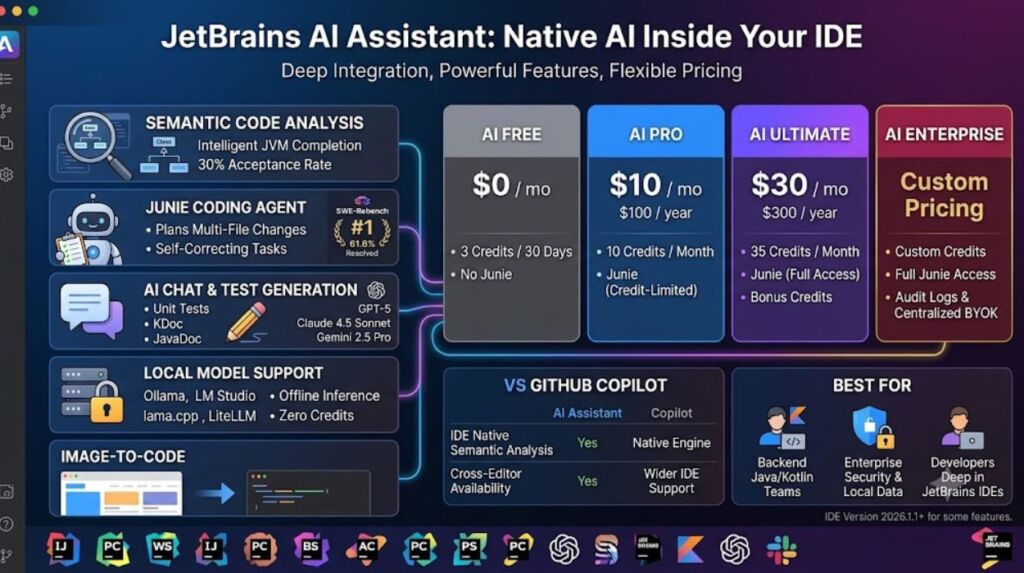
JetBrains AI Assistant is a built-in AI coding layer inside JetBrains IDEs — IntelliJ IDEA, PyCharm, WebStorm, GoLand, Rider, and 8 other JetBrains products — that adds code completion, AI chat, test generation, and the Junie autonomous agent. It ships in 4 pricing tiers: AI Free, AI Pro, AI Ultimate, and AI Enterprise.
- 01What Is JetBrains AI Assistant?
- 02What Are JetBrains AI Assistant’s Key Features?
- 03How Much Does JetBrains AI Assistant Cost?
- 04What Are the Pros and Cons of JetBrains AI Assistant?
- 05How Does JetBrains AI Assistant Compare to GitHub Copilot?
- 06Who Should Use JetBrains AI Assistant?
- 07What Are the Best Alternatives to JetBrains AI Assistant?
- 08Frequently Asked Questions
- 09The Bottom Line
What Is JetBrains AI Assistant?
JetBrains AI Assistant is a native AI subscription layered on top of JetBrains IDEs, developed by JetBrains s.r.o., that adds inline code completion, project-aware chat, and the Junie coding agent directly inside the editor. JetBrains added AI Assistant to its IDE lineup in 2023 and expanded it in 2026 with the Junie agent and Claude Agent SDK integration.
JetBrains built AI Assistant on top of its existing static-analysis engine — the same engine that powers refactoring and code inspection in IntelliJ IDEA. This lets the tool read the codebase at a semantic level: import graphs, class hierarchies, and call chains, not just the open file. Java and Kotlin developers get the most accurate completions because IntelliJ’s analysis engine was built for JVM languages first.
| Attribute | Value |
|---|---|
| Developer | JetBrains s.r.o. (founded 2000, headquartered in Prague and Amsterdam) |
| Initial AI release | 2023 (AI Assistant); Junie agent launched January 2026 |
| Pricing | Free, $10/mo (Pro), $30/mo (Ultimate), custom (Enterprise) |
| Supported IDEs | IntelliJ IDEA, PyCharm, WebStorm, GoLand, Rider, PhpStorm, RubyMine, RustRover, CLion, DataGrip, DataSpell, Android Studio (limited) |
| Key feature | Junie autonomous coding agent with plan-before-code execution |
| Models available | GPT-5, Claude 4.5 Sonnet, Claude 4.0 Sonnet, Claude 3.7 Sonnet, Gemini 2.5 Pro, GPT-4.1, plus local models via Ollama, LM Studio, llama.cpp |
| Minimum IDE version | 2025.1 for the free tier; 2026.1.1 for Junie’s debugger integration |
Source: JetBrains AI plans and usage documentation, JetBrains AI Plans & Pricing page.
A backend engineer working in IntelliJ IDEA on a Spring Boot service represents the typical use case: AI Assistant indexes the module’s classes and interfaces, then generates a new REST controller that matches the existing package structure and naming conventions without manual correction.
What Are JetBrains AI Assistant’s Key Features?
JetBrains AI Assistant’s core features are code completion, AI chat, the Junie agent, test generation, and local-model support — each built on the IDE’s semantic analysis engine rather than a generic text model. These 5 feature groups cover the full development cycle from writing to shipping code.
- Complete inline suggestions in real time with a 30% average autocomplete acceptance rate reported by JetBrains, using project-aware context from open tabs.
- Deploy the Junie agent to plan, write, test, and self-correct multi-file changes; Junie scored 61.6% resolved and 72.7% pass@5 on the SWE-Rebench benchmark in its most recent cycle, ranking #1 among tested coding agents.
- Debug running programs directly through Junie’s Debug mode, which sets breakpoints, inspects stack frames, and evaluates expressions in a live debugger session on IntelliJ IDEA 2026.1.1 and later.
- Generate unit tests, KDoc, JavaDoc, and docstrings automatically from selected functions without leaving the editor.
- Convert UI mockup screenshots into working code through the Image-to-Code feature.
- Run fully local models through Ollama, LM Studio, llama.cpp, and LiteLLM, consuming zero AI credits and keeping code on the local machine.
- Connect external tools, databases, and documentation servers through Model Context Protocol (MCP) integration, extending Junie’s and Claude Agent’s reach beyond the codebase.
Each feature draws on the same underlying index: JetBrains’ semantic code graph. Test generation, for example, does not just template a test file — it reads the target function’s parameter types and existing test conventions in the project before writing assertions.
How Much Does JetBrains AI Assistant Cost?
JetBrains AI Assistant costs $0 for the Free tier, $10/month for AI Pro (Individual), $30/month for AI Ultimate (Individual), and custom pricing for AI Enterprise, according to JetBrains’ official pricing page. Business seats cost more: $20/month for AI Pro Business and $60/month for AI Ultimate Business.
| Plan | Monthly Price | Annual Price | AI Credits | Junie / Claude Agent Access |
|---|---|---|---|---|
| AI Free | $0 | $0 | 3 credits per 30 days | Not included |
| AI Pro (Individual) | $10 | $100/year | 10 credits/month | Included, credit-limited |
| AI Pro (Business) | $20 | Contact sales | 10 credits/month | Included, credit-limited |
| AI Ultimate (Individual) | $30 | $300/year | 35 credits/month ($5 bonus) | Full access |
| AI Ultimate (Business) | $60 | Contact sales | 35 credits/month | Full access |
| AI Enterprise | Custom | Custom | Custom | Full access + audit logs, centralized BYOK |
Source: JetBrains AI Plans & Pricing, JetBrains AI licensing documentation.
Each AI Credit equals $1 USD of usage, and JetBrains calculates consumption per interaction based on token count rather than a flat per-request fee. Annual billing on AI Pro and AI Ultimate cuts the effective monthly cost by approximately 17% compared to month-to-month billing. AI Assistant bills separately from the JetBrains IDE license itself — a developer already paying $24.90/month for an individual IntelliJ IDEA Ultimate subscription pays the AI Pro or AI Ultimate fee on top of that, unless the AI Pro allotment included with an All Products Pack or dotUltimate subscription covers it.
Junie’s agent tasks consume AI Credits at a rate tied to token usage, and complex multi-file refactors exhaust a 10-credit AI Pro allotment within days of regular use. Upgrading to AI Ultimate’s 35-credit allotment, or purchasing Top-up AI Credits (valid for 12 months from purchase), resolves the shortfall for heavier Junie workloads.
What Are the Pros and Cons of JetBrains AI Assistant?
JetBrains AI Assistant’s biggest advantage is semantic code understanding that beats plugin-based tools on JVM languages; its biggest limitation is a credit-based quota that Junie consumes faster than competitors’ unlimited-request models. Both strengths and weaknesses trace back to the same architecture: deep IDE integration paired with metered cloud usage.
Pros:
- Delivers measurably more accurate completions for Java and Kotlin than plugin-based alternatives, since the suggestions draw on IntelliJ’s existing semantic analysis engine rather than a generic language model.
- Runs Junie’s plan-before-code workflow, which produces a reviewable Task Blueprint in
.junie/plansbefore modifying files — reducing the scope-creep failures common in agents that start writing immediately. - Supports fully local inference through Ollama, LM Studio, llama.cpp, and LiteLLM at zero credit cost, satisfying strict data-residency requirements for finance and healthcare teams.
- Enforces zero-data-retention agreements with OpenAI, Anthropic, and Google for cloud-routed requests, per JetBrains’ documented data policy.
- Lets developers select a specific cloud model per conversation — GPT-5, Claude 4.5 Sonnet, Claude 3.7 Sonnet, or Gemini 2.5 Pro — instead of a single fixed default.
Cons:
- Costs 3x more than GitHub Copilot Pro at the AI Ultimate tier ($30/month versus $10/month) for access to the same class of frontier models.
- Burns through the AI Pro plan’s 10 monthly credits quickly once Junie handles multi-file tasks, forcing frequent upgrades or Top-up Credit purchases.
- Locks value to the JetBrains ecosystem — developers working primarily in VS Code or Neovim gain little from AI Assistant’s IDE-level integration.
- Produces less consistent results on non-JVM, non-standard codebases, where the semantic-analysis advantage narrows compared to Java and Kotlin projects.
- Requires IDE version 2025.1 or later for the free tier and 2026.1.1 for Junie’s debugger features, excluding teams on older JetBrains releases.
How Does JetBrains AI Assistant Compare to GitHub Copilot?
JetBrains AI Assistant wins on IDE-native semantic analysis and local-model support; GitHub Copilot wins on cross-editor availability and simpler, flat-rate pricing. The two tools solve the same problem — AI-assisted coding — from opposite starting points: JetBrains from the IDE outward, Copilot from the model outward.
| Factor | JetBrains AI Assistant | GitHub Copilot |
|---|---|---|
| Entry price | $10/month (AI Pro) | $10/month (Copilot Pro) |
| Top tier price | $30/month (AI Ultimate) | $19/user/month (Copilot Business) |
| IDE support | JetBrains IDEs only | VS Code, JetBrains IDEs, Neovim, Xcode, and more |
| Agent | Junie (plan-before-code, IDE-native) | Copilot Workspace / Agent mode |
| Local models | Ollama, LM Studio, llama.cpp, LiteLLM | Not natively supported |
| Codebase indexing | Native semantic analysis engine | Repository-level embeddings |
Source: GitHub Copilot plans and pricing, JetBrains AI Plans & Pricing.
Developers who work exclusively inside IntelliJ IDEA or PyCharm gain more from AI Assistant’s deeper project understanding. Developers who switch between VS Code, JetBrains IDEs, and other editors across projects get more consistent value from Copilot’s single subscription covering every environment. For a full breakdown, see our dedicated GitHub Copilot vs JetBrains AI Assistant comparison.
Who Should Use JetBrains AI Assistant?
JetBrains AI Assistant fits developers already committed to a JetBrains IDE, particularly backend Java and Kotlin teams, and does not fit developers working primarily in VS Code or terminal-only workflows. The tool’s value scales with how much of the workday happens inside a JetBrains product.
- Backend Java and Kotlin developers on IntelliJ IDEA gain the largest accuracy advantage from the semantic analysis engine.
- Enterprise teams in regulated industries (finance, healthcare) benefit from zero-data-retention policies and local-model routing via Ollama for sensitive codebases.
- Solo developers on the All Products Pack or dotUltimate subscription get AI Pro access at no additional cost, making the free inclusion worth activating regardless of usage volume.
- Polyglot teams managing Java backends, TypeScript frontends, and SQL databases in one repository benefit from cross-language semantic context in a single IDE.
Developers who split time between VS Code, terminal-based agents, and JetBrains IDEs get less consistent value, since AI Assistant’s advantages don’t transfer outside JetBrains products. That group fits better with an editor-agnostic tool covered in our Best AI Coding Tools in 2026 roundup.
What Are the Best Alternatives to JetBrains AI Assistant?
The strongest alternatives to JetBrains AI Assistant are GitHub Copilot, Cursor, and Amazon Q Developer, each targeting a different priority: universal IDE support, editor-first agentic workflows, and free AWS-integrated assistance.
- GitHub Copilot costs $10/month for individuals and covers VS Code, JetBrains IDEs, and Neovim from one subscription, trading JetBrains’ deeper semantic analysis for cross-editor consistency. Read our full GitHub Copilot Review.
- Cursor runs as a standalone VS Code fork at $20/month and centers the entire workflow around its Composer agent rather than layering AI onto an existing IDE. Read our full Cursor AI Review.
- Amazon Q Developer offers a genuinely usable free tier with a JetBrains plugin, fitting budget-conscious teams already running workloads on AWS. See our Best Free AI Coding Tools listicle for the full free-tier breakdown.
Frequently Asked Questions
Does JetBrains AI Assistant require a separate subscription from the IDE license?
Yes. AI Assistant bills separately from JetBrains IDE licenses like IntelliJ IDEA Ultimate, unless the AI Pro allotment is already included through an All Products Pack or dotUltimate subscription.
Does JetBrains AI Assistant train models on private code?
No. JetBrains enforces zero-data-retention agreements with its third-party LLM providers — OpenAI, Anthropic, and Google — meaning code is transmitted for inference only and discarded immediately after.
Can JetBrains AI Assistant run without an internet connection?
Yes, for local models. AI Assistant supports fully offline inference through Ollama, LM Studio, llama.cpp, and LiteLLM, consuming zero AI credits regardless of subscription tier.
What is Junie, and is it the same as AI Assistant?
Junie is JetBrains’ autonomous coding agent, distinct from the base AI Assistant chat and completion features. Junie plans multi-file tasks before executing them and is included with AI Pro and AI Ultimate subscriptions, subject to credit consumption.
The Bottom Line
JetBrains AI Assistant’s AI Pro tier at $10/month matches GitHub Copilot’s entry price while adding deeper semantic analysis for JVM languages, but the credit-metered Junie agent makes AI Ultimate’s $30/month tier the realistic cost for any team running regular multi-file agent tasks — a 3x premium over Copilot that only pays off for developers fully embedded in JetBrains IDEs.